A scheduled task normally runs in the cloud. Link one to your Mac and each run works like a conversation started from the app: your trusted folders, the shell, the Omni browser and computer control, within what your organization and your own settings allow. This works for agents that run on Claude Code, Codex or OpenCode.

Run a schedule on this Mac

  1. In the app, open the scheduled task’s editor.
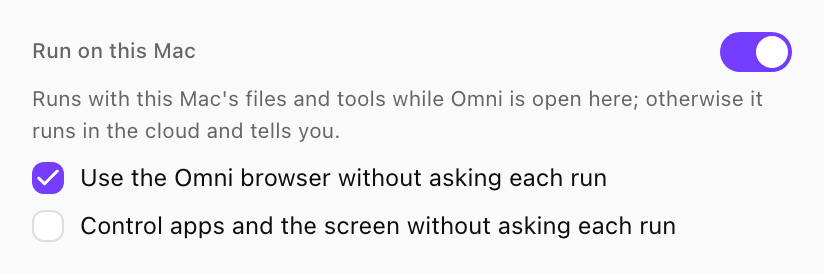
  2. Switch on Run on this Mac.
  3. Optionally let runs work without asking each time:
    • Use the Omni browser without asking each run for the Omni browser.
    • Control apps and the screen without asking each run for computer control.
    Each option shows only when your organization’s policy allows it. Without them, the Mac asks when a run first needs the browser or the screen. If nobody answers, the run continues without it.
  4. Save the schedule.
Run on this Mac switched on, with Use the Omni browser without asking each run checked and Control apps and the screen without asking each run unchecked

Run on this Mac in the schedule editor. Shown with sample data.

The switch shows only in the app, only for a schedule that runs as you, and only while this Mac is connected. A linked schedule reads On your laptop in the schedule list.

When your Mac is not available

A run uses your Mac only while Omni Desktop is open and connected. If the Mac is asleep, off or the app is closed when the schedule fires, the run goes to the cloud, without your Mac’s folders. The app then tells you it ran without your Mac, with Run now to run it again here.
  • You, by switching Run on this Mac off.
  • Another member who changes what the schedule runs: its prompt, model, timing or who it runs as.
  • An admin who can remove laptops in Devices.
Your consent to the browser and the screen belongs to that schedule. It ends when the schedule is unlinked, when your organization’s policy turns the browser or computer control off, or when you choose Ask each time for the browser in Settings.

Schedules an agent books in a chat

When an agent in a conversation on your Mac schedules itself to continue later, that follow-up runs on the same Mac, under the same rules.