

Recurring schedules
A schedule is a cron expression in UTC with a prompt. Schedules on the agent’s home lists them, and Add schedule opens a dialog with a Simple tab (describe the task in a sentence and generate a schedule) and an Advanced tab holding Interval, Daily and Weekly modes. In the Advanced tab you pick the time in a time zone (your browser’s by default); the Runs line shows it in that zone and in UTC, with the resulting cron expression, and the schedule is stored in UTC. Because the stored time is UTC, it does not follow daylight saving: a 09:00 Los Angeles schedule saved in October (16:00 UTC) runs at 08:00 Los Angeles time after the clocks change in November. Edit the schedule after a clock change if the local time matters. The shortest interval is five minutes, and a new schedule starts at 09:00 daily. Each row shows its human-readable cadence in UTC and the next run. Every edit publishes; a schedule fires only once it is live.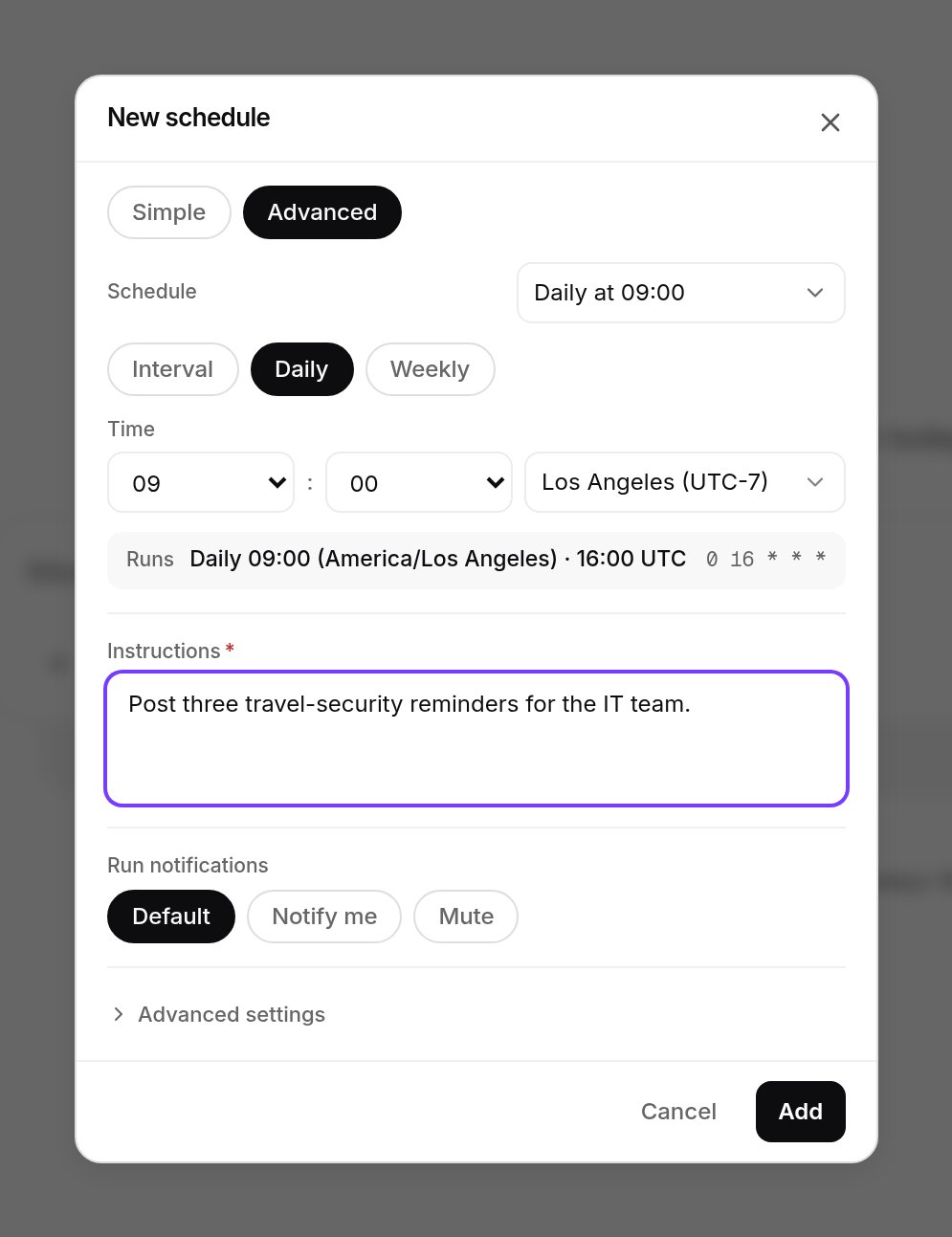
Add schedule, Advanced tab: daily at 09:00 Los Angeles time, which the Runs line shows as 16:00 UTC and 0 16 * * *. Shown with sample data.
GET, POST, PATCH and DELETE under /v1/agents/{agent_id}/scheduled-tasks, with POST /{task_id}/run to fire one immediately and enabled: false to pause it; a schedule has cron, prompt, title, enabled and, optionally, a model for that schedule.
Some agents carry managed schedules xpander owns, such as a heartbeat; you can pause them or run them now, but not edit or delete them.
Re-checks the agent books itself
When an agent should look again later (“check again in five minutes”, “follow up after the deploy”), it books a one-off run for itself. Booked runs are listed under Upcoming runs in the agent’s Schedules section, and under Scheduled in Xpander Chat’s conversation filters. Each also shows in the conversation that booked it as a Next run line with the time and a countdown, plus Show prompt and Cancel. A booked run can be cancelled there, or overDELETE /v1/agents/{agent_id}/self-schedules/{schedule_id}. An agent that runs on a coding CLI can book one while it is still working in the conversation. The capability is a per-agent switch with a cap on how many pending runs one task may hold, three by default. A recurring re-check is therefore a chain of one-off runs the agent renews, rather than a loop it cannot leave.
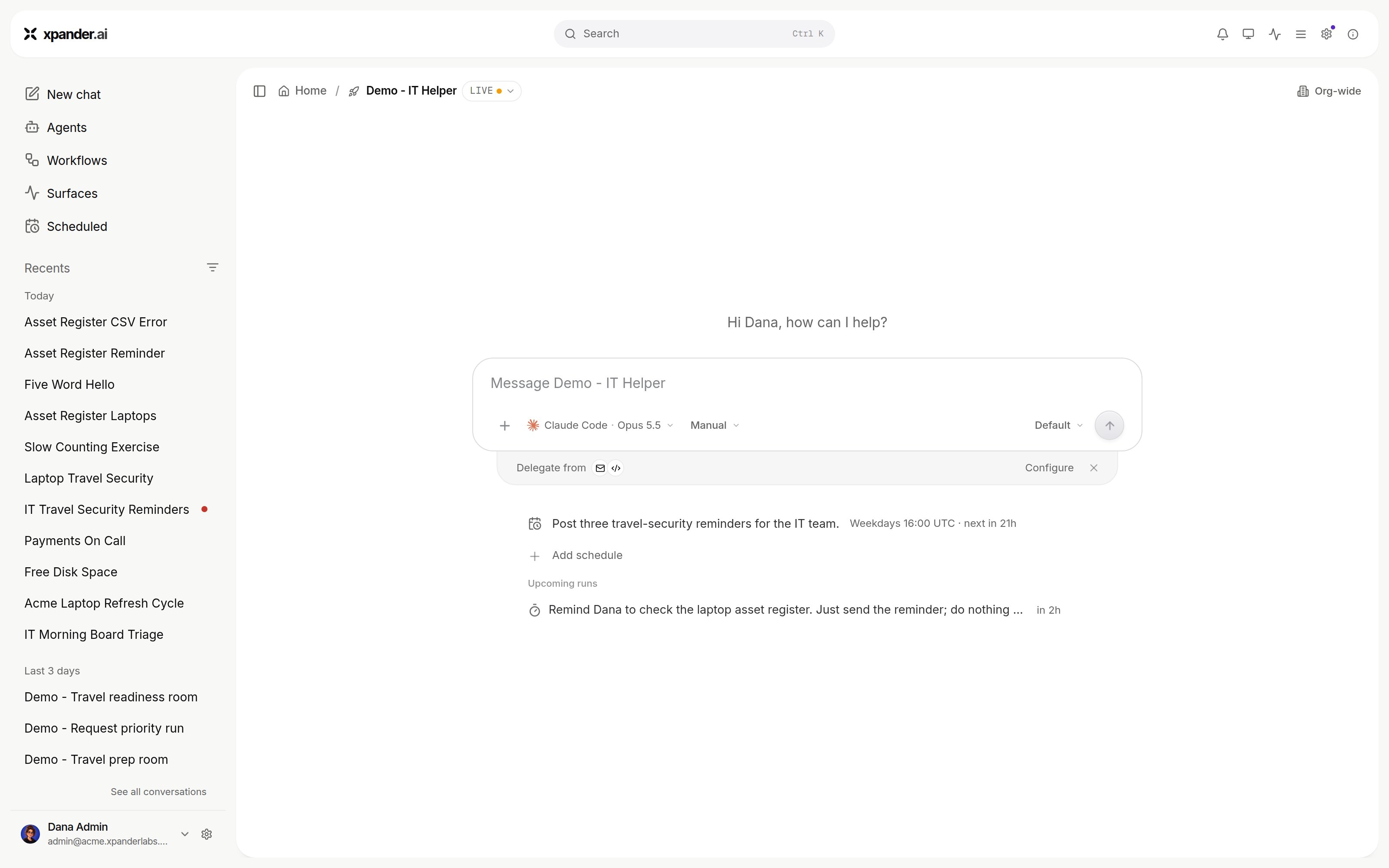
A recurring schedule and a booked re-check under Upcoming runs, on the agent's home. Shown with sample data.
How a scheduled run reports
A fire is a turn in the agent’s conversation: its actions, result and cost appear in the Session Manager with the source Schedule, and the conversation shows the run under a scheduled-run line. On an agent that runs on a coding CLI, a booked run may come due while the agent’s process in that conversation is still running. Then no new turn starts. The prompt reaches the running process as its next message, and the agent carries on with the same files and session. The agent sees the prompt headed “The follow-up scheduled earlier in this task is due now” with the time in UTC. Xpander Chat shows the prompt without that line. If the process has ended, the booked run is a turn that opens a new process in the same conversation. A schedule created from a Slack channel binding replies in that channel with the channel’s format. A fire that fails is not retried; the next scheduled fire is the retry. A fire for an agent whose status isINACTIVE is skipped. Nothing reaches the Session Manager. The schedule keeps its settings and fires again once the agent is active. A re-check the agent booked for itself is marked failed. Notifications on success or failure follow the agent’s notification settings, and a schedule can opt in to its own.