

CHANNEL row opens it); Email is its own switch next to the message composer. What you see depends on what your organization has connected and on your user group’s switches.
In Slack, Microsoft Teams, Telegram, WhatsApp and email, the answer is the message the channel posts, comparisons, tables and summaries included. An agent publishes a live surface there only when you ask for a report, a dashboard, a scorecard or a live view, or when its instructions say to deliver one.
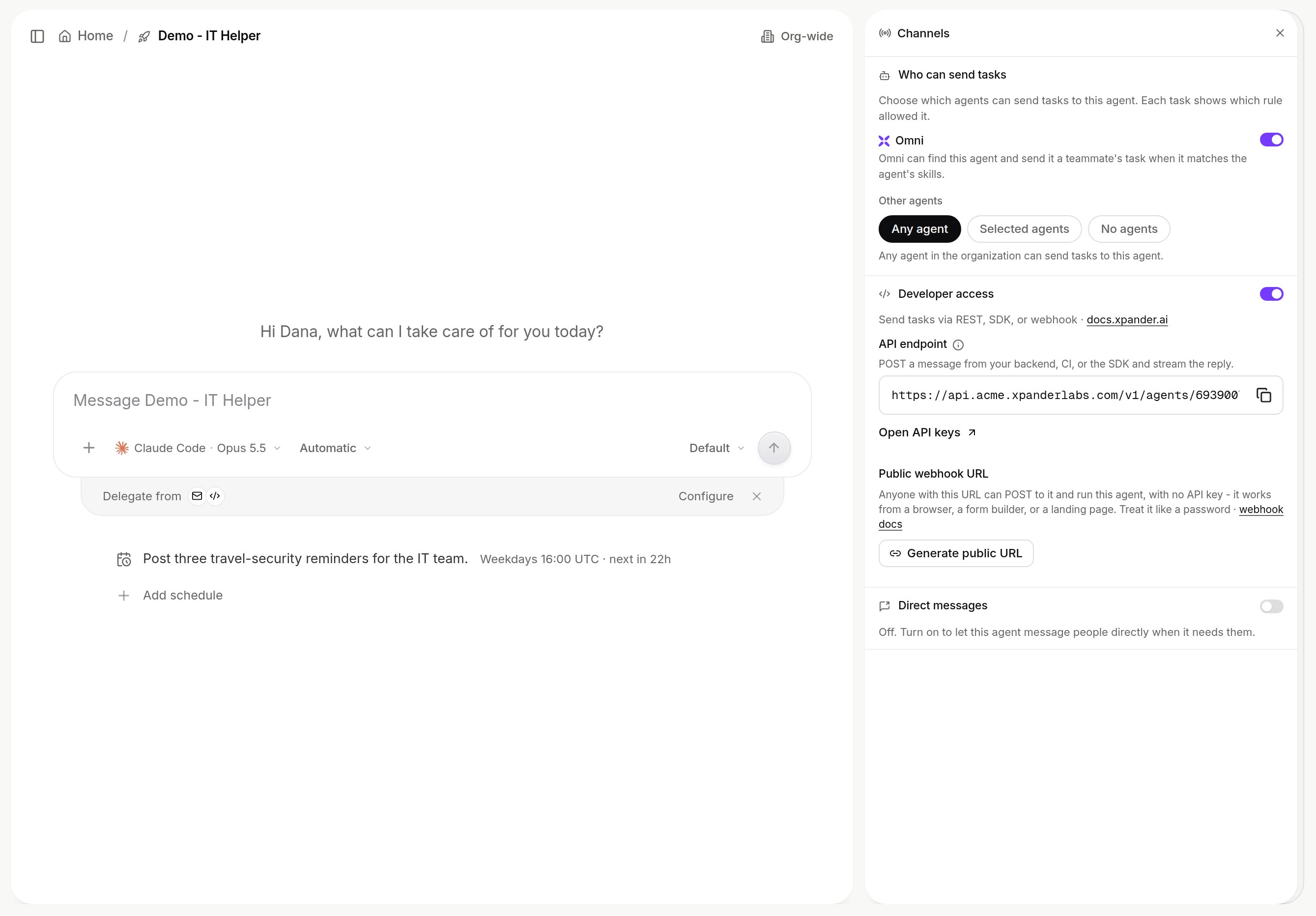
The Channels pane on an agent. Shown with sample data.
Other agents
Who can send tasks, in the Channels pane, decides which agents may hand this agent work: “Choose which agents can send tasks to this agent. Each task shows which rule allowed it.”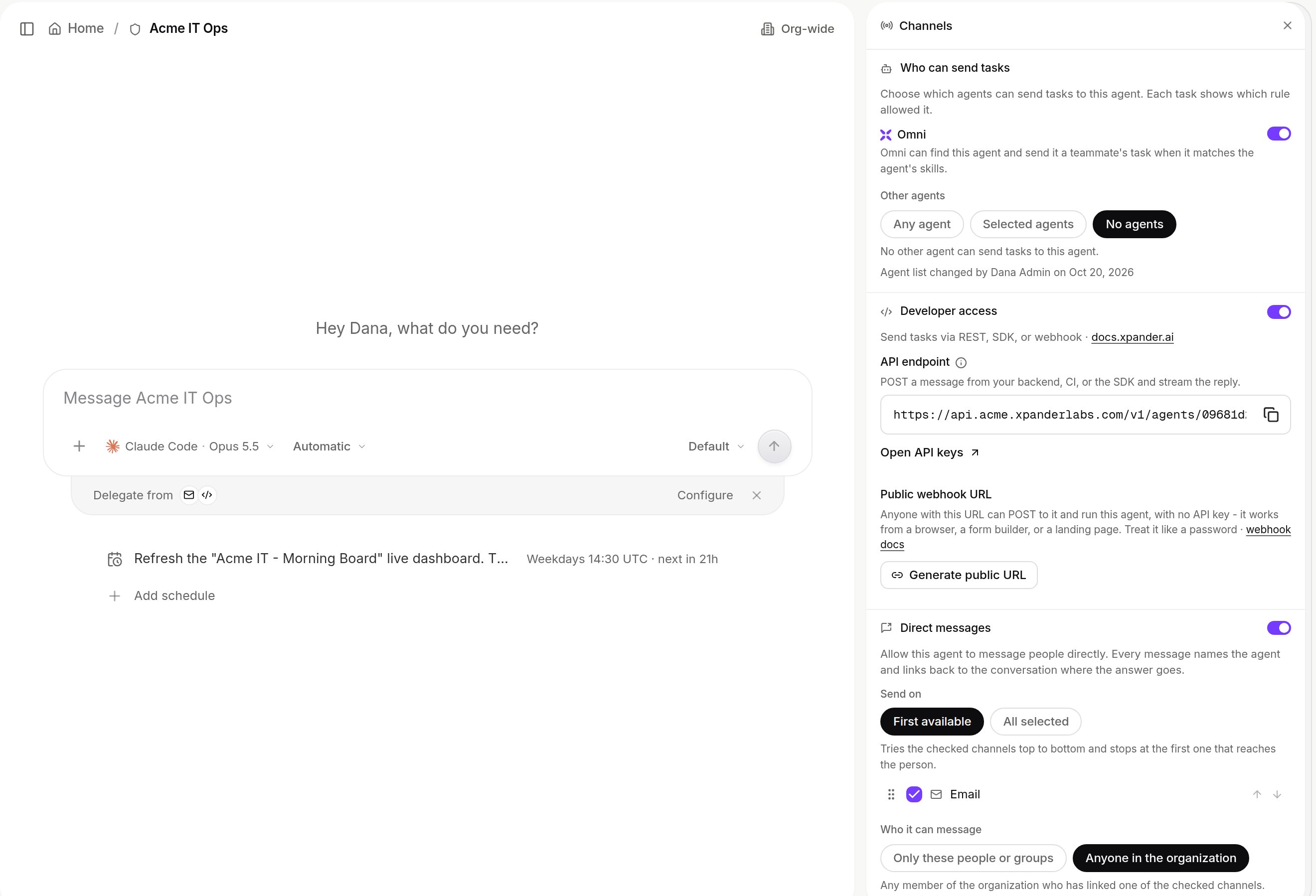
Agent settings > Channel > Configure: Who can send tasks, Developer access and Direct messages. Shown with sample data.
- Omni: a switch. On, Omni can find this agent and send it a teammate’s task when it matches the agent’s skills.
- Other agents: Any agent, Selected agents (the agents you pick) or No agents.
@Agent mention in a chat sends that agent a task, within the same rule.
New agents start from the default an admin sets in Platform > AI governance > Policies > Agents that can send tasks (Any agent or No agents, for the organization or per group). The rule on each agent then overrides it.
Slack and Microsoft Teams
An admin connects the workspace or the tenant once under Platform > Agents > Channels; there is no bot to build. One Slack workspace maps to one organization, and one Microsoft 365 tenant likewise. People are matched to their xpander account by verified email; someone whose email does not match gets a Link account button with a code that lasts fifteen minutes. Which agent answers a message, in this order:- An @mention of Xpander Chat reaches Omni, the built-in agent, in the author’s own conversation, replying in a thread as “your-name’s Omni” and following that thread for about five minutes without another mention.
- A slash command,
/agent <name> <prompt>(or/xpander), invokes a named agent the author may use; replies in that thread keep reaching it. - A reply in the thread of a direct message an agent sent reaches that agent, for the person the message reached, in the conversation it came from when they may continue it and in a new conversation otherwise; see Agents in Slack.
- Any other direct message reaches Omni in a standing conversation;
new chatorresetstarts a fresh one. - An untagged message in a channel routed to an agent reaches that agent when auto-engagement is on and one of the channel’s rules matches; a judge model confirms the intent, and a message addressed to a person is left alone. Once engaged, the agent follows the thread for about five minutes. Thread replies engage only when Also engage in thread replies is on for the channel.
- Nothing matches: the message is ignored.
/invite @xpander in a private channel. A channel row holds:
- Rules: plain-language descriptions of when to step in, each with an optional extra instruction for that case. The Auto-engage switch governs them; mentions always get through.
- Reply: Also engage in thread replies, and Judge every message instead of staying engaged after a match.
- Where: this channel, this channel and more, or somewhere else. The extra channels receive the finished answer only.
- Format: free-text instructions for how answers in this channel should look, which override the agent’s own output format for that channel.
<handle>@xpander.bot on xpander cloud. The switch also sets a sender policy, Anyone, Listed senders of addresses or domains, or a Custom pattern, and a Reply to newsletters switch. Mail to it, with attachments, becomes a turn; the answer is a reply in the same thread. A self-hosted installation can carry its own inbound mail domain; see Email.
WhatsApp and Telegram
Members link a phone number or a Telegram account to their xpander account and talk to Omni, the built-in agent, from there; Omni hands work to the organization’s agents as it does in Xpander Chat. Replies come back in the same chat, whole, and a message sent while a run is in progress is steered into the run. Both ride identities xpander owns, so they are offered on xpander cloud only; an admin switches each on or off for the organization under Platform > Agents > Channels.Webhook
Developer access is a switch in the Channels pane (shown at the top of this page) for REST, the SDK and webhooks. Developer access > Public webhook URL mints a URL that is itself the credential: anyone holding it canPOST to it and run this agent with no API key, which suits a form builder, a CI job or a landing page. Treat it like a password. Regenerate URL revokes the old one immediately. The call returns the task’s result when it completes, or {"status": "Started", "task_id": ...} with ?asynchronous=true; it accepts JSON, form fields and multipart files. Field mapping and result extraction are on Webhooks.
API
Developer access > API endpoint shows the address of the conversation API,POST /v1/agents/{agent_id}/conversations/invoke, which sends a message in a conversation and returns the reply with the conversation record. A system that starts tasks and reads them back later uses POST /v1/agents/{agent_id}/invoke instead; both take an organization API key that can be scoped to named agents. See API and structured output.
MCP clients
People reach Omni, and through it your agents, from Claude Code, Cursor, Claude Desktop, ChatGPT and other MCP clients athttps://omni.xpander.ai/mcp, signed in with OAuth in the browser. That is a personal connection, not a per-agent setting; setup is on Connect your MCP client. A separate endpoint, https://api.xpander.ai/mcp/, exposes the xpander API itself over MCP for integrations; it is not an agent, and it also signs in with OAuth 2.1. See Model Context Protocol.
Direct messages
An agent can message one person in your organization on that person’s own linked Slack, email, WhatsApp or Telegram, for example to hand over a result or ask for something it needs. It is off until an organization admin turns on Direct messages in the agent’s Channels pane; everyone else sees the section read-only. Saving publishes the change at once.- Send on: First available tries the checked channels in the order shown and stops at the first one that delivers; drag a channel to reorder. All selected sends on every checked channel. A new setting starts with Slack and email checked.
- Who it can message: Only these people or groups, picked by name or user group, or Anyone in the organization. With no one picked, the agent can message no one.
xpmessage-send: one person per call, named by email or xpander user id, with an optional channel that must be one of the checked ones. Channels the person has not linked are skipped, and a channel your admin switched off for the organization under Platform > Agents > Channels is not used. A person outside the list, or no reachable channel, means nothing is sent and the agent is told why. Every message links back to the agent’s conversation; an email carries <Agent> (agent) via xpander as its subject, and WhatsApp and Telegram messages open with that line. A person gets at most ten messages an hour on each channel from agents and platform notifications together.
Over the API the setting is the direct_messages field of Update Agent.
Schedules
A cron schedule or a re-check the agent books for itself starts a turn in the agent’s own conversation with no person present. See Schedules.What your administrator controls
A workspace or tenant is connected once under Platform > Agents > Channels, where each channel also has an organization-wide switch; the steps are on Slack workspace and Microsoft Teams tenant. Which channel sections you may configure on an agent is set per user group under Triggers.What is recorded
Every task from any channel appears in the Session Manager with its source, under the person who asked; runs nobody started, such as webhooks and schedules, act as the agent’s background user. Conversations that started in a Slack or Teams channel are listed under the organization’s tasks, not in the personal sidebar; direct-message conversations appear in the sidebar. Changes to the organization switches land in Platform > AI governance > Audit log asOrg Channels Updated.