

Inbound: clients reach xpander over MCP
Theapi service is the entry point. REST calls carry an API key. MCP takes OAuth 2.1 only, on every deployment.
How a client signs in
- A call without a token gets
401withWWW-Authenticate: Bearer resource_metadata=.../.well-known/oauth-protected-resource. Anx-api-keyheader gets the same401. - The client registers at
/oauth/register. - The person signs in at
/oauth/authorizewith PKCE, and the client exchanges the code at/oauth/token. - The client calls
/mcp/withAuthorization: Bearer <token>.
On an Air-Gapped install
The Omni endpoint is the install’s public MCP URL,global.mcp.publicUrl. Until it is set, /omni-mcp/ answers 404, the MCP row on Platform > Agents > Channels reads Not offered on this install, and the License page shows MCP endpoint as Disabled. An agent’s Channels pane shows only Omni and API, so the organization switch decides. See Channels.
The Skills registry address
Platform > Agents > Skills registry gives MCP clients one address for the organization’s registry. Each person signs in as themselves.Each person’s library, in preview
Each person’s own library is served as one MCP endpoint at your MCP host:mcp.<your domain> on Hybrid (from the chart’s ingress, no global.mcp value). Air-Gapped has no MCP host, so it is not served there.
Per-agent MCP URLs are no longer served. Hybrid clients move to the MCP host. Air-Gapped clients move to https://api.<your domain>/mcp/, which lists and runs your agents.
The APP_URL value
/oauth/authorize redirects to ${APP_URL}/oauth_login, read from the api service, so APP_URL must be the UI origin. On the API host, the browser lands on {"detail":"Not Found"}. Chart keys: Model Context Protocol.
Outbound: skills served over MCP
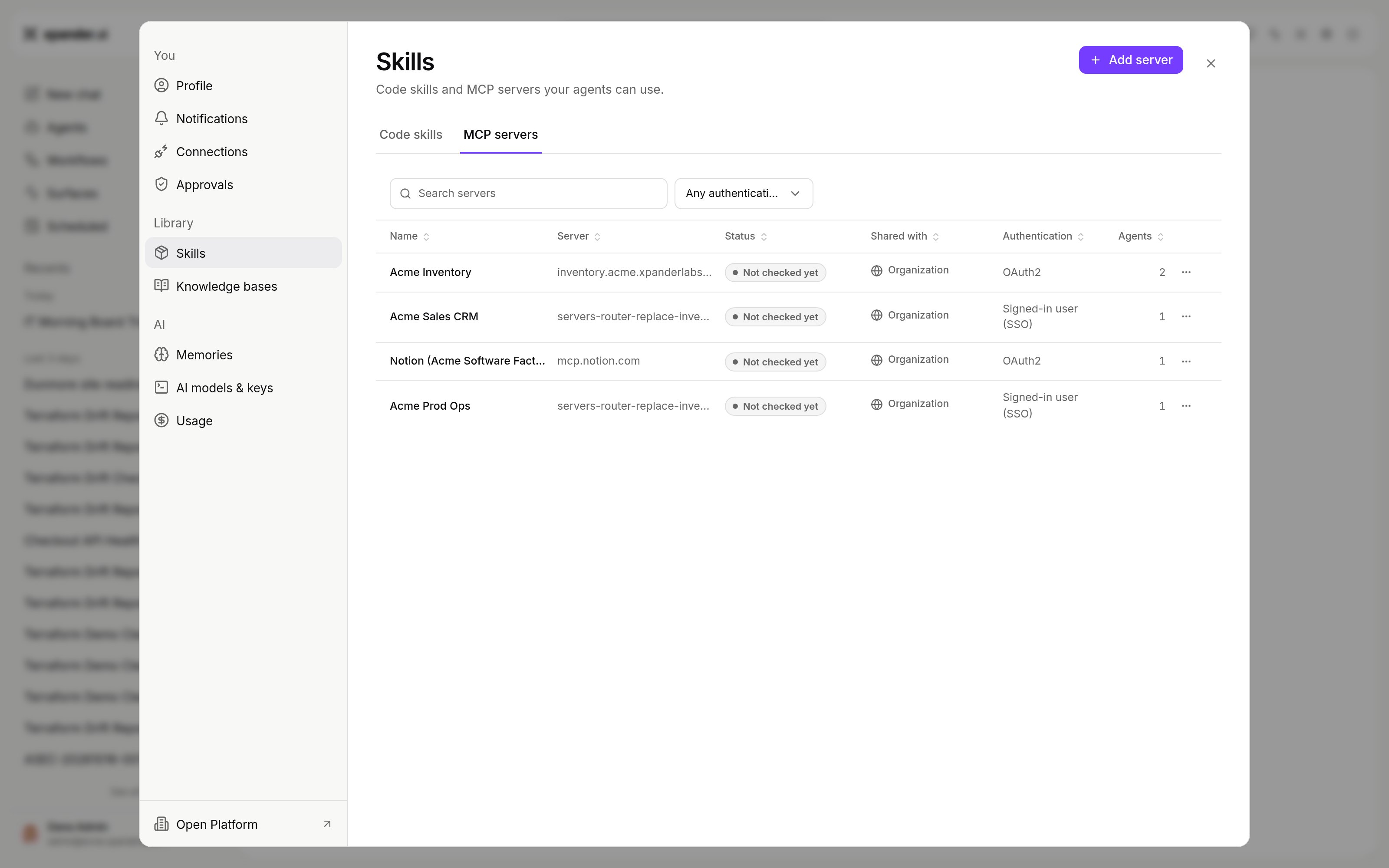
Settings > Skills > MCP servers with Add server. Shown with sample data.
Where to register an endpoint
Registry settings
Off removes it everywhere. Optional leaves it for each agent to add. Auto-injected and On by default put it on every agent in its audience. Local stdio entries (auvx ... command) work on Air-Gapped too. Their actions can be gated for approval like any skill’s.
Whose credential the endpoint receives
See whose credential a shared agent uses.
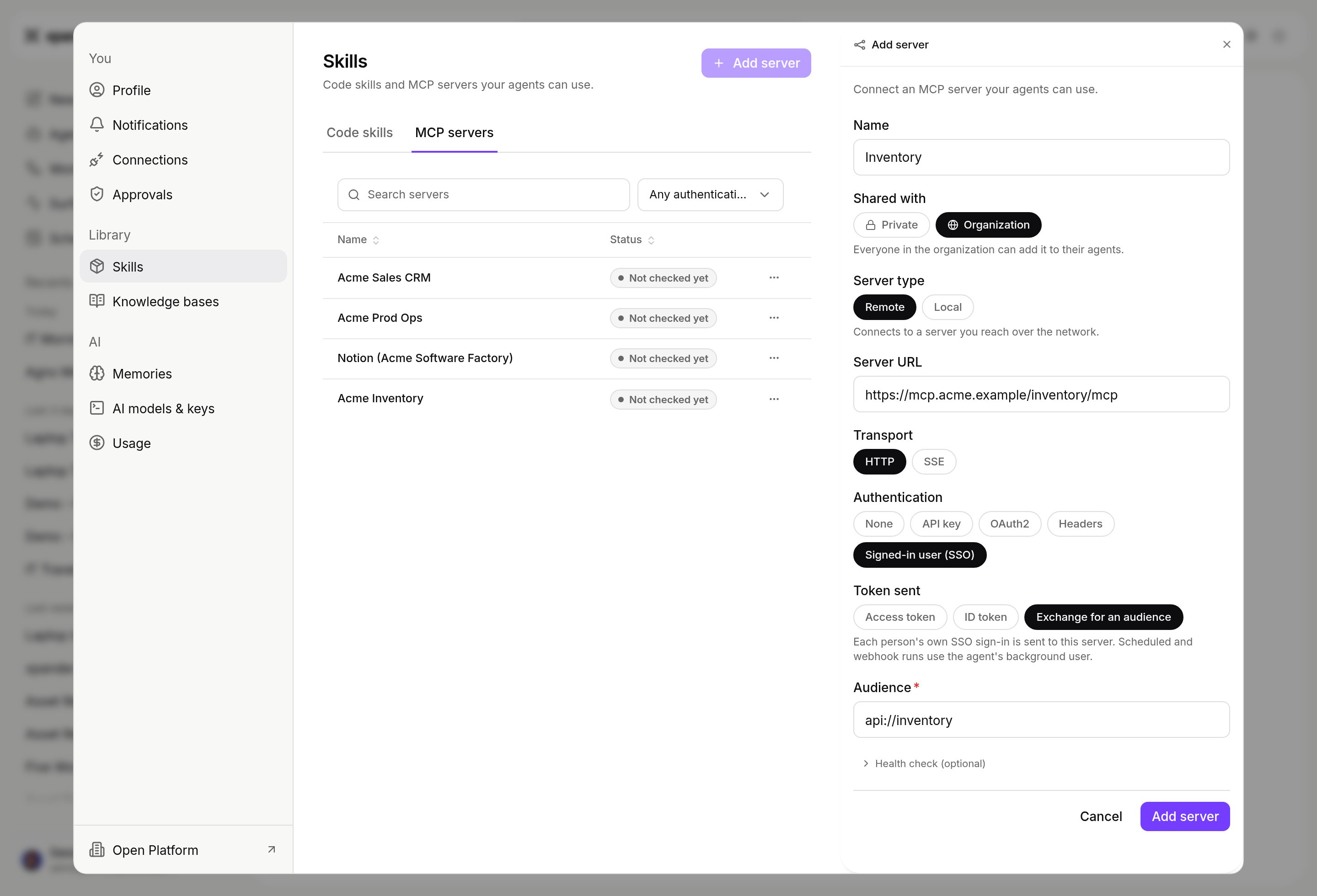
Add server with Authentication set to Signed-in user (SSO), Token sent set to Exchange for an audience, and an Audience. Shown with sample data.
How calls behave
- Remote endpoints use HTTP or SSE. Local stdio servers run in the agent’s workspace and are tested at save time.
- When an endpoint asks for input (MCP elicitation), the person answers in the chat, or an app answers over the API.
- Long-running operations (MCP Tasks) run in the background.
- A dropped session reconnects. Connected means a real call worked.
An MCP gateway you already run
Add its endpoints to the registry as above. Both its policy and xpander’s controls apply to xpander’s calls. Its other clients stay outside xpander. It must be reachable from the cluster’s pods, not only the browser.Verify
Next steps
Connect a client to Omni
Setup per client.
Let each person sign in
Act as whoever asks.
Add an MCP skill to an agent
Step by step.