

Providers
Where keys live
Every agent model call goes through the LLM Gateway, including calls on Amazon Bedrock and calls on an endpoint or key set on one agent. The key comes from one of three places, checked in this order:- An agent-level credential on one agent.
- An organization-level key per provider under Platform > AI governance > Models (Use your own key… on a listed provider, Add provider for your own endpoint). The Providers table shows each provider as Connected or Needs a key.
- The install’s keys on a self-hosted cluster: chart values
secrets.static.<provider>ApiKey, or a Kubernetes secret referenced withenvFromSecretKeys.
--reset-then-reuse-values needs Helm 3.14 or later. It keeps the values you set and applies the chart’s defaults for everything else. The LLM Gateway runs whichever way you upgrade.
The LLM Gateway is always on in a self-hosted install, so every provider your agents use needs a key in place 2 or 3. A call to a provider with neither is refused with a message that names the missing key.
A key named by an environment variable on agent-controller (for a custom provider, an agent or the organization default model) never reads one of the install’s own credentials, and a name on the reserved list reads as no key (reserved key names).
Pods that use an updated secret restart on their own. The xpander-static secret has a Helm keep policy; if a key is not picked up after an upgrade, patch the secret directly and restart xpander-agent-worker. The full value-to-secret mapping is on Hybrid: managing LLM API keys.
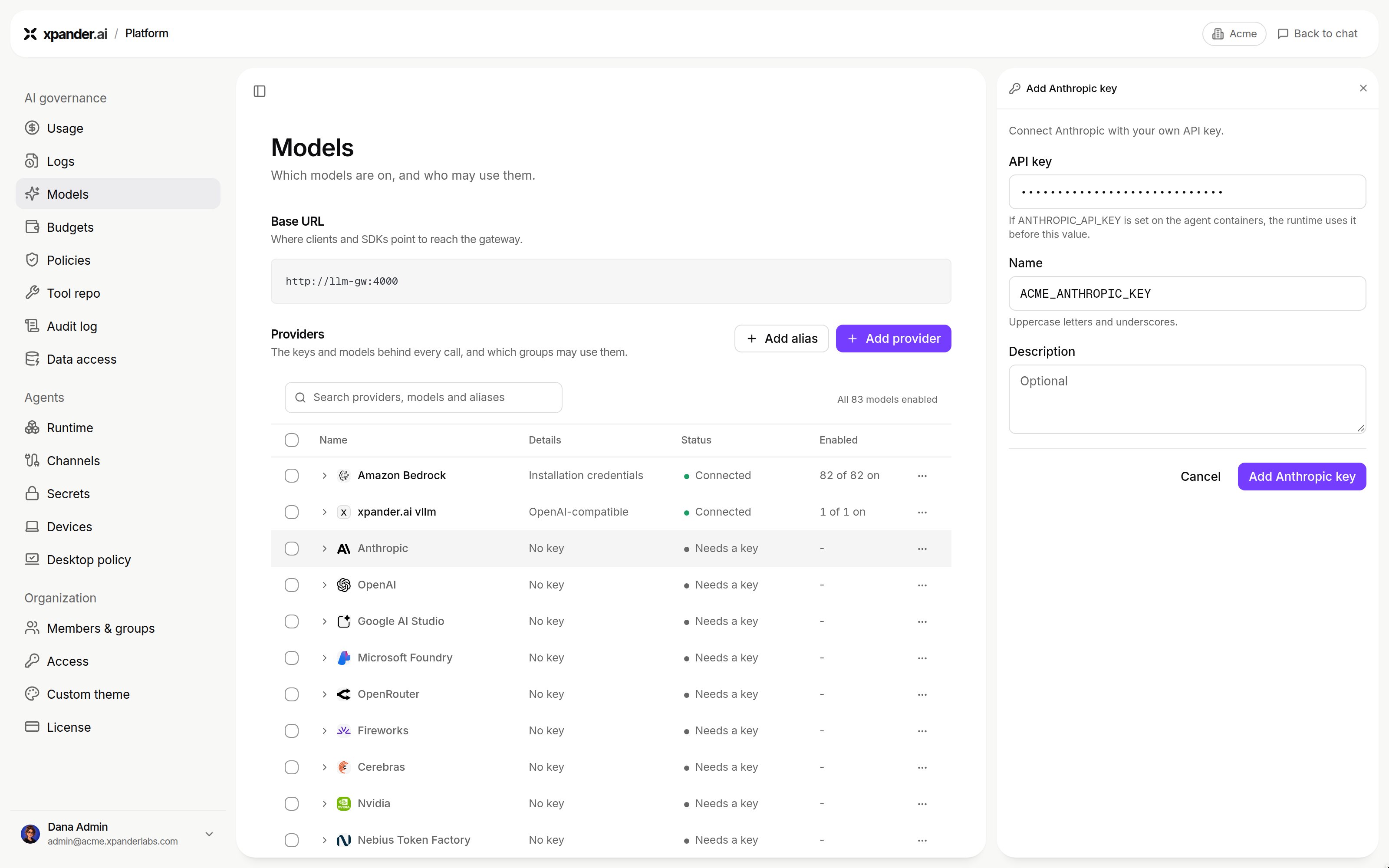
Use your own key on a built-in provider: the API key, its name and an optional description. Shown with sample data.
Credits against your own keys
Model calls are charged in credits when they run on keys xpander provides. A call that runs on a key you brought, agent-level or organization-level, is never charged credits. Agents on a Hybrid install never use xpander’s keys: every provider your agents use needs a key saved in the organization (Platform > AI governance > Models) or set on the install (secrets.static), and a call to a provider with neither is refused. See Licenses and who pays. Claude Code on Bedrock on a Hybrid install needs your own Bedrock auth.
Provider setup on a self-hosted install
Claude Code speaks to Anthropic; Codex speaks to OpenAI; OpenCode takes any<provider>/<model> slot the proxy routes. Credentials live only on the Agent Controller.
Anthropic direct
An Anthropic API key on the controller, the same key wiring as the rest of xpander. The controller egresses toapi.anthropic.com; override the upstream with LLM_PROXY_ANTHROPIC_BASE_URL for a gateway of your own.
Anthropic on Amazon Bedrock
Claude Code can run Anthropic models on Bedrock through the proxy’samazon_bedrock leg. The controller resolves AWS auth in this order, and no executor ever sees it:
On Air-Gapped there is no public Bedrock: point
LLM_PROXY_AMAZON_BEDROCK_BASE_URL at a VPC (PrivateLink) Bedrock runtime endpoint and set the matching region, or leave Bedrock off. The Air-Gapped chart exposes all of this under global.llm.bedrock: region, bearerTokenSecret (a Secret you create carrying a Bedrock API key), assumeRoleArn and assumeRoleExternalId (the STS path), and baseUrl (the VPC endpoint the amazon_bedrock leg dials on a sealed install). Leave the token and the role empty to use the pod’s own credential chain (EKS Pod Identity or IRSA). On Hybrid, set the same variables on the Agent Controller through the chart’s env values.
Bedrock in a Hybrid deployment needs your own credentials. Until an admin adds a Bedrock key or role under Platform > AI governance > Models, or the cluster has its own AWS identity for Bedrock, Bedrock calls from agents there have no key. The Bedrock account also needs the opt-in above.
The keyless (role / Pod Identity) methods above apply to the AI gateway’s proxy on the Agent Controller. The
agent-worker service has a separate constraint on keyless Bedrock; see Amazon Bedrock: key vs IAM on the Hybrid page.Add a custom provider
Any endpoint that speaks the OpenAI-compatible API (vLLM, Ollama, NVIDIA NIM) is registered once for the organization under Platform > AI governance > Models > Add provider (the steps are also on Custom endpoints):- Name, and the ID (used in API calls) derived from it (lowercase, underscores), fixed once added.
- Protocol: OpenAI-compatible. Base URL: the address as the pods reach it, for example
http://vllm.<namespace>.svc.cluster.local:8000/v1. On a Hybrid or Air-Gapped install private addresses work; metadata and link-local addresses are refused. On xpander cloud the base URL must be a publichttpsaddress: a private, loopback or cluster address is refused, so an endpoint inside your own network is reachable only from a Hybrid or Air-Gapped install (Custom endpoints). - API key: No key (local or unauthenticated server), Use an existing key, or Create a new key with a Key name and the key.
- Test connection under Models reports Reachable with the round-trip time and lists the models the endpoint serves; a model that accepts function calls carries a
toolsbadge. Add the models agents may use, then Add provider. - Open the provider’s menu and choose Keys and models…. Under Models, tick the models the organization may use. Prices are optional: a model’s menu has Edit model, where Price per 1M tokens (USD, optional) takes Input, Output, Cache read and Cache write. They are “Used to track spend. Leave 0 if you don’t pay per token.” A ticked model with no price is usable; its spend just reads as zero. Prices are never charged.
POST /v1/agents accepts only the built-in providers in model_provider; a custom ID is refused with 422. A custom provider is picked per conversation instead. The composer’s Harness and model popover has a left rail with Claude Code, Codex and OpenCode; each pane lists the providers the organization enabled, custom ones included, with the models the organization may use. Whether a harness works with a custom model is shown under Agent readiness in the provider’s Keys and models…, from the last Test model run. A local model also needs a context window well above the prompt xpander composes. A worked example, vLLM on a GPU node in the same cluster with the flags that make the probe pass and the context length that runs, is on Air-Gapped: a worked vLLM setup. When a custom OpenAI-compatible endpoint has no /responses route, the gateway sends Codex calls to it as chat completions.
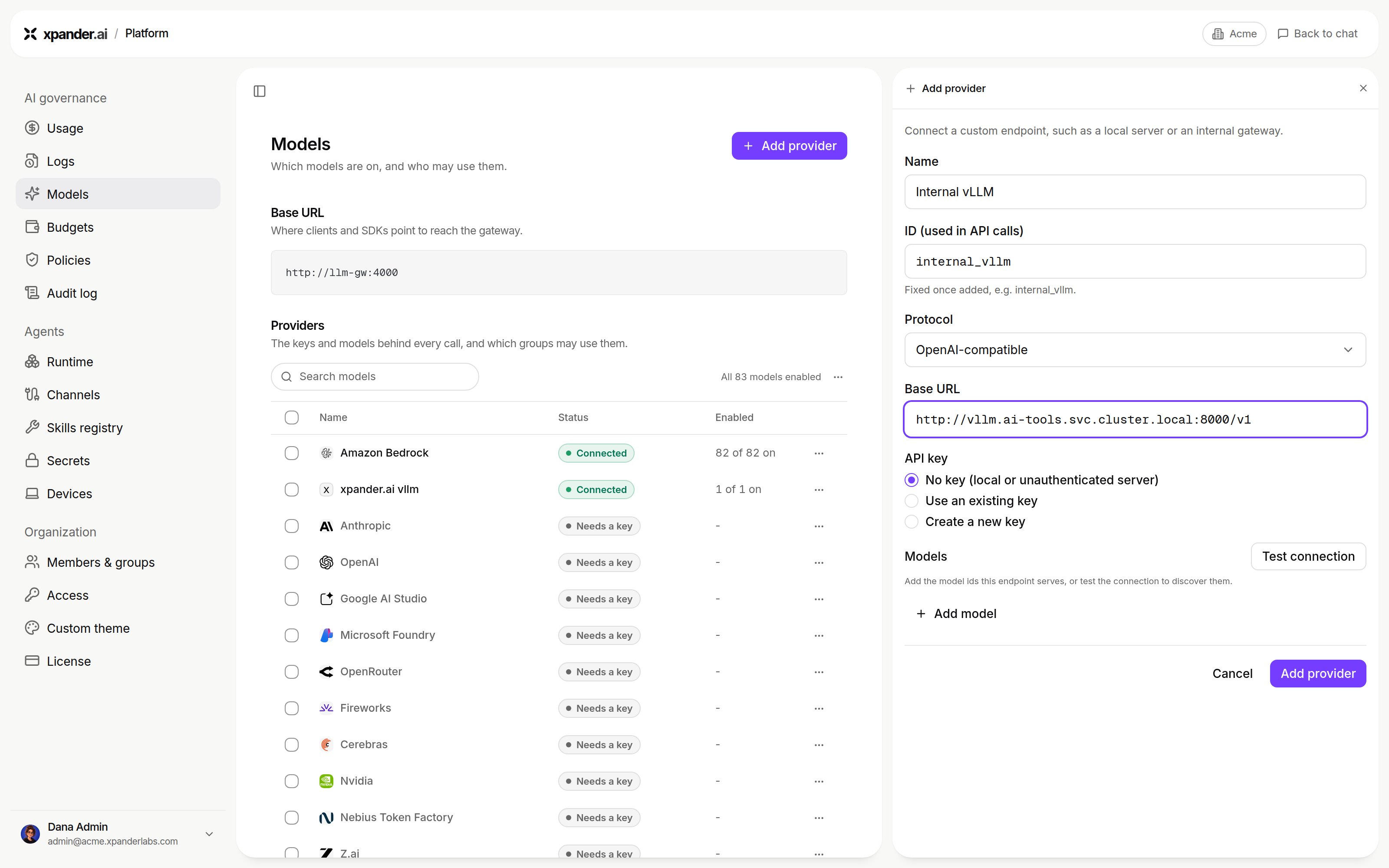
Add provider: name and ID, protocol, base URL, the API key choice, and Test connection under Models. Shown with sample data.
Which harness and model a new agent gets
A create that names a runtime, a provider, a model or harness settings is honored as written. A create that names none of them is defaulted, in the same order everywhere (cloud, Hybrid, Air-Gapped):-
The organization’s default LLM maps to a CLI as follows:
- Anthropic maps to Claude Code, on that model.
- Amazon Bedrock with an Anthropic model id maps to Claude Code on Bedrock.
- OpenAI maps to Codex.
- Any other provider the LLM proxy routes maps to OpenCode, with that
<provider>/<model>slot.
-
The install’s default knobs (env on the
agentsandagent-controllerservices; on Air-Gapped the chart values below). -
The baked defaults: Claude Code on Anthropic direct with Fable 5.1 (
claude-fable-5-1), Codex ongpt-6-astra, OpenCode onanthropic/claude-opus-5.
Claude Code on Bedrock on Air-Gapped needs the chart’s harness defaults set.
global.harness.defaultProviders.claudeCode: amazon_bedrock and global.harness.defaultModels.claudeCode: <Bedrock model id> tell a defaulted agent to run Claude Code through Bedrock. Without them the agent targets Anthropic directly, and its first turn fails with 503 no anthropic credential configured for harness agents even when the organization’s default model is on Bedrock.
Model access per group
Platform > AI governance > Models (Who may use it…) sets which models each group may use. A model outside the group’s allow-list does not appear in the harness picker, and a run that names it is refused.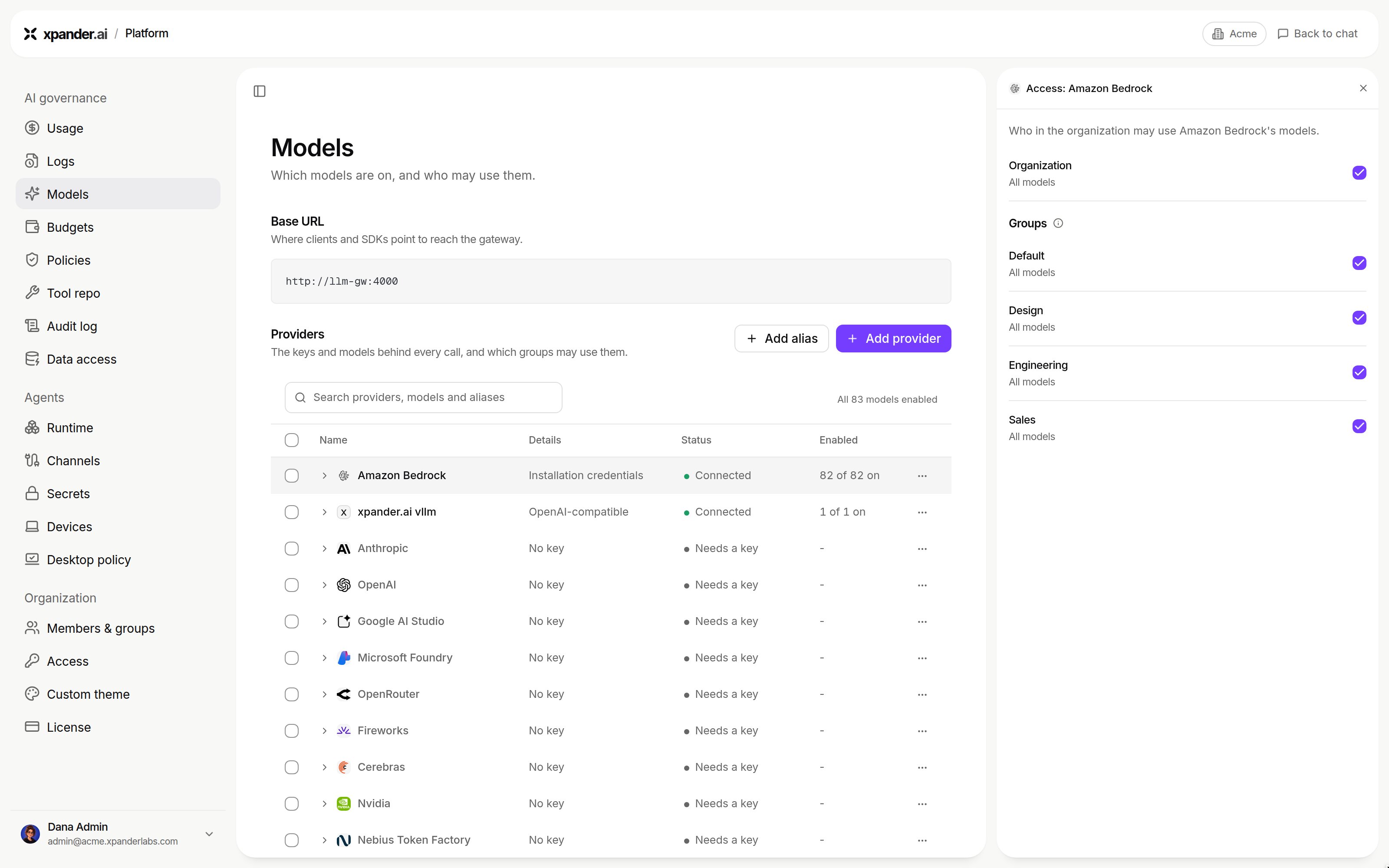
Who may use it on a provider: the organization, then each group, with the models each may use. Shown with sample data.