

New Features:
- xpander Desktop for everyone: Desktop is open to every cloud member. Install it from the branded download page, with Homebrew, npm, apt, winget or Scoop, with a one-line curl or PowerShell command, or roll it out through MDM with installer packages and a managed URL profile. Connector sign-ins finish in your system browser, and Desktop says what is wrong when an xpander URL cannot be reached. Self-hosted and air-gapped installs serve Desktop from their own UI image.
- Computer control on Desktop: Agents can zoom into a screen region at full resolution, an App automation switch (on by default) controls app scripting, and a Limit risky apps setting (off by default) adds per-app control tiers with an Esc stop that cannot be faked. Deleting files refuses folders that hold secrets or trusted roots.
- Omni Sidekick: A floating Omni widget is available in the chat app and on every Platform page. Drag it anywhere and it keeps its spot. It reads the page you are on, with secrets removed, and the conversation you have open. Omni can read and change admin settings for you (members, groups, roles, models, budgets, rate limits, API keys, policies, channels, secrets, projects, knowledge bases, approvals, the skills registry and the MCP registry). Every change is staged on a confirm card, you approve it, and it is audited. The same admin tools are on the Omni MCP server.
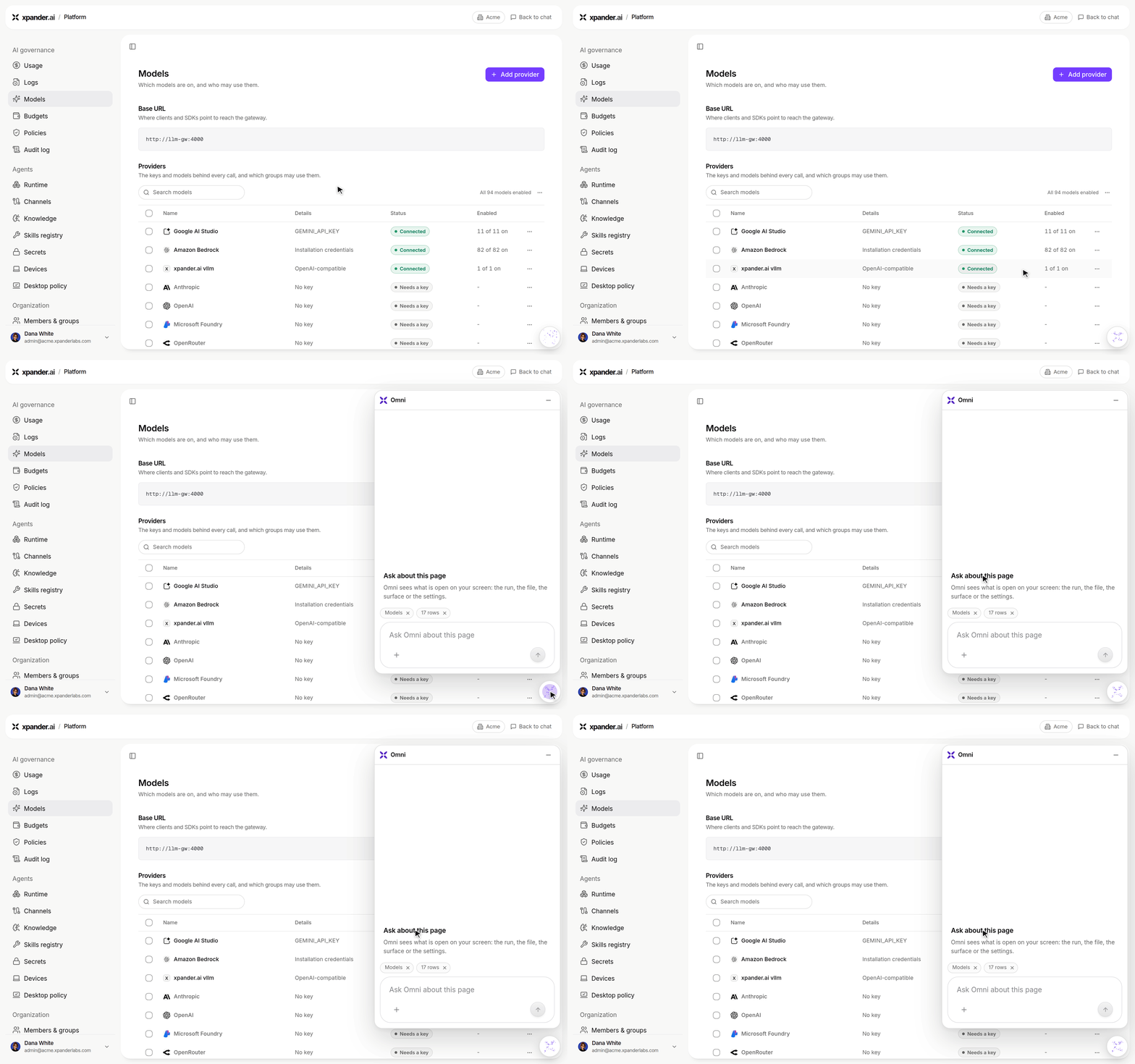
On a Platform page, the Omni button opens Ask about this page, with the page attached as context.
- AI Gateway is the only model path: Every model call, including Bedrock, agent-level endpoints and keys, OpenCode off-catalog models and Codex on a person’s ChatGPT plan, now goes through the gateway. The LLM Gateway is renamed AI Gateway in the product.
- Bring your own models, round two: Custom endpoints work with Claude Code, Codex and OpenCode, including Anthropic-protocol endpoints. A Test model card checks a model before you use it, models discovered on your own endpoint wait for approval with a model profile, and a watchdog checks custom endpoints every 2 minutes, marks unhealthy ones on the Models page and alerts you.
- Rate limits: Set gateway rate limits per second or over a rolling minute, with a floor, live use and a model rate test, right inside the budgets table.
- MCP tool gateway:
mcp.<your domain>serves one MCP gateway for each person, whose catalog is that person’s tool library. Sign in with OAuth and connect connectors from the MCP client itself. - Editable live surfaces: Type straight into text, diagram, HTML and title blocks, edit any block inline and see its edit history. New diagram and HTML blocks, governed images, and one block that can join several sources with a preview of each. HTML dashboards stay inside a live surface, and reports in chat default to live surfaces with live sources.
- My Surface: The agent home is a live surface built from your own conversations and runs, with lanes, board settings and instant load.
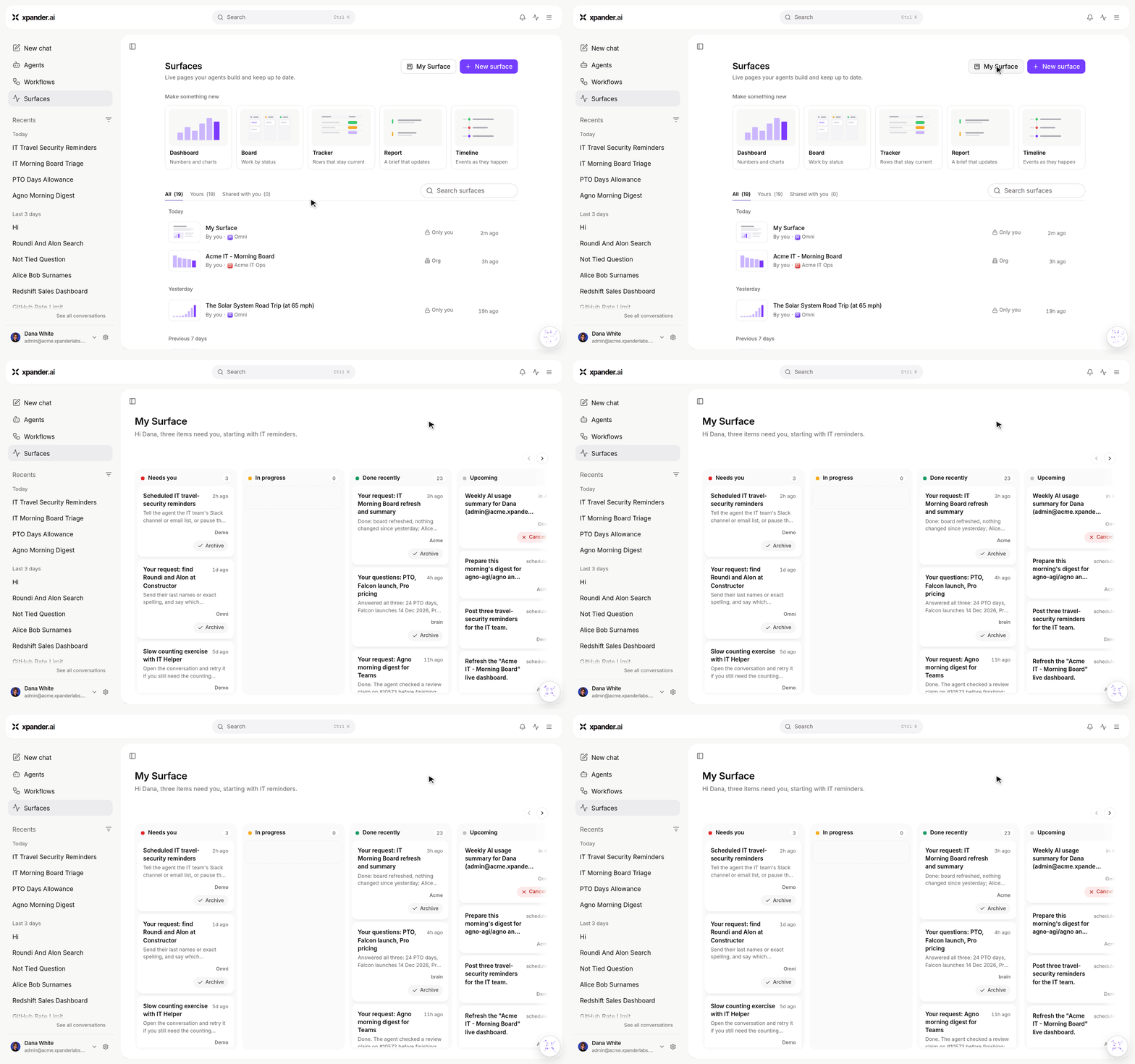
Surfaces > My Surface: your conversations and runs in lanes for Needs you, In progress, Done recently and Upcoming.
- Agents build skills and connectors: An agent can build a SKILL.md skill, a connector from an OpenAPI spec (with OAuth2 sign-in read from the spec), or a desktop connector that records the steps of an app with no API. Each one starts as a draft. Admins approve and test agent-built items in the skills registry and set who may build them.
- Native Slack tools for agents: Agents get built-in Slack tools. An agent asks for approval before its first Slack message to a new person, and with Each user an agent can post from a person’s own Slack account after they connect it.
- Branch a conversation: Start a new conversation from any message.
- Conversation hover card and progress card: Hover a conversation in the sidebar to see its status, a one-paragraph recap and its runs. A long turn shows a task card with its real steps, and the Worked for fold splits into Plan and Activity.
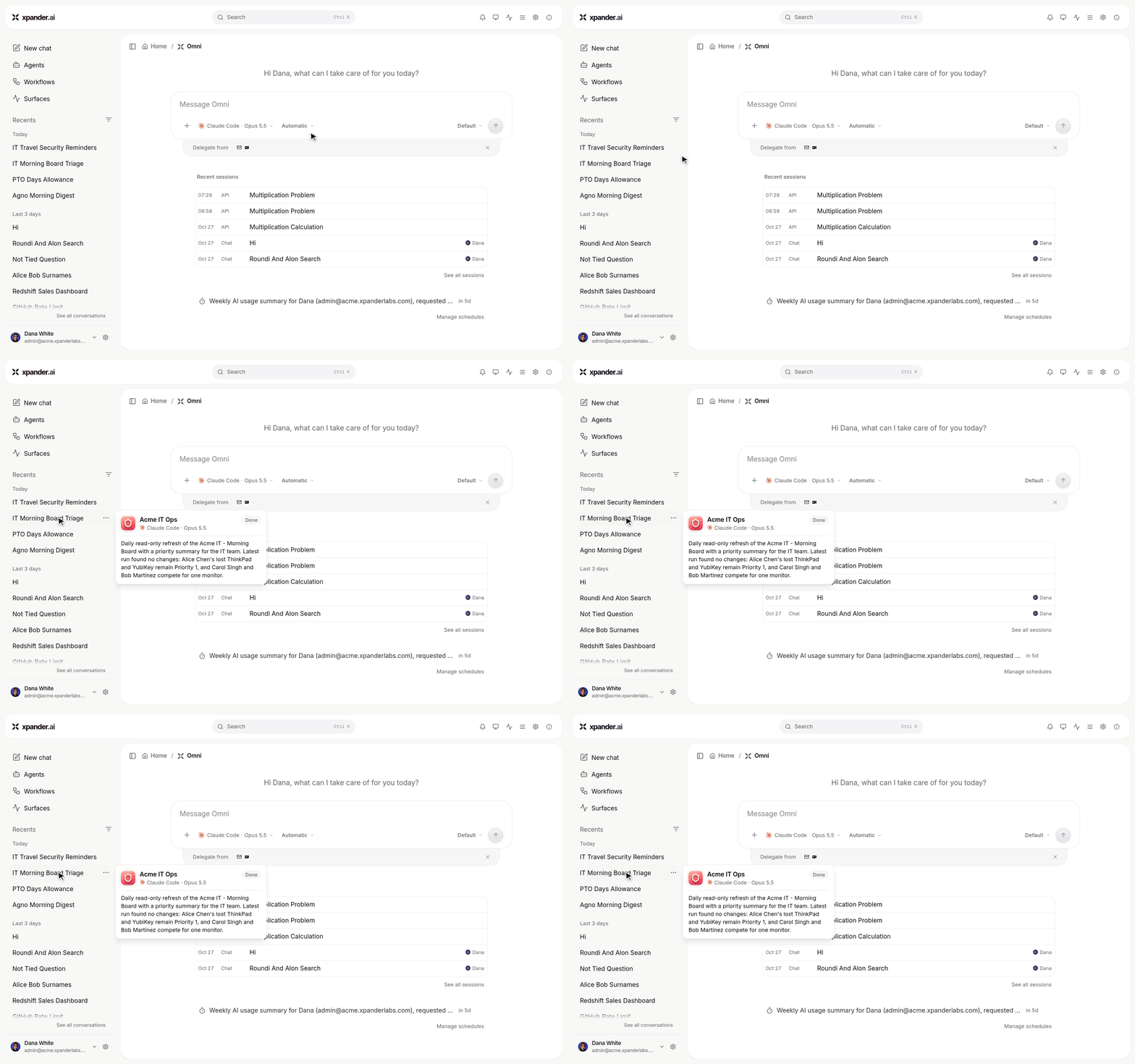
Hover a conversation in the sidebar to see its agent, status and a short recap.
- Who can send tasks to new agents: An org or group default in Policies decides who may send tasks to newly created agents, and agents that Omni builds get their creator’s default.
- Custom-header MCP servers: The MCP form tests every auth mode and refuses a save that cannot connect.
- Get your Omni by API:
GET /v1/agents/omnireturns, or creates, the Omni of the API key’s owner.
Improvements:
- Platform pages redesigned: Every Platform page follows one layout. The Tool repo is now the Skills registry under Agents and scales to hundreds of items with approvals first, Models provider rows open a panel with Enable all and Disable all, and per-rule saves never overwrite another admin.
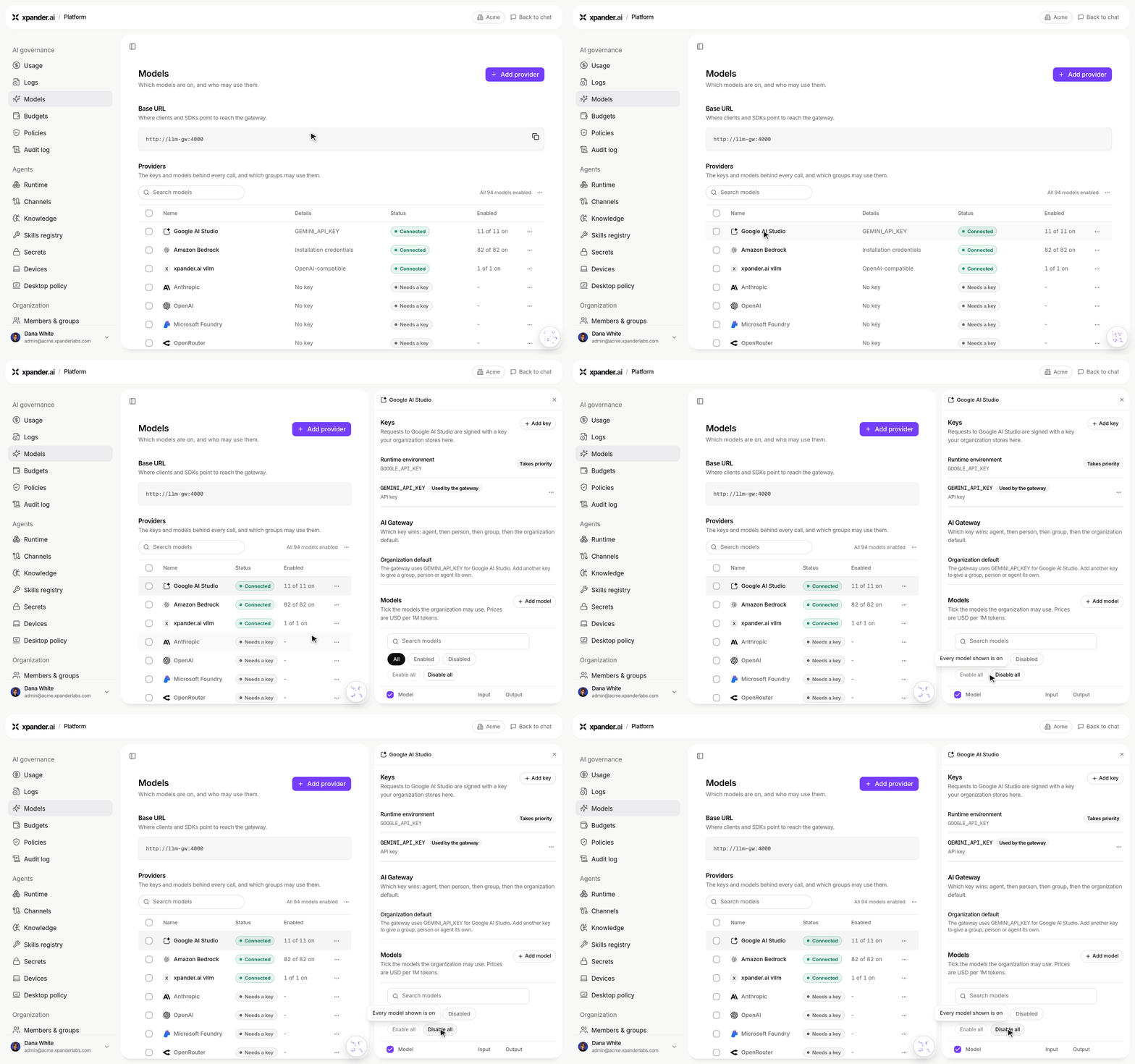
Platform > Models: a provider row opens a panel with its keys and models, plus Enable all and Disable all.
- The product name is Omni across the web app, Desktop and user-facing messages.
- Billing and usage: A turn configured for a personal plan never bills the organization key without asking, plan usage stays current through the gateway, a usage window past its reset shows as started over, cache read and write tokens are shown beside input and output, and each gateway call is priced by who pays for its tokens.
- Faster Logs: Session turns read from call summaries, and the trace pane shows every marked turn’s message.
- Approvals: One Manual-mode approval covers its whole tool group for the run, including calls held in parallel, and a reply resumes correctly after an approval decision.
- Secrets: Harness agents can see and request organization vault secrets that are not bound to them, through a binding link page, and the workspace secrets link now lasts 7 days.
- Chat: Smoother streaming, pinned conversations kept on the server, conversations open at their latest message, the running turn’s steps show when you reopen it, See all conversations follows the sidebar filters, a question card can be skipped, and image tool results show a thumbnail that opens the file.
- Phone layout: The composer pickers move to a tray under the input and the Omni launcher stays clear of Send.
- Live surface PDFs print light in dark mode and include their images.
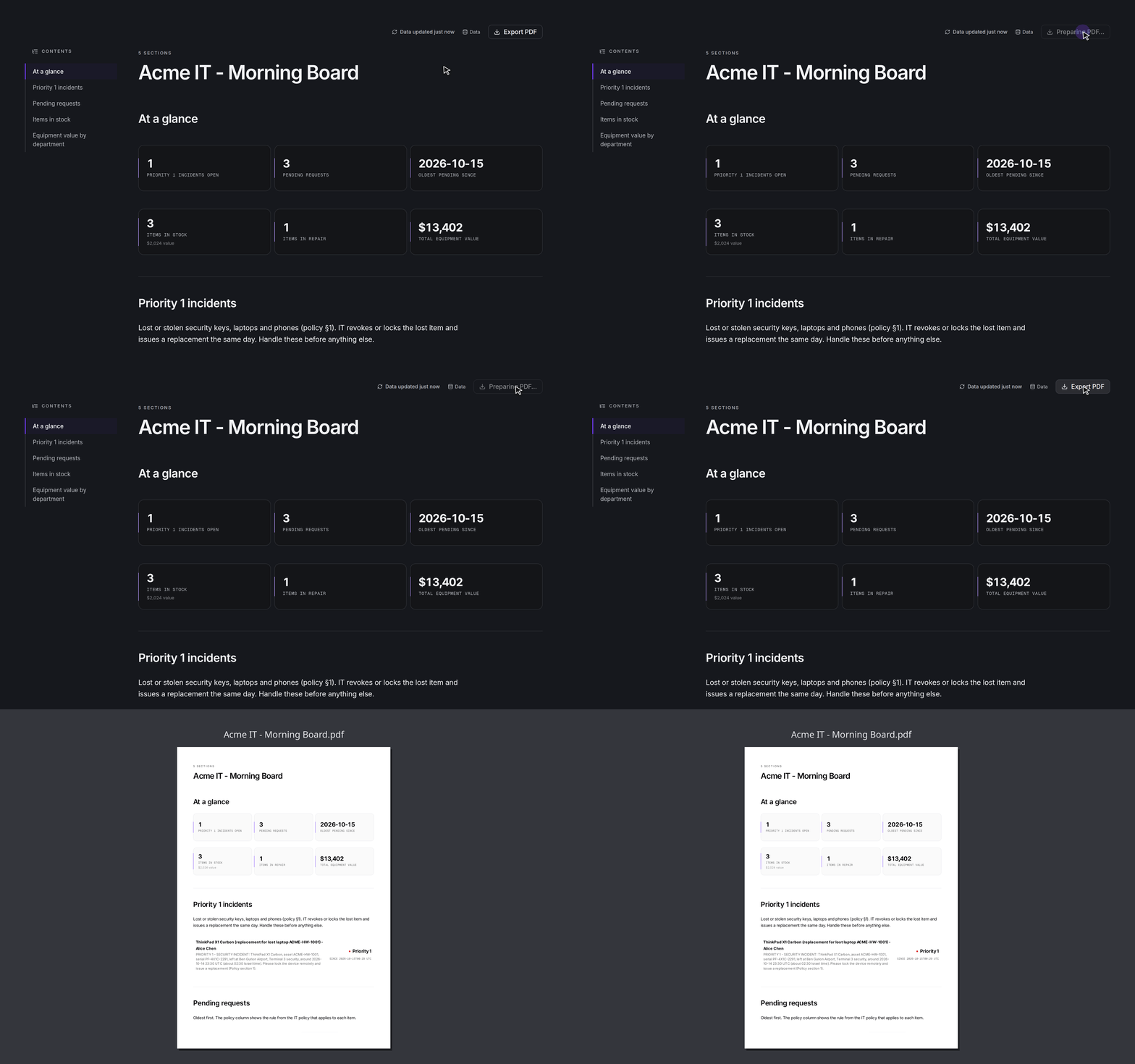
In dark mode, Export PDF on a full-page surface still prints a light PDF.
- Security: Agent-written config can no longer switch off the harness gate or the platform model login, unused APIs that logged secret values are removed, and base images are patched for critical vulnerabilities.
- Self-hosted: Hybrid policy checks keep the last policy bundle while the cloud is unreachable, and an environment is only offered the built-in tools its controller supports.
- Google Drive built-in creates folders and uploads into a chosen folder or shared drive.
- The built-in User policy and role now show as Member.
Bug Fixes:
- Fixed @Agent mentions starting a task on every tagged agent, and a card raised by a summoned agent not resuming on that agent.
- Fixed a workflow Agent node not returning when a harness turn finished, and manager-agent runs not failing on a team error.
- Fixed MCP elicitations not being answerable through the public tasks API.
- Fixed a relayed turn replaying an earlier turn’s answer.
- Fixed turn recovery interrupting a live process, and a CLI switch on a live process staying on the old CLI.
- Fixed a child task on another agent not being claimed.
- Fixed workspace paths inside tool arguments not being mapped.
- Fixed the async webhook answering Started when the run was refused.
- Fixed Omni cards landing twice on a direct task, one delete card per agent in a batch delete, and unreadable list changes in the agent diff card.
- Fixed each staged agent not getting its own Publish card.
- Fixed personal skills not being shared when attached or injected by the skills registry.
- Fixed direct connector invokes on relative server URLs.
- Fixed
PATCHwithgated_commands: nullnot clearing the gates, and task delete not removing the task. - Fixed API contract defects on custom functions, knowledge base updates, template import and webhooks.
- Fixed live surfaces not reading the agent’s own local database, typed text lost on a save error, and updates not showing in the open surface pane.
- Fixed shared HTML and text files not rendering when the content type had a charset, and
.doc/.docxfiles not offering a download. - Fixed the model picker not drawing on first paint, and composer harness picks not showing their save state.
- Fixed org-shared surfaces closing when their agent was not shared.
- As always, our agents and humans continuously fix various bugs, and sometimes create new ones (that will be fixed in the next update.)
New Features:
- LLM Gateway is live: Every model call now goes through one gateway: agents on every runtime, workflow nodes, summaries, bots, voice-note transcription, image generation and the platform’s own helper calls. Three new pages appear for organizations whose gateway answers: AI models & keys, Governance > Usage and Governance > Logs. Logs show a session cockpit with a tokens chart, a money toggle and the exact payer of each call, can be filtered by what started the run, mark unbilled platform operations, and keep prompt and response text by default, with capture settable per group. A Connect your tools wizard sets up Claude Code, Codex and OpenCode in one click, including Claude Code on your own Claude plan. Built-in
xp-fastandxp-compactionmodel aliases are available, and the gateway forwards only allow-listed client headers upstream.
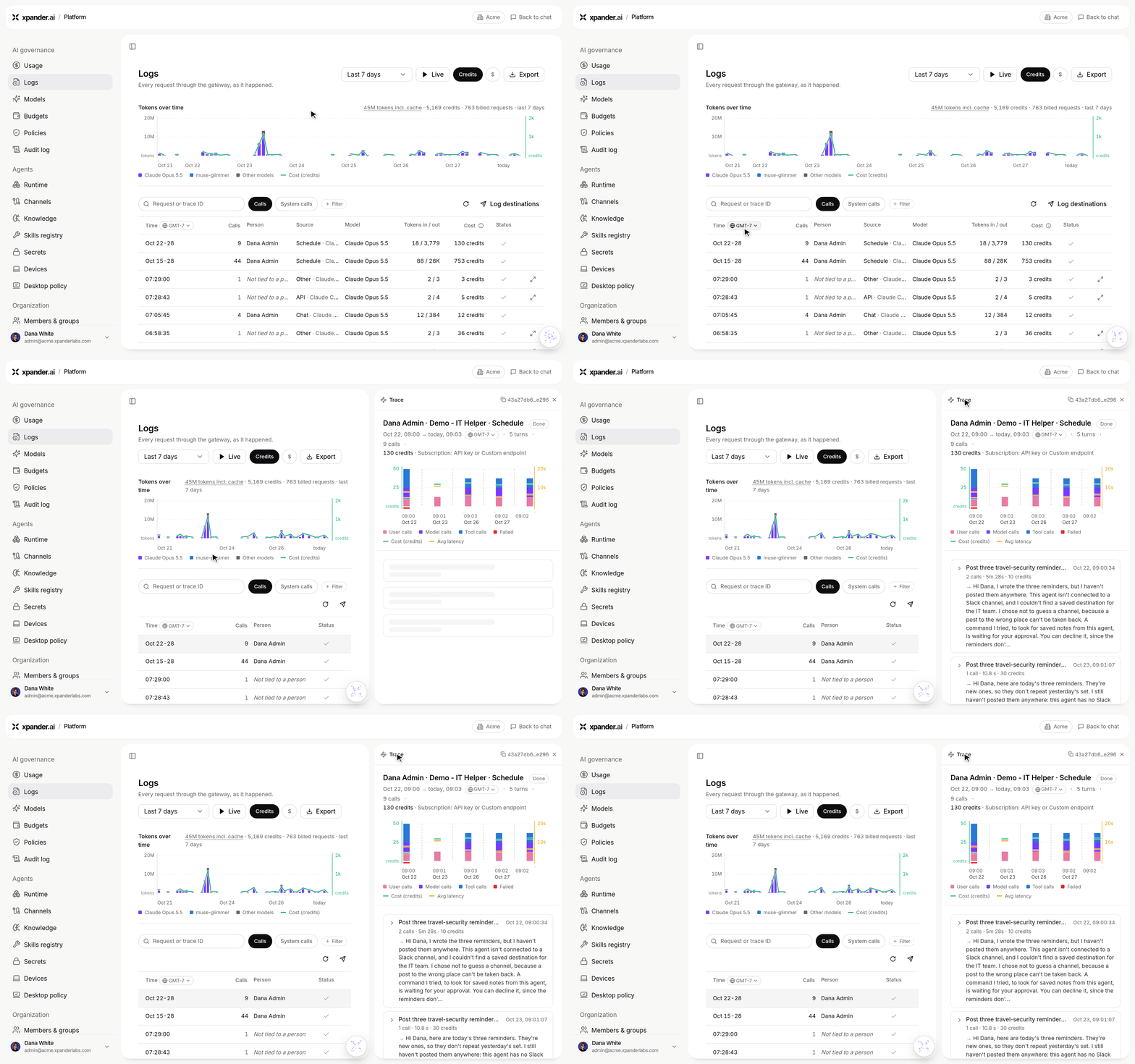
Platform > Logs: open a session to see its trace, with a calls chart, its cost and every turn.
- Log export to your own storage: Send gateway request logs as Parquet files to your own S3, GCS or Azure bucket every 20 seconds, one row per request with ids, models, route, tokens, cost and timings, never text. Test writes a real test file. OpenTelemetry export is available as OTLP/HTTP.
- Surfaces page: Surfaces joins the left navigation and lists every live surface you can see, grouped by date, with All, Yours and Shared with you tabs, search, a small live preview per row and a menu to open, open full page, copy the link or delete. Starter cards for a dashboard, board, tracker, report or timeline open an Omni chat with the sentence started. The top-bar Live Surface button is replaced by this page and by Open surfaces in the command palette.
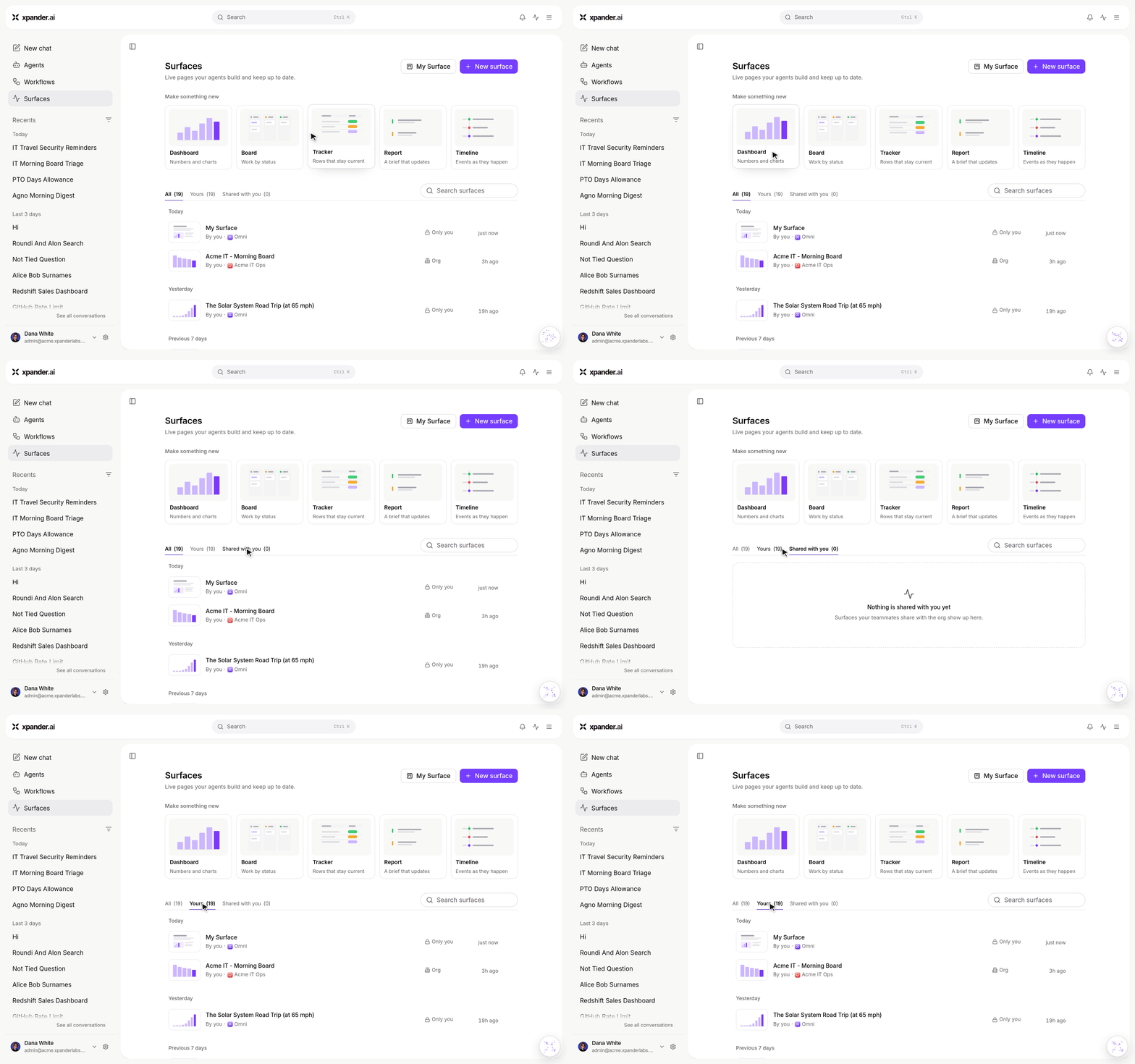
Surfaces: starter cards, then every live surface you can see under All, Yours and Shared with you.
- Live data in surfaces: A live surface block can read an attached connector or MCP tool and runs for each viewer exactly as the agent’s own call would, so a person never sees another person’s data. A block with no access shows a clear no-access state, publishing is one call that holds up under load, and the header is now the title, Data, visibility, Maximize and Close.
- Email-triggered workflows: A workflow can start from an email sent to it and runs its full graph, with safe handling of inbound mail. An agent’s email settings list the last 20 emails it received, each opening in a viewer, and keep a 72-hour debug log.
- Knowledge bases for harness agents: Agents on Claude Code, Codex and OpenCode can list and search their connected knowledge bases, read-only, as agno agents do. Knowledge bases are no longer gated and are available to everyone.
- Agents post to Teams channels: An agent can post to a Microsoft Teams channel it is bound to, and thread replies continue the conversation with the agent.
- Forms and withdrawals on approvals: An MCP server can ask you for input in an approval card with a form, and harness agents can run stdio MCP servers and MCP tasks. The person who asked can withdraw a pending approval, the approval card names the approvers and says the run resumes, and a declined approval answers one retry, not the whole conversation.
- Fine-grained policies and projects: Policies can now name resources, conditions and an Ask effect, and decide agents, operations and commands. Agents belong to Projects, with a project picker, access per person and group, and project policies. The built-in Everyone group is named in policy grants.
- Tool repo, round two: Add and edit items on the Tool repo page, set audiences and checks, and see versions. Items set to Off are hidden from lists, catalogs and Omni, and every invoke path is gated. An agent panel shows what the Tool repo turned off.
- Agent-built tools start as drafts: A custom function an agent builds becomes a draft only the builder and the person it was built for can use. Each test run is stored with secrets masked, publishing needs a passing test and the user’s approval, and an admin switch can send publishing to an approval queue or turn building off for the organization, a team or one agent.
- Guided setup for AWS: A guided Amazon Bedrock IAM role setup, with a Test connection, and an assume-role helper when connecting AWS connectors.
- More ways to bring your own model: A custom endpoint provider is open to every cloud admin who may add keys, and the Azure endpoint is stored next to each Azure key.
- Old UI retirement: The legacy console shows a retirement notice from 18 October and redirects to the chat app from 1 November. Custom container and OpenClaw options are hidden, and organization admins can create API connectors without a licence.
- @mention an agent in an agent chat: An @Agent mention sends that agent a task, and the mention picker lists only agents that accept tasks.
Improvements:
- Agents’ schedules run on the agent’s own harness and model. Scheduled tasks can no longer reopen a process held for a person, and only pending self-schedules count against the limit.
- Notifications and unread: Notifications are marked read per user, the feed stays fresh, conversation rows share one source of unread truth, the organization-wide list refreshes when it changes, and a one-click notify bell sits on the chat status line.
- Sources on conversations: Source chips show on the conversations list and the Session Manager, with the source filter back in the filter menu.
- Cross-agent work: A task prompt names the sending agent, a clearer origin line replaces the old one, and a run on another agent is a step in the thread, not a card.
- Usage and budgets: Usage Costs grouped by Person names the members, budgets bind runs on your own keys on every billing plan, and budgets are enforced on self-hosted installs.
- Platform audit: A full audit of the Platform console fixed model pickers, action pickers, request details and access policies, and models bulk actions are open to every admin.
- Faster pages: The surfaces list is compressed and skips redundant reads, surfaces open instantly, the creating task’s log is left out of lists and views, and the trace timeline folds runs of plain calls into range rows.
- Security hardening: A user-chosen model endpoint never receives an xpander key or reaches internal addresses, its address is pinned against DNS rebinding and validated when saved, expired organizations cannot run agents through the webhook, relayed calls no longer replay as the install service key, harness
start_servicecommands are gated, reserved environment names are refused before a secrets link collects them, and base images are patched for two known vulnerabilities. - Rendering: Diagrams render with a new built-in renderer, connector and provider logos are bundled and theme-safe, and an MCP row shows its status in the Connection row with tools as a checkbox table and descriptions on hover.
- Agents’ prompts: The agent description is left out of harness and OpenClaw prompts, and the managed description is regenerated on every publish.
- Self-hosted and air-gapped: The workspace secrets link and asset links use the install’s public host, Redshift IAM sign-in works, Claude Code on a pinned Bedrock model keeps its model family, and removed connectors are dropped from the on-prem library.
Bug Fixes:
- Fixed a harness run parked on an MCP sign-in not resuming when the sign-in completed.
- Fixed a remote MCP session dropped by the server ending the run; it reopens and an expired token is refreshed.
- Fixed an MCP server reading as Connected before a tool call had worked.
- Fixed an agent save re-checking an unchanged default user, and the app hiding the reason when a save was refused.
- Fixed agent enable and disable riding a draft instead of going live at once.
- Fixed a workflow created through the API losing its nodes.
- Fixed a compaction wake loop, and Claude Code refusal retries going to direct Anthropic on Bedrock pins.
- Fixed an open process that waits between turns showing a Working dot, and an answered question card staying in the thread.
- Fixed a shared reply following a viewer’s model override.
- Fixed schedule cards appearing in channel live surfaces.
- Fixed OCR dropping text from some documents, and a stalled Redis holding up probes and the heartbeat.
- Fixed large prompt captures not landing in time.
- Fixed the Browser agent showing a duplicate screenshot operation, and harness agents missing the always-on screenshot tool.
- Fixed storage signed links losing their token in harness output.
- Fixed connector proxies not following same-host http to https redirects.
- Fixed a warning missing when a live connector runs on a connection with no credentials.
- Fixed the phone composer hiding the text field, and switched-to sessions not opening at their last position.
- Fixed a conversation on an organization-wide agent reading Only you.
- As always, our agents and humans continuously fix various bugs, and sometimes create new ones (that will be fixed in the next update.)
New Features:
- Accounts: Organizations you operate are now Accounts, replacing the MSP wording. A new Accounts page lists them with members and spend, Open account switches into one, and a public Accounts API creates, updates and removes accounts and manages their members and budgets. Account creation hands the first admin an invitation, or a one-time sign-in link when email delivery is off.
- Policies and Check access: Platform > Access gains Policies, where you write and attach access policies to people and groups, and Check access, which shows what a person can do and which policy decides it. Members shows each person’s effective role, and roles are policies.
- Tool repo: A new Platform page lists every callable item in one place (connectors, built-in tools, skills, MCP servers and custom functions) and sets each one Optional or Off. For connectors and MCP servers you can also limit the tools to all, read-only or a custom selection, and the choice is enforced wherever agents run.
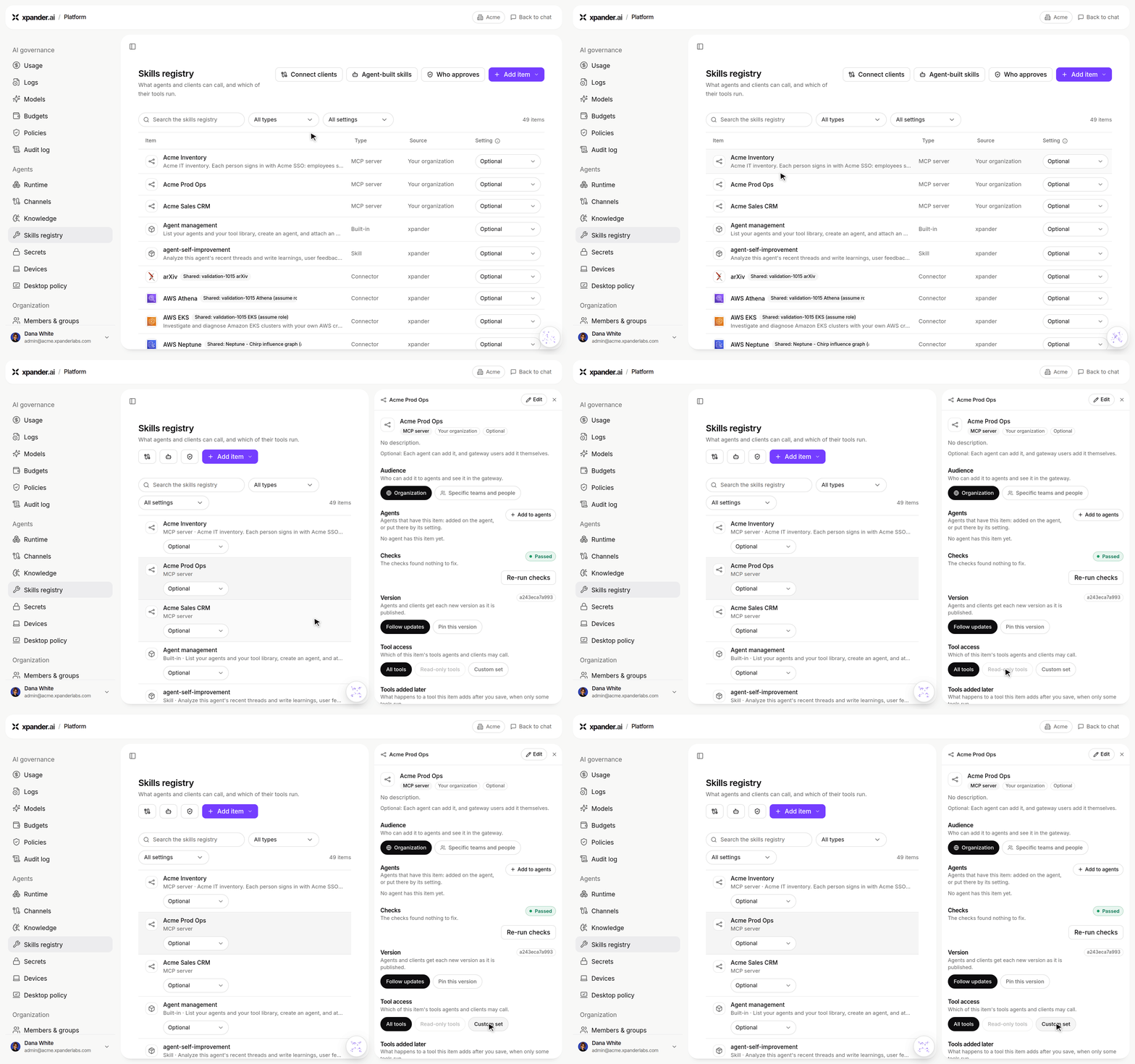
The Tool repo is now Platform > Skills registry. Open an MCP server to set its Tool access: All tools, Read-only tools or Custom set.
- Agents can message people: An admin can let an agent send a direct message to a person in the organization. It goes out on the person’s linked Slack, email, WhatsApp or Telegram, comes from the agent, and a reply continues the agent’s conversation. Turn it on under Channels > Direct messages and choose the channels and the people it may reach.
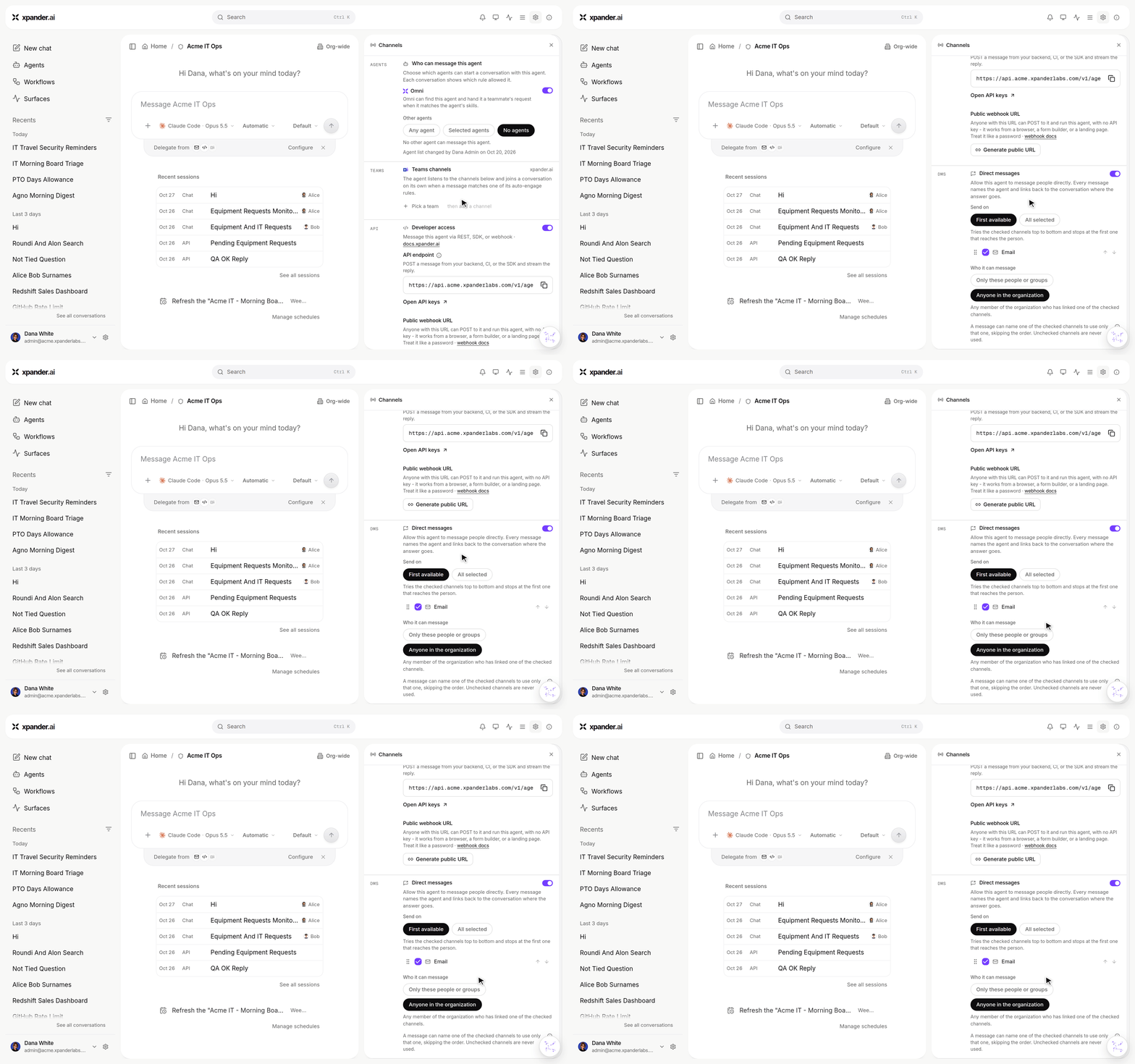
Agent settings > Channels > Direct messages: which channels to send on and who the agent can message.
- Choose who can send tasks to an agent: Each agent’s owner decides which agents may hand it work, from agent settings. Omni is one entry on that list and replaces the Omni discovery switch. A delegated task shows the source agent, the user and the rule that allowed it.
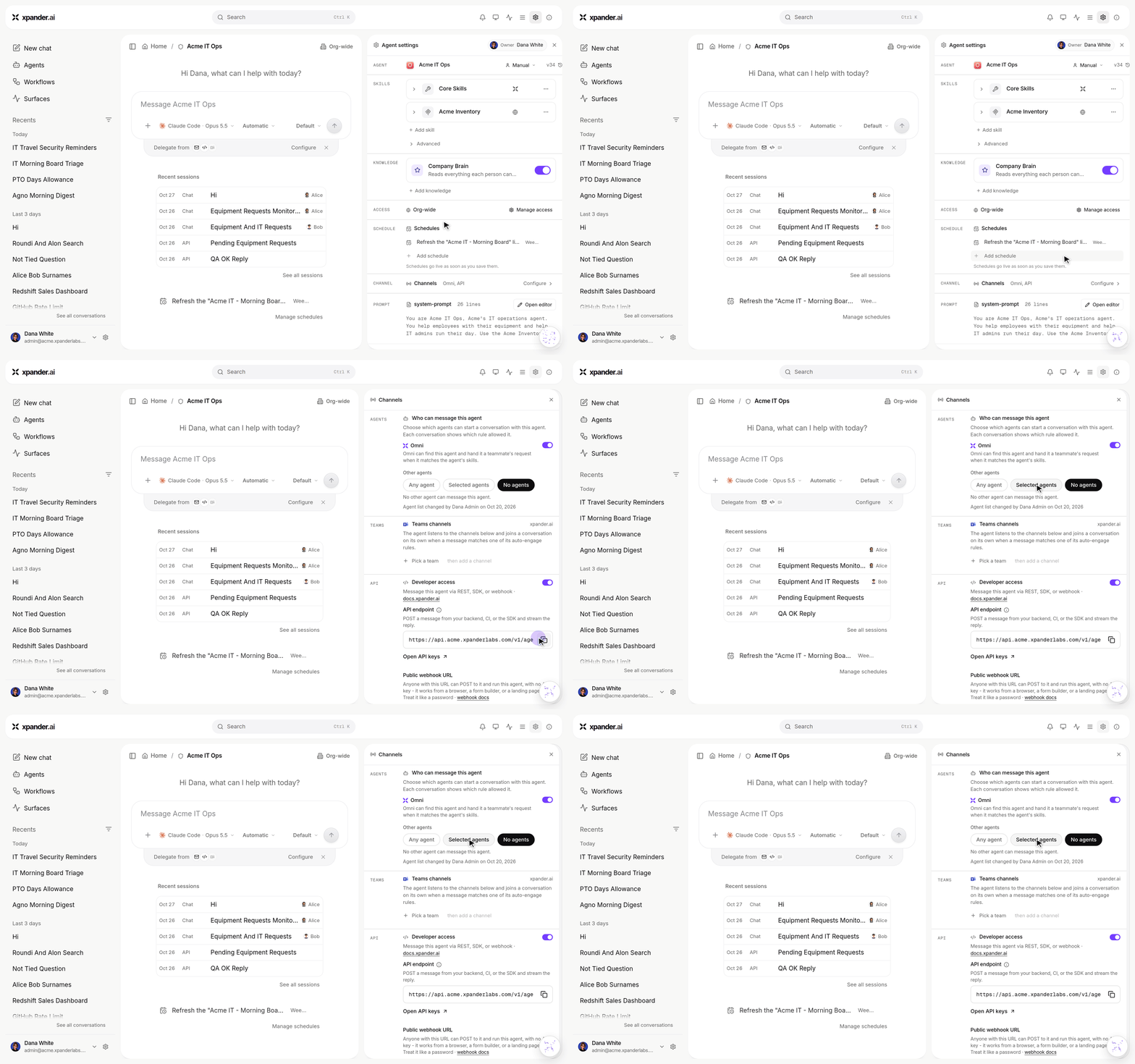
Agent settings > Channels: Who can message this agent, with the Omni switch and Any agent, Selected agents or No agents.
- Pin an agent to a Claude plan: Pin a shared agent to your own Claude plan so every turn, including scheduled ones, runs on it. Give each plan a name, see the connected Claude account and its usage in the model picker, and get a bell notification when the plan reaches its limit. A spent plan falls back to the organization’s licence and returns when the limit resets.
- MCP sign-in with your SSO token: An MCP server can now authenticate with the signed-in user’s SSO token, so each person reaches it as themselves.
- Move serverless agents to an external harness: The external harness is offered to serverless agents, on the agent home too, with a banner that shows progress until the agent switches.
- Live Surface gallery blocks: New block types with typed table columns and kanban cards give agents more ways to lay out a report.
- Disk that grows by itself: A harness agent’s disk grows automatically when it reaches 90% of its limit, up to five times the base size, and the owner gets an email with the largest folders and a link that opens the agent with a cleanup prompt.
- Open an agent chat from a link: A link can open an agent’s chat with a prefilled prompt.
- Background tasks model: One setting chooses the model used for background tasks, replacing the agent routing model card.
Improvements:
- Sidebar: One notice on each row replaces the status pills: green only for a real unread answer, a glow for a failed resident session, and an Unread filter that matches. Finished resident sessions join the date timeline and a failed delete only restores the row.
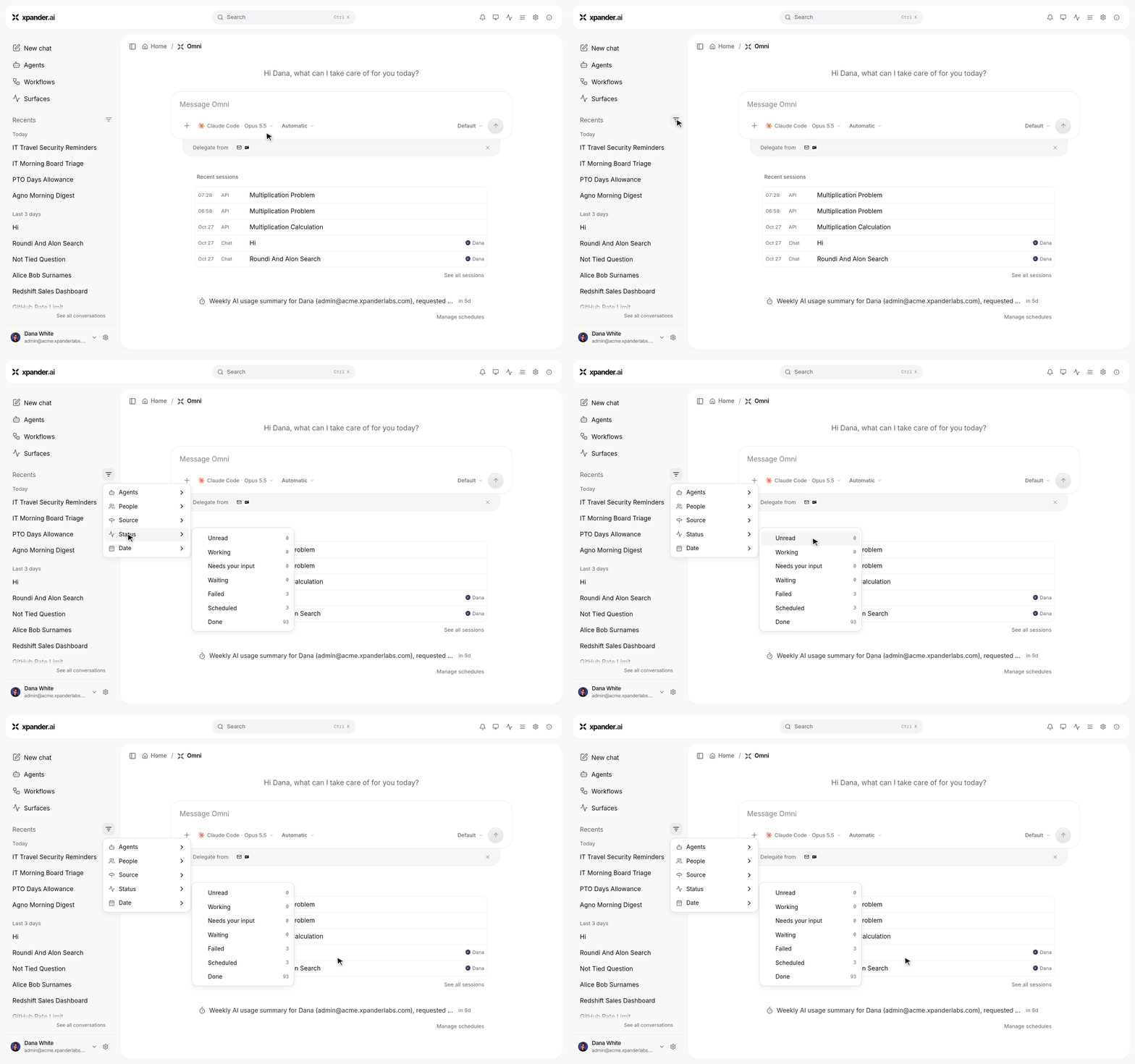
Recents > Filters > Status: Unread lists only conversations with an answer you have not read.
- Cost and billing: Totals separate what xpander bills from what your own keys cost, the cost split shows who pays, an organization sees one money unit everywhere, and per-end-user budgets now apply. Tier-contract customers see their tier statement, and the licence view shows the licence start.
- Schedules: Regular agent schedules show a paused state with Pause and Resume, schedule edits keep the agent’s default user, and empty schedule prompts are refused. A self-schedule from a live harness process fires as a followed turn in the same conversation, and scheduled surface refreshes update their surface in one conversation.
- Inactive agents are refused on every run path and their schedules skip.
- Harness agents: The composer’s model pick is honoured on Claude Code and Codex, a failing MCP server is skipped instead of stopping the run, a turn ends with the provider’s error instead of retrying silently, OpenCode works with custom OpenAI-compatible providers, custom provider picks run on agno turns too, typed live surface blocks are the default over Markdown, and Claude Code is updated to 2.1.289. Fleet nodes can run on kernels without Landlock where the chart allows it.
- Sub-agents: Each sub-agent gets its own live row instead of “N sub-agents running”.
- Chat: A chat keeps up with a run opened mid-way, the working indicator follows the process’s activity, @mentions render as chips in the Session Manager, the in-chat live surface preview has a capped height, a direct-turn thought reads as a plain step, and a harness agent’s
skills/folder opens read-only in Computer. Shared-session agent threads stay out of the lists and unsaved tool toggles survive a refresh. - Slack: Messages from Slack apps count as bot senders without an Authorize card, a reply to an agent’s channel post continues its conversation, an agent’s own posts have no Open in xpander button, a thread read keeps the whole instruction, and an agent’s DM shows the agent and reaches a person linked in several workspaces. Messaging channels answer in text and publish a live surface only on request.
- Security hardening: Revoked API keys stop working at once, MCP sign-in tokens no longer carry the organization key, file uploads are scoped to the caller’s organization, the custom function sandbox is walled off from the network, an unused connection-string endpoint is removed, only the chat widget may be framed, and logo and avatar pickers no longer accept SVG.
- Sign-in: The legacy token handoff is stripped from the URL and PKCE verifier cookies stay on the shared auth domain, fixing a
bad_code_verifiersign-in error. - Custom providers: Test connection uses a stored key you pick.
Bug Fixes:
- Fixed Finish process ending a harness run while questions, waits or background shell commands were still open, and an empty resident result showing the no-reply line instead of the last update.
- Fixed a finished resident process reading as live in history, and a stale task notification showing as the result of a resumed Claude Code session.
- Fixed a service exit on a harness agent showing as a note from a person.
- Fixed a secret saved during a live fleet segment not reaching the next message, and link-saved secrets missing from a harness agent’s Secrets.
- Fixed one bad tool failing an agent load; Omni now checks that an agent loads.
- Fixed a task for another agent landing in the sender’s conversation instead of opening its own.
- Fixed turns being able to bind the executor’s loopback ports.
- Fixed filler descriptions on CLI tool steps.
- Fixed the Scope check counting changes that were not real.
- Fixed
xplivesurface-createrejecting an inline manifest without a workspace path. - Fixed policy categories with no actions showing in the policy editor.
- Fixed web-chat @Omni mentions not running as a guest turn.
- As always, our agents and humans continuously fix various bugs, and sometimes create new ones (that will be fixed in the next update.)
New Features:
- Workflows are generally available on the new UI: No preview entitlement needed.
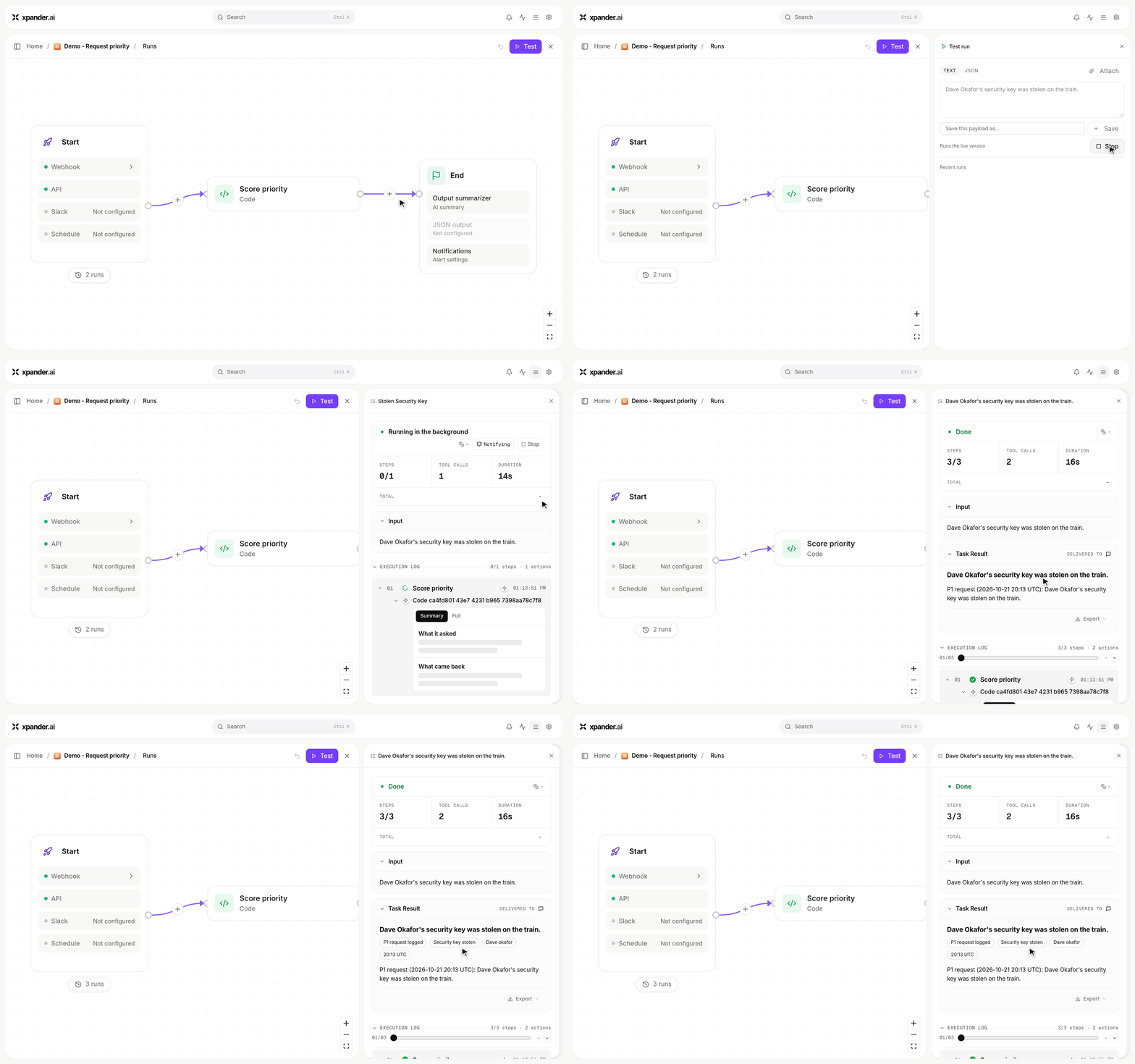
A two-step workflow: Test with a request, Run, and the result comes back marked P1.
- UI updates: The Platform settings pages are rebuilt on the chat design system, with details opening in a right-hand card. The sidebar is now a flat nav (New chat, Agents, Workflows, Scheduled) over one filterable conversation list, and it is resizable.
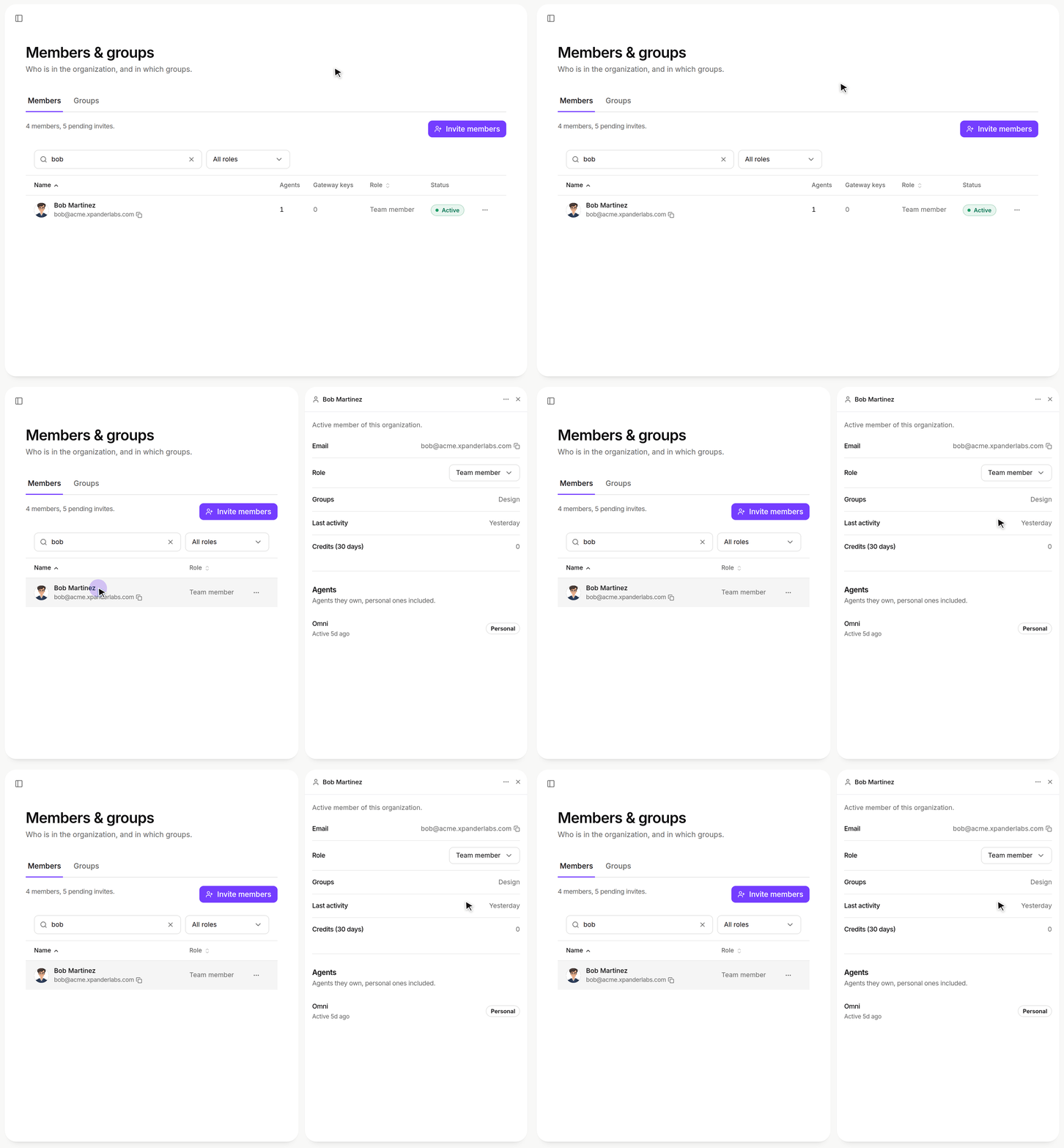
Platform > Organization > Members & groups: a member's details open in a right-hand card.
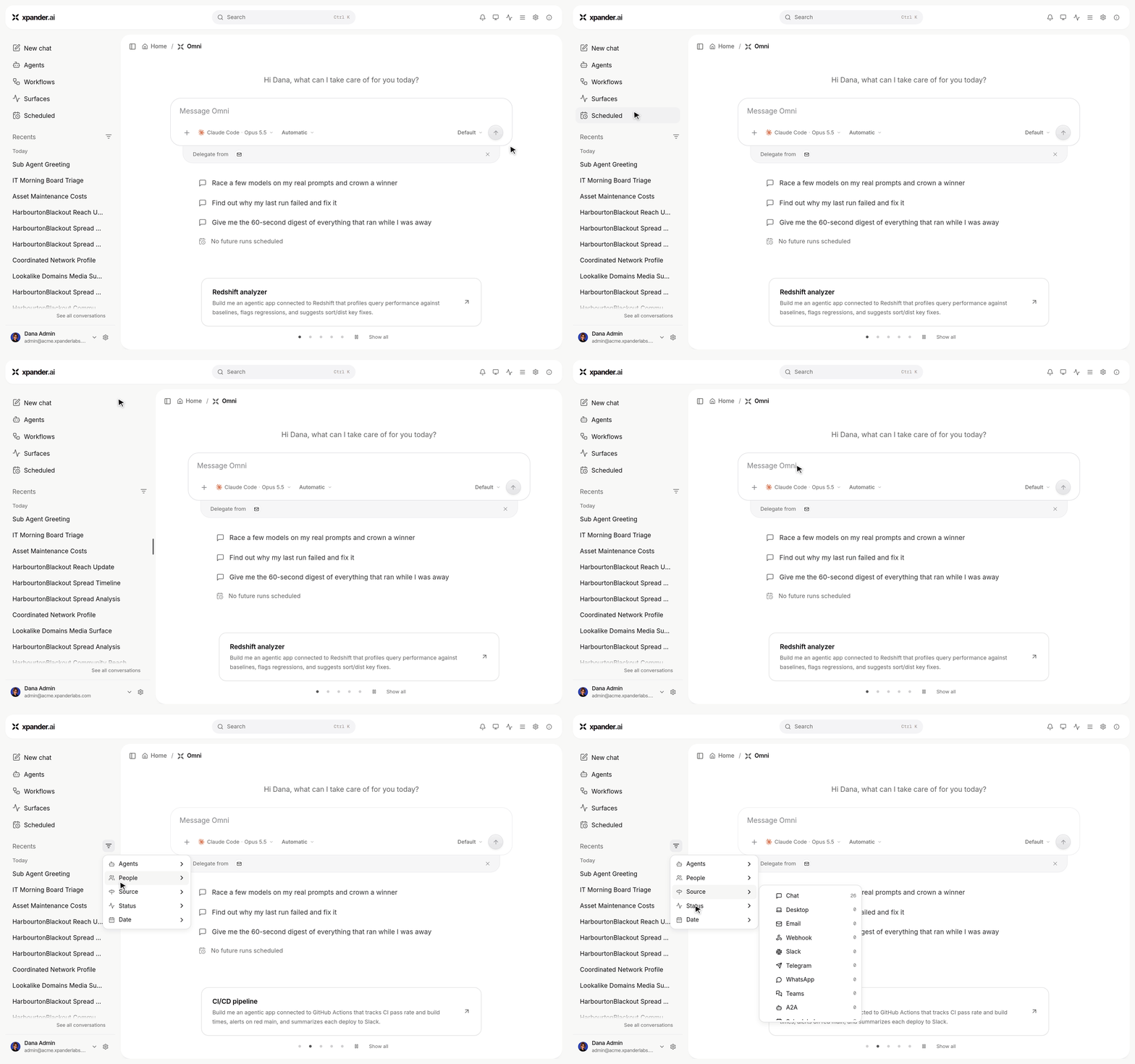
The sidebar: New chat, Agents, Workflows, Surfaces and Scheduled over one conversation list. Drag its edge to resize it; Filters narrows the list.
- Debug logs for support: Download a debug-logs zip from the Support dialog or the thumbs-down note. Feedback reports redact credentials, and sharing with xpander support is opt-in.
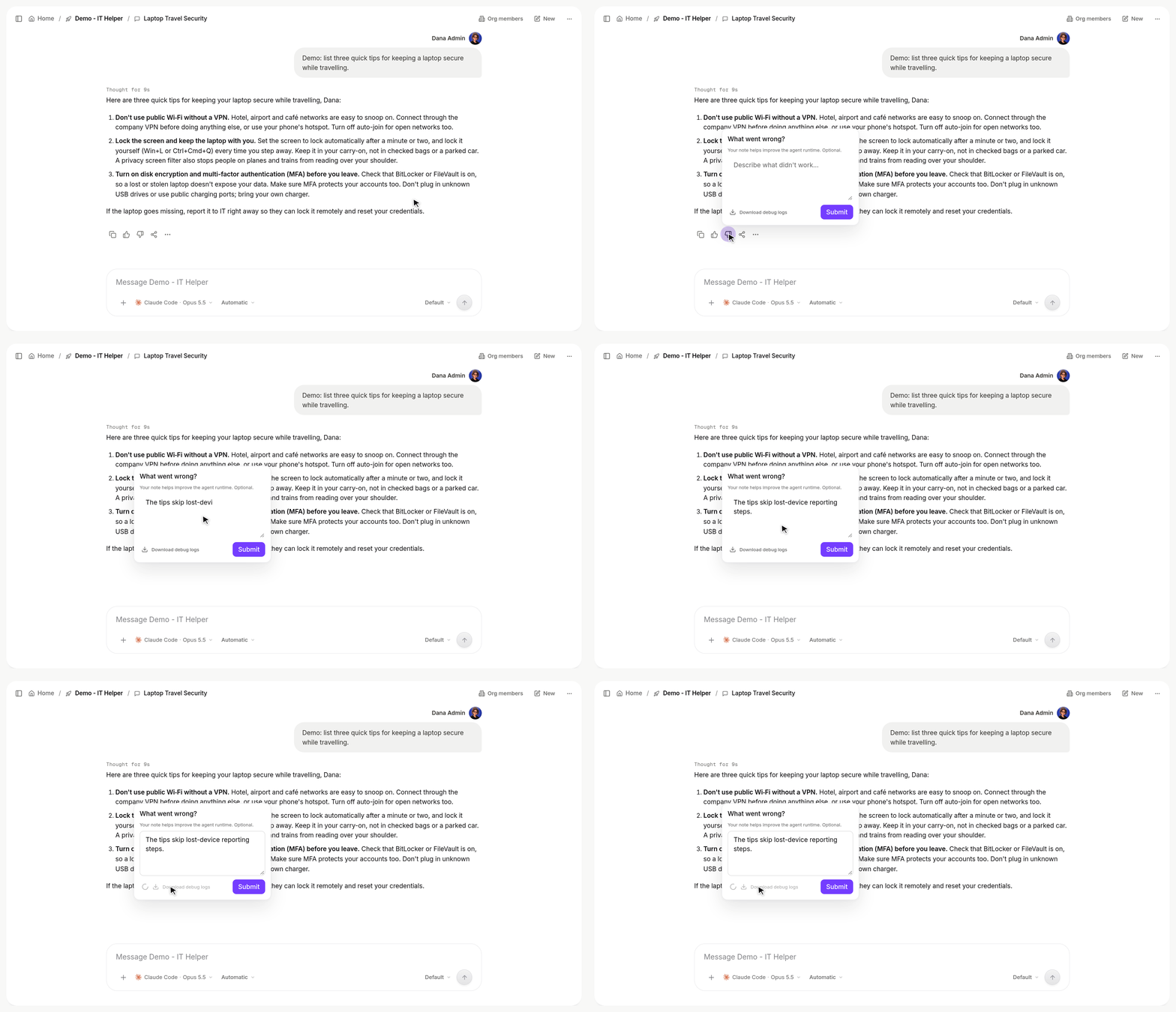
Thumbs-down on a reply, add a note, then Download debug logs saves that conversation's zip.
- Copy and move agent workspaces: Duplicating an agent, or moving it to an external harness, now copies its whole workspace and keeps its model.
- Agent directory layout: Harness agents get per-conversation
sessions/folders and ashared/folder, migrated automatically. The Computer view browses the whole agent directory. - Schedules in agent settings: Create and edit an agent’s schedules from inside any conversation. Scheduling for Claude Code, Codex and OpenCode agents is now managed by xpander.
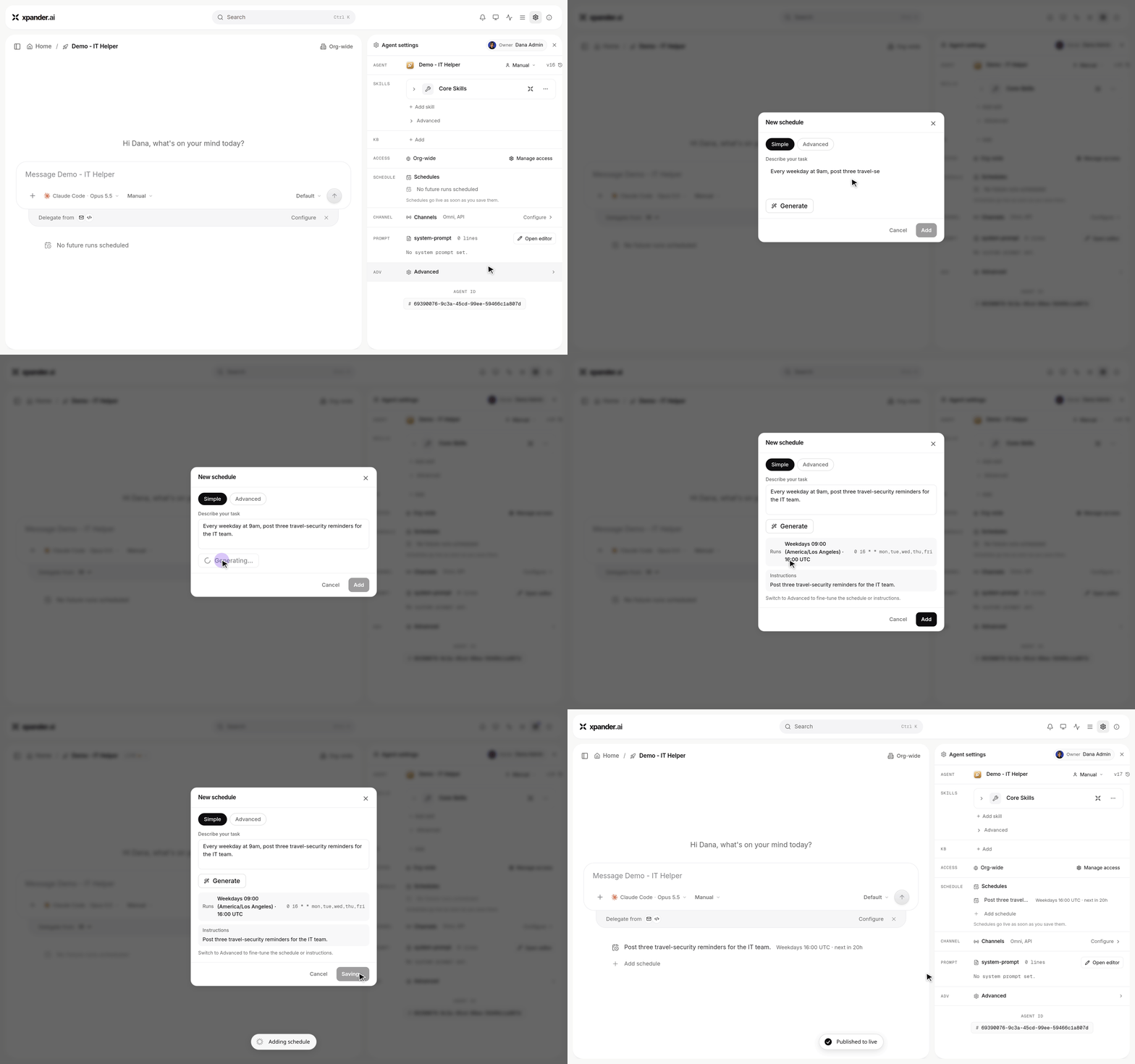
Agent settings > Schedules: describe the task, Generate fills in when it runs, then Add.
- Slack questions as thread messages: An agent’s follow-up questions arrive as a new message with buttons that mentions you.
Improvements:
- Faster, more scalable agent runs: Shorter cold starts, no per-user process caps, better spread across executors, and the fleet rolls itself after a new harness image.
- Claude Code runs at the 1M-token context window, and Claude Sonnet 5.5 pricing is added.
- Sub-agent steps nest under their Agent row, and Stop cuts only the running turn of a live process.
- Harness agents start with the Playwright browser on, pick up newly added connectors mid-session, and get image text from Slack as context instead of in your message.
- Self-hosted and air-gapped: Claude Code on Bedrock, the custom theme included, private-range MCP servers, and working skill bundle downloads.
Bug Fixes:
- Fixed Slack system messages triggering auto-engagement, and stuck hourglasses or lost replies on steered Slack messages.
- Fixed the pending-changes bar being invisible in light mode and the queue chip showing for files-only sends.
- Fixed the sidebar pinning Omni on the platform home, and “Agent not published yet” appearing on real load errors.
- Fixed duplicated agents switching runtime, and an MCP token under two identities forcing a sign-in.
- Fixed a racing follow-up being answered twice, a lost steer from a finished child, and the answer before Finish process being replaced by “Done.”
- Fixed unreadable skill bundle files, Add model missing on keyless providers, and connectors with unusual tool schemas failing on harness agents.
- As always, our agents and humans continuously fix various bugs, and sometimes create new ones (that will be fixed in the next update.)
New Features:
- Long-running agent processes: An agent on Claude Code, Codex or OpenCode now stays alive across messages as one resident process instead of starting a fresh run for every turn. While it works it posts progress notes and questions into the thread, it can pause itself until a time or an event (a pull request merge, a channel reply, your answer to a question) and wakes with the reason, and it ends the process itself when the job is done. Follow-up messages steer straight into the live process, and a parked process resumes at once when you write to it. In the app a live process shows an In progress pill with its current state and the agent’s last note, an Awaiting your answer chip when it holds a question, Finish process in the Stop dialog and the conversation menu, and a finish card listing the actions taken (pull requests merged, branches pushed) as linked chips.
- Confirmation before irreversible actions on shared work: Closing or merging a pull request, changing its base, rewriting or deleting a branch, deleting or archiving a repository, and any write to a pull request or branch the process did not author now go through the person first.
- Session Manager: The Task Manager becomes the Session Manager. Inside a conversation it lists the session’s turns, one row per message, under a summary card with state, turns, tool calls, duration and credits, plus Stop and Notify. A working reply reads “Working for Ns” over its latest activity and folds into “Worked for Ns” with details on hover once it finishes. Steering is the default for follow-ups, and you can pick an effort level for the agent.
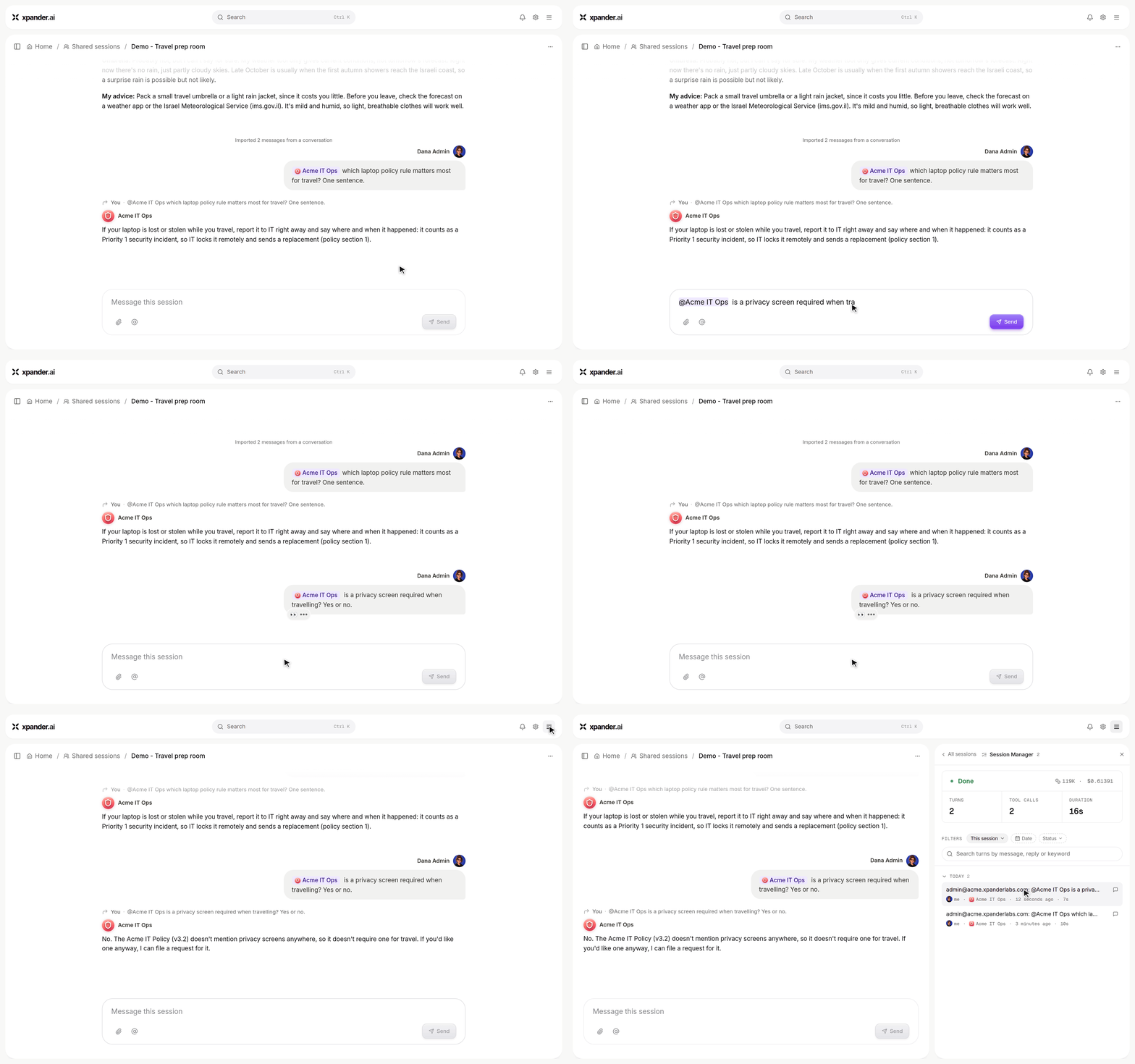
An agent answers in a shared session, then Session Manager lists every turn with its tokens, cost and duration.
- Shared sessions are generally available: A shared session room gets its own Session Manager listing every agent’s turns with per-turn state and clocks, an Activity view with the session’s total tokens and cost, and Archive and Restore in the session options menu.
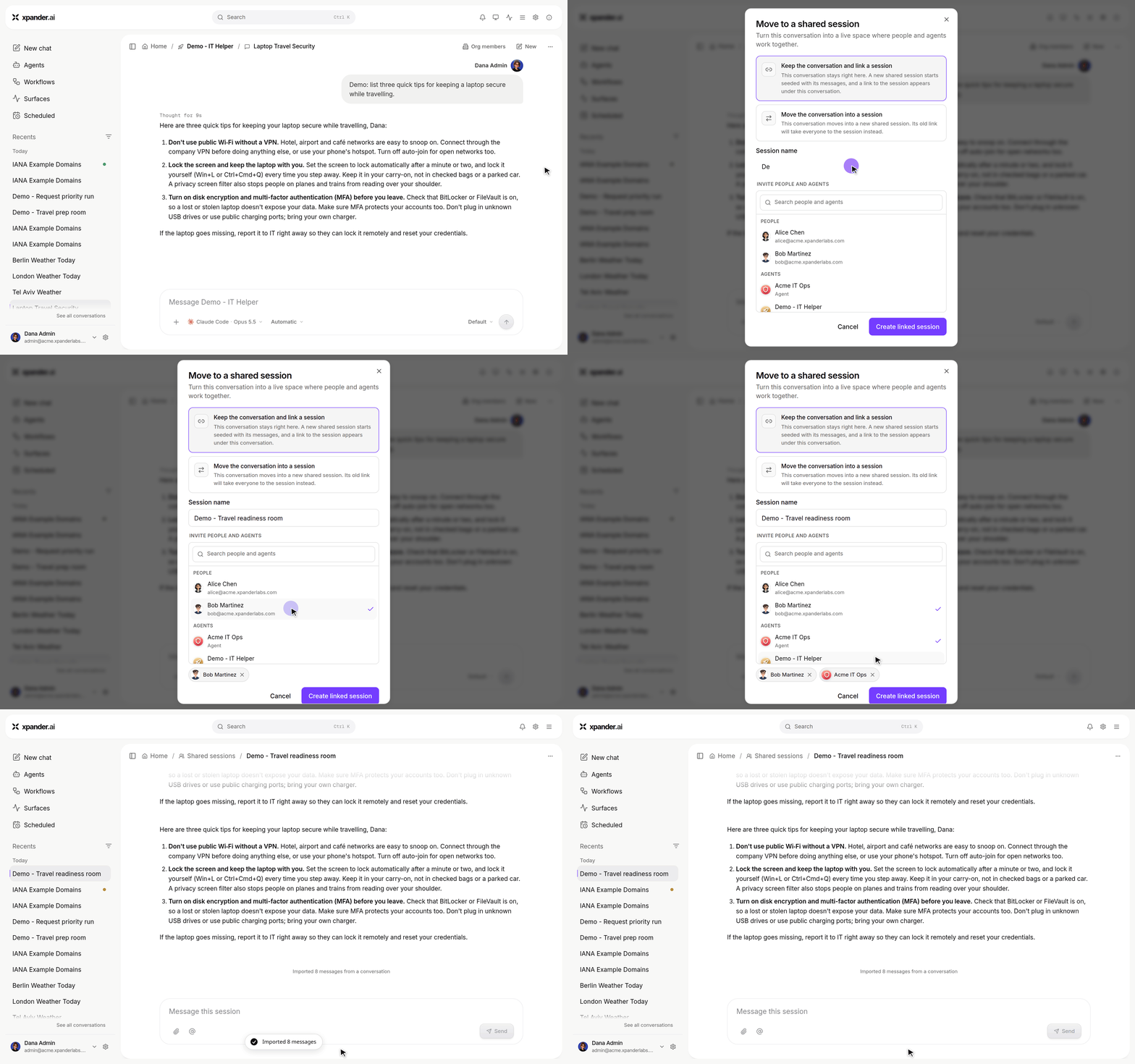
Conversation actions > Move to a shared session: name the session, invite people and agents, and it opens with the conversation's messages.
- Private and scoped skills: A registry skill can be organization-wide, restricted to groups or people, held by specific agents, or private. Manage the whole audience in one place, see provenance badges for agent-created and repository-managed skills, and repository-managed skills render locked. Settings gains a Skill Registry with Code skills and MCP servers tabs: create private code skills, import Markdown or ZIP bundles, edit instructions and pick the audience. A publish API lets a repository push skills to the registry, and audiences are enforced on the files delivered into an agent’s workspace.
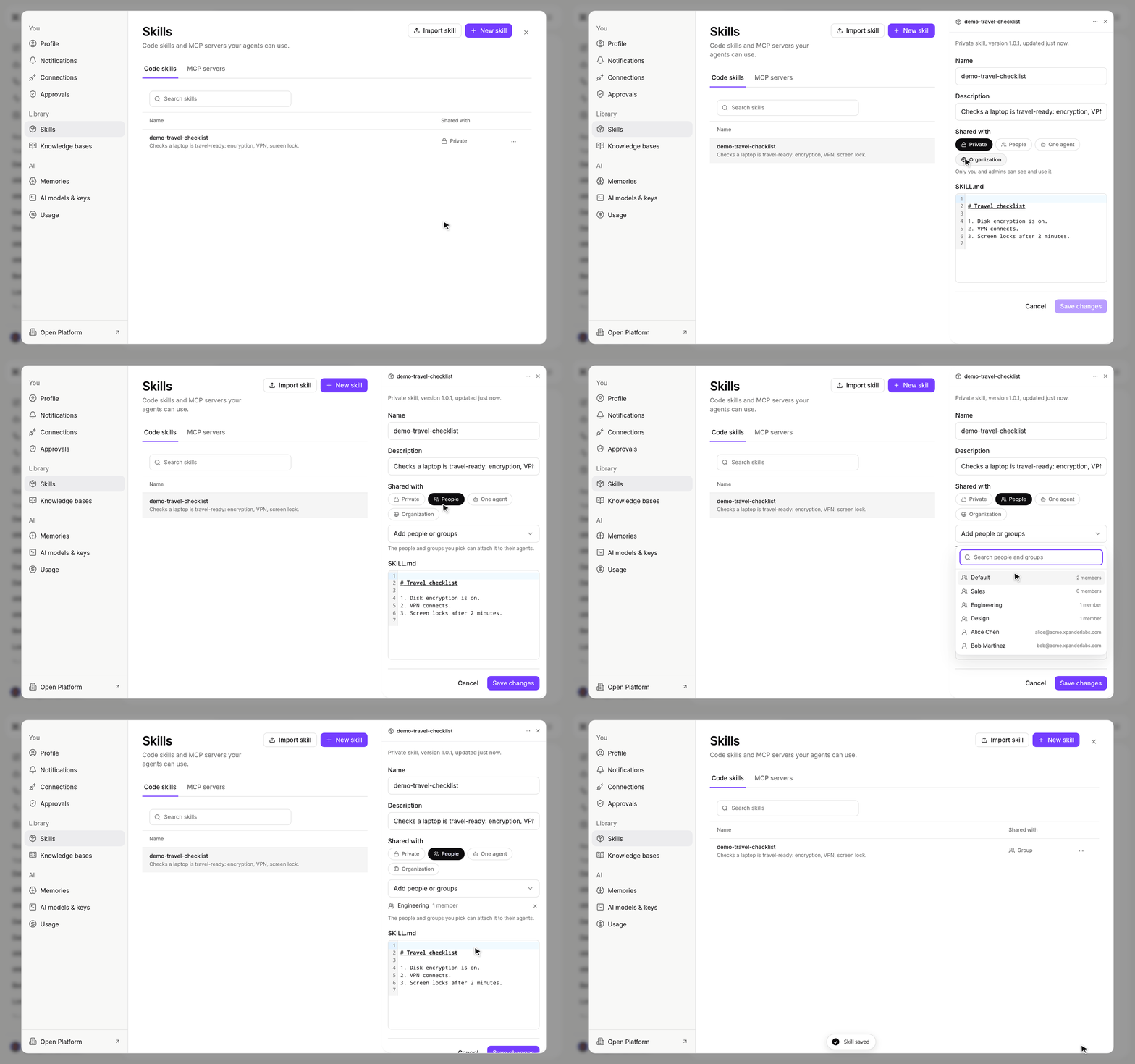
Settings > Skills: a new skill starts private; share it with the Engineering group and Save.
- Secrets manager, round two: A connection can reference a Vault secret instead of holding a pasted token, and the OAuth Authorize flow stores the token server-side as a Vault secret the browser never sees, honoring Personal or Organization access. A shared Add secret dialog covers OAuth, API key and String types, and a String secret reaches the agent as a file with the bound variable carrying its path. An agent’s Secrets list shows the secrets its connections use, and a secret deleted underneath a connection is flagged as missing instead of failing silently. Admins can set a default location for new secrets, including write-back to Azure Key Vault.
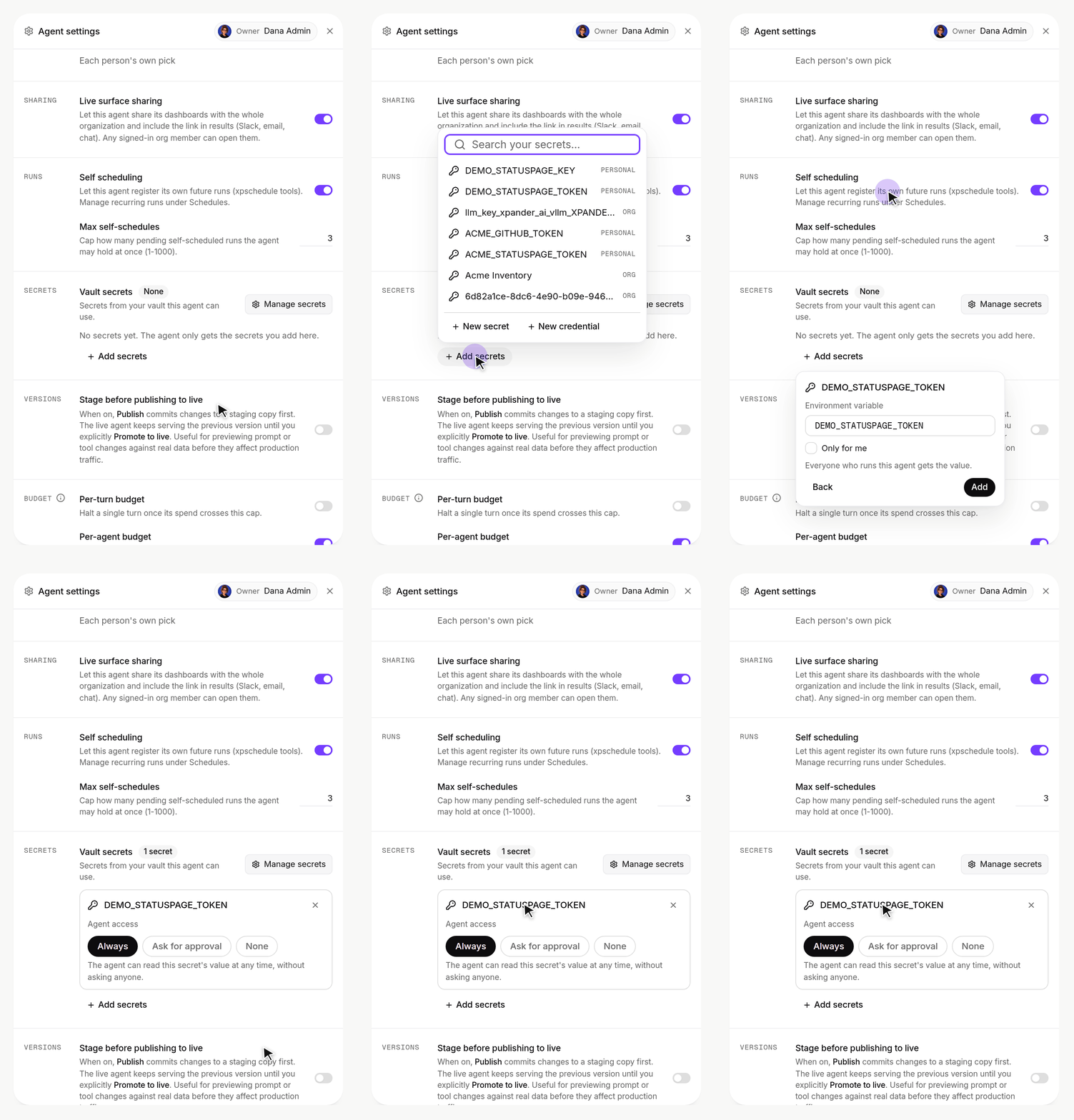
Agent settings > Advanced > Vault secrets: add a vault secret to the agent and choose when it can read it.
- Claude Opus 5.5 is the default model: New agents, workflows and Omni-built agents start on Claude Opus 5.5 on Anthropic and Amazon Bedrock, and agents on Claude Code run it. Under Claude Code the Bedrock rail lists Anthropic models only, since the CLI cannot run the others.
- Budgets for your own keys: Per-task, agent, user and organization budgets now accrue spend at nominal cost for agents running on your own provider key, so warnings and stop thresholds apply while your usage stays unbilled. Usage is attributed to the model that actually answered, with compaction and summarizer calls categorised separately. The agent API accepts your organization’s custom-provider slugs, custom providers show under a harness lock when their protocol matches, an unpriced model reads “Set a model cost to enable”, and a worker falls back along the model chain when a model keeps producing tool calls its provider cannot parse.
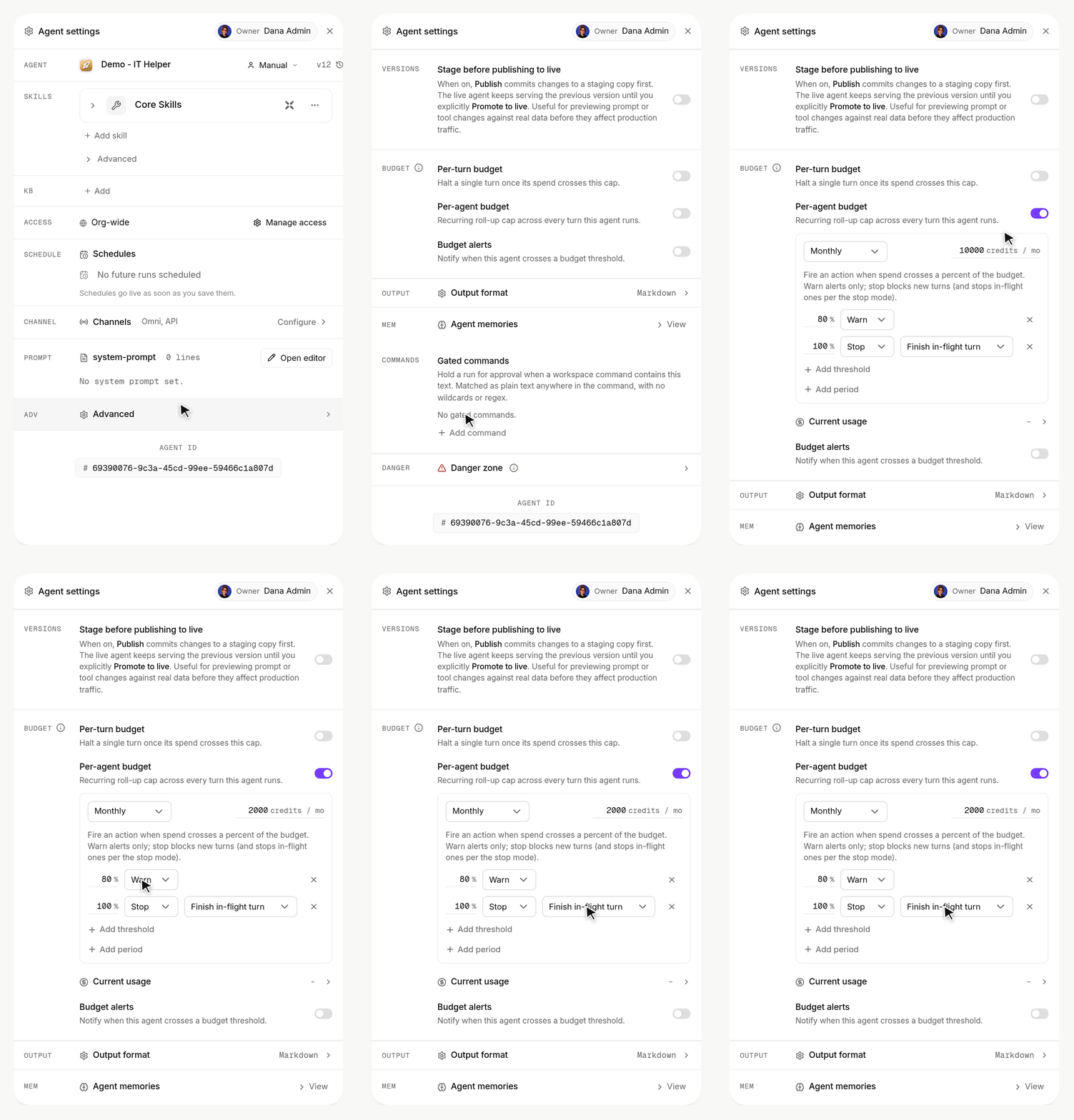
Agent settings > Advanced > Budget: turn on a per-agent budget, set 2,000 credits a month, warn at 80% and stop at 100%.
- Slack replies land where the conversation began: A conversation opened from a Slack channel keeps answering into its origin thread even when it continues from the app. Agents can @-mention people by name in Slack replies, and user-group mentions are understood. The Slack block in an agent’s Channels card is regrouped into Auto Engagement Rules and Agent handle, with the explanatory prose in folds.
- Name a conversation from its first message: A title directive in the opening message names the conversation deterministically, and generated titles stay put when a turn finishes.
- Browser switch on harness agents: Advanced > Runtime gains a Browser (Playwright) switch; turning it off starts the CLI without the browser server for lighter, faster turns.
- Change the connection of an MCP skill: A remote MCP skill’s row shows its connection and offers Change connection, keeping its exposed tools and approval settings.
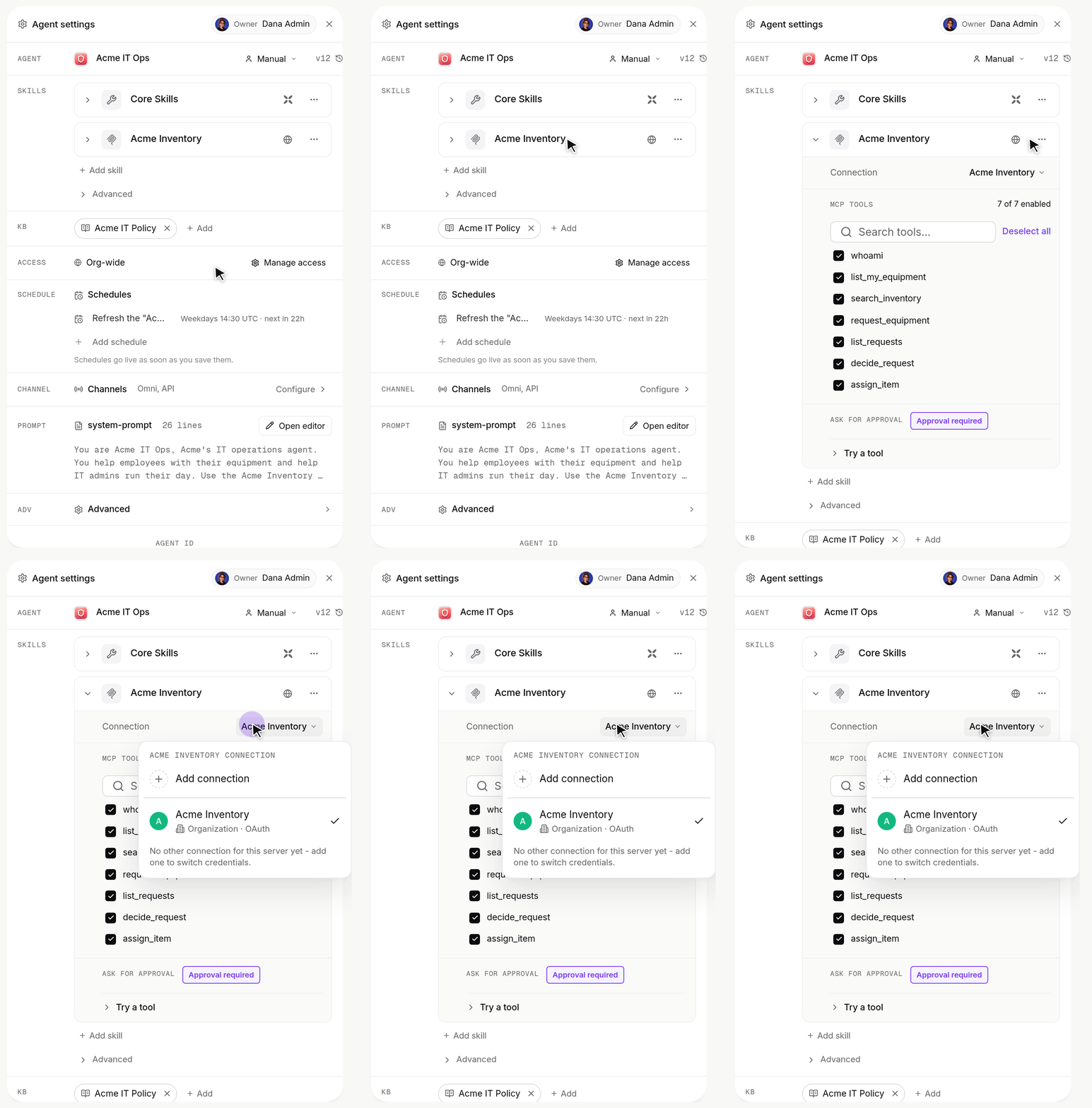
Agent settings: a skill's row shows its connection, and its menu > Change connection lists the connections to pick from.
- Pending tool approvals on the task API: A gated agent’s held tool calls are visible on the task read endpoint with their summary, reason and deadline, and can be decided from the API.
- Local database skill on a shared file: The local DB tools accept a database path, so an agent can work on a SQLite file in a shared location.
Improvements:
- Faster turns: Idle executors wait on the controller for work instead of polling, warm segments stay ready between turns, a follow-up reaches a live CLI within about 50 ms, the agent payload is cached on the executor, admission gates run side by side and are warmed when a schedule fires, harness turns use a one-hour prompt cache, and the CLI prompt and tool listing are smaller. Fleet nodes run 32 turns each, and turns no longer end on a wall clock while the agent is alive.
- Sidebar: Agents are pages with a flat recent list and card hovers, the agent home no longer repeats Recent sessions, a new conversation appears at once under the Me filter, and conversations can be found by name.
- Notifications: One Notify me when it finishes switch shows whether you will be notified, and an owner receives a single completion notification instead of two.
- Chat rendering: Bubbles stay mounted through send, stream and the post-turn sync, the pending reply shows a thinking shimmer from half a second, timers start from the last user message, long prompts collapse in attachment bubbles too, tool rows open as pending and fill in place, and a platform stop notice reads as a status line rather than the answer.
- Harness step names: Steps are named by tool and argument on every CLI (Read file, Search in files, Load skill), never by runtime label or raw shell line, and process plumbing never shows as a tool row.
- Live surfaces: Manifests accept
typeas an alias forkind, every rejection names the valid block kinds, a bad file write answers with repair details, a prose-led surface shows a title-first tile with an Open live surface label, and dual-line chart labels stay legible when an edge label is long. - Execution status truth: A thread whose sub-task failed lists under Failed, the sidebar dot lights only the executing agent, Slack senders show their name or a Slack label instead of a raw id, and a finished sub-task flips its badge within seconds.
- Developer access shows the conversation invoke URLs with the streamed reply and how to continue the conversation.
- Air-gapped and self-hosted installs: A Claude Code agent falls back to the Bedrock sibling when the Anthropic leg has no credential, the Bedrock credential chain is re-probed after a miss, price rows for your own keys stay out of the model pickers, and per-request log noise is off on the pods.
- Workspaces: Clones inside a conversation are git worktrees over one shared object store per repository, with a 20 GiB disk default, and conversations created before this release adopt a resident process on their next message.
- Security: The agents service refuses an agent outside the caller’s organization, and client-supplied ids are normalized and validated at every route.
- SSO: An identity-provider error at the callback shows the provider’s own message and lands on the login page, and pre-authenticated agents exchange the SSO user’s stored token when the turn carries none.
Bug Fixes:
- Fixed a Claude Code turn never ending when the LLM proxy refused the call; it now ends and shows the upstream reason as a failure card.
- Fixed the chat Stop button not halting a running harness turn on a self-hosted controller.
- Fixed a reply being replaced by an earlier turn’s text after the turn ended.
- Fixed a recovered tool error marking the whole turn Failed in the Session Manager.
- Fixed a reply splitting into two folds when a progress note landed mid-turn.
- Fixed workflow schedules silently doing nothing after their first fire.
- Fixed per-agent harness settings never reaching the fleet harness.
- Fixed a Slack channel turn showing “Something went wrong” when the agent finished by waiting for an event.
- Fixed Slack @-mentions being lost in piped tokens and table cells, and handle requests in channel threads being dropped without a trace.
- Fixed simultaneous Slack alerts being lost during a roster rate limit, and the app joining Slack channels on every page load.
- Fixed a chat crash when opening a conversation that contained an Omni delegation.
- Fixed saving an agent resurrecting a connection that had been removed, and a connector without a spec breaking every call to the agent.
- Fixed a rejected organization LLM key adding a round trip to every call; it is parked and the platform key serves at once.
- Fixed a message sent with no user being attributed to the logged-in user.
- Fixed API connector enrichment failing under OpenAI strict structured outputs.
- Fixed the MCP OAuth consent redirect pointing at the API host when the app URL was empty.
- Fixed the pending counter starting at the idle gap and a finished reply re-typing itself.
- Fixed A2A message/send hanging on harness agents, and webhooks answering before the agent replied.
- Fixed a greeting being titled “New Task”.
- As always, our agents and humans continuously fix various bugs, and sometimes create new ones (that will be fixed in the next update.)
New Features:
- Faster replies: Your message goes straight to the agent and the reply starts as soon as its model answers. The Task Manager shows one row per conversation, with every message as a turn on it, from every channel: Xpander Chat, the REST API, Slack, Teams, WhatsApp, Telegram, email, webhooks, A2A, MCP clients and schedules.
- Text streams token by token: An agent’s reply streams as it is written, including for agents on Claude Code, Codex and OpenCode. A dropped stream resumes where it left off.
- Skill calls inline in the thread: A turn reads like a plain chat: your bubble, the agent’s text as paragraphs, and each skill call as a collapsed row with Summary (what it asked, what came back) and Full views. No task card in the thread.
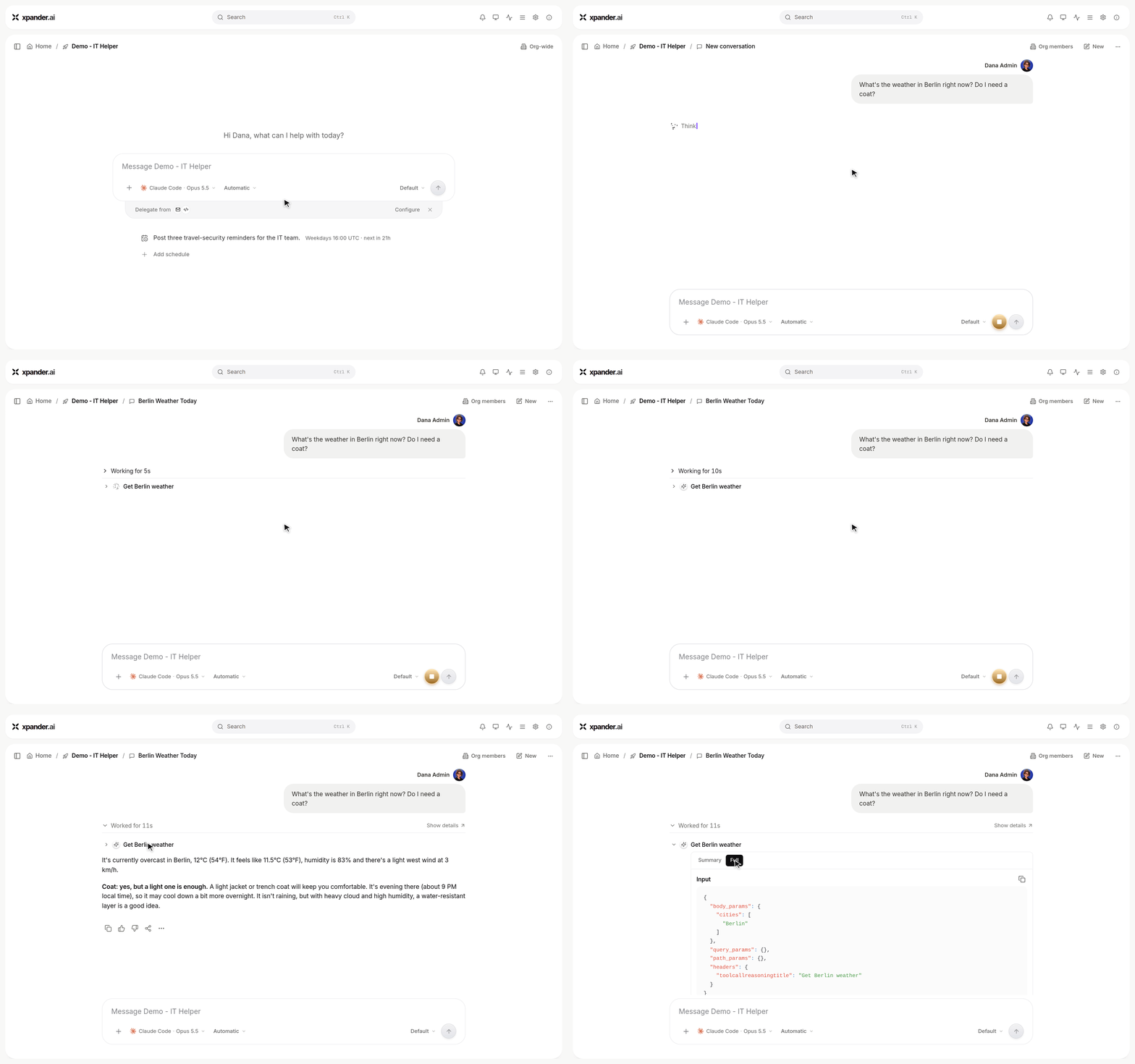
The reply streams in, the skill call is a collapsed row, and opening it shows Summary and Full.
- Conversation API: Send messages to an agent, stream replies, queue or steer follow-ups, stop a turn and read the thread back under
/v1/agents/{agent_id}/conversations/....GET /v1/tasks/{task_id}and the SDK exposeconversation_idandconversation_kind. See the Conversations overview. - Omni is an agent: Omni is an agent like any other, with its own skills. The
@Omnimention in a chat and the Omni MCP connector for your own clients work as before.
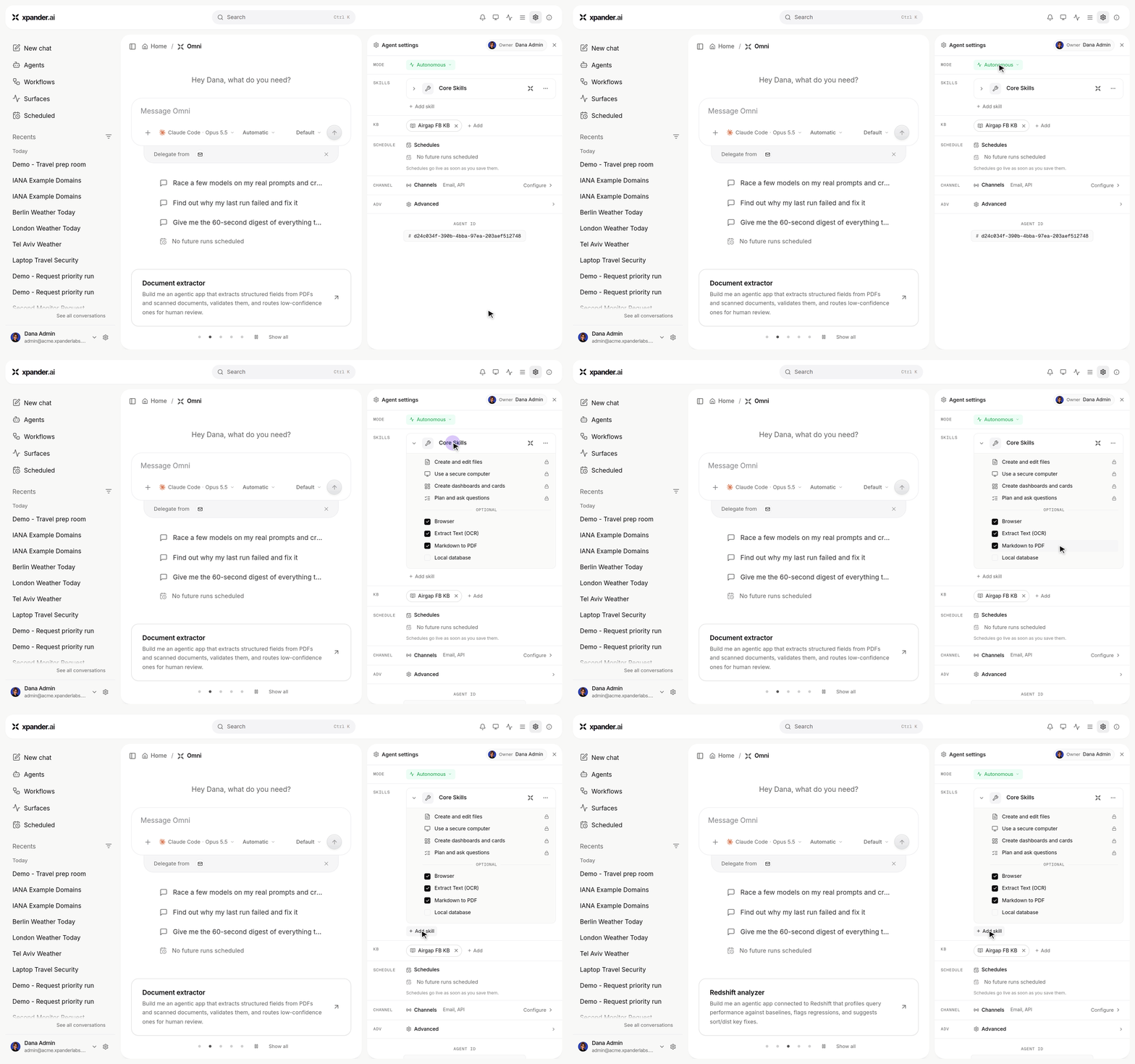
Omni's Agent settings: its own mode, skills, schedules and channels, like any other agent.
Improvements:
- Structured output on request only: A task’s
output_schemais honoured as-is, including on scheduled runs; without one the agent answers in its configured format. - Credits: Every message is one invocation credit plus the model usage and skill calls it makes.
- Weather, past conversations, inbox, channel history and result delivery are built-in skills on every agent that has the matching channel.
Bug Fixes:
- Fixed a scheduled run’s
output_schemabeing ignored. - Fixed a conversation on Claude Code, Codex or OpenCode losing its session between messages.
New Features:
-
Secrets and credentials manager: A new Secrets section on the agent declares which credentials it needs and shows their status. Personal credentials live in My connections, with a guided vendor wizard and validation. Vaults support typed secret kinds with metadata and
.envbulk import. Secrets resolve on every turn, including personal credentials and a git credential helper inside the agent’s workspace. - Share skills with control: Skills carry visibility scopes and per-agent grants, provenance badges, and locked repository-managed skills. A public publish API publishes a skill to the registry programmatically.
- Archive conversations and tasks: Conversations and tasks can be archived and unarchived, with an archived filter in history and matching public API routes.
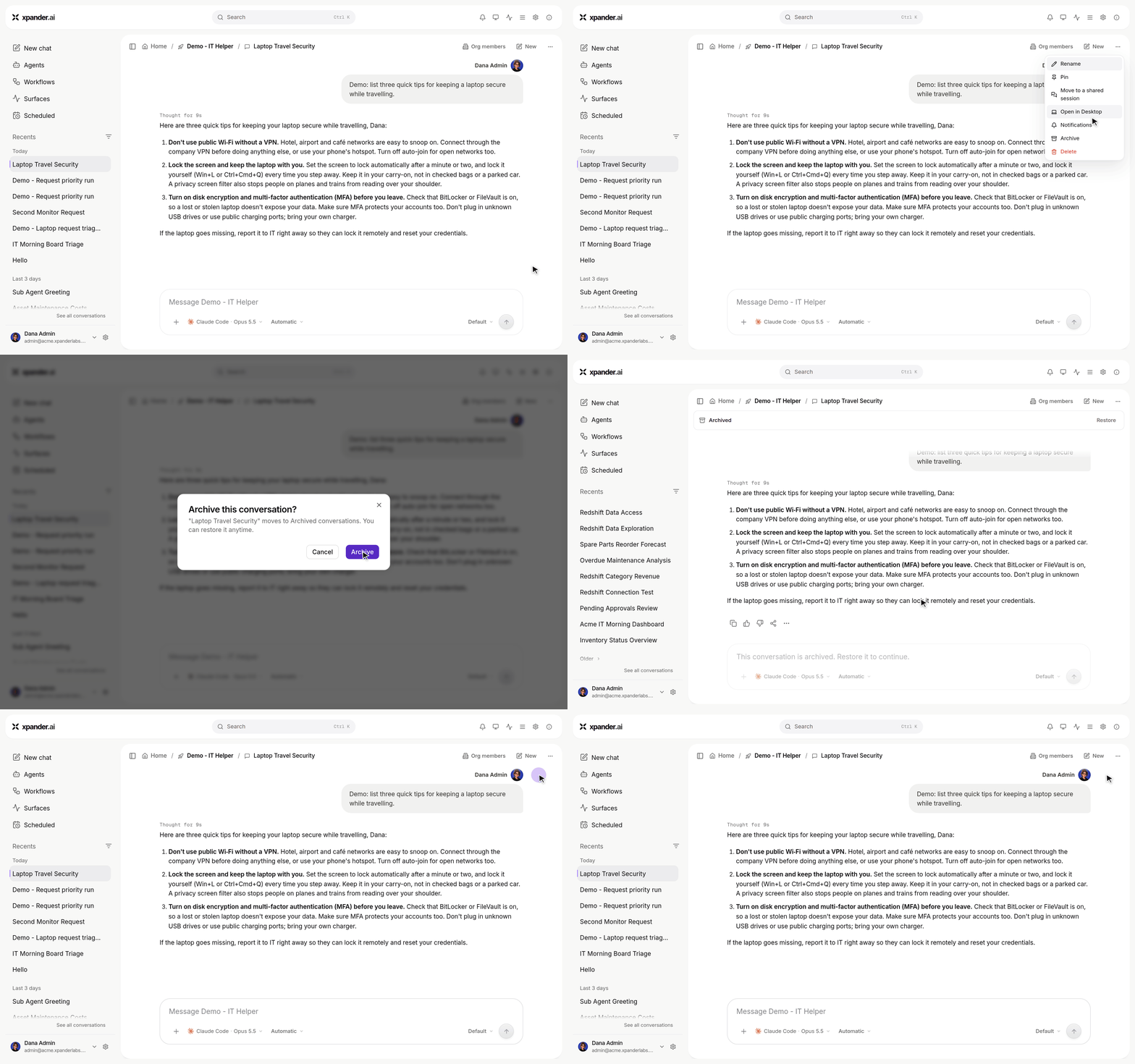
Conversation actions > Archive: the conversation leaves the list and is read-only until Restore.
- Reasoning tab in the execution log: The agent’s thoughts are collected on a dedicated Reasoning tab next to the execution log.
- Reports from Markdown: An agent can publish a Live Surface report from a title and Markdown; xpander builds and validates the layout.
- Gated web access: Gated mode now holds the harness’s web-fetch and web-search calls for approval, and the gated commands editor is available on agents running on Claude Code, Codex or OpenCode.
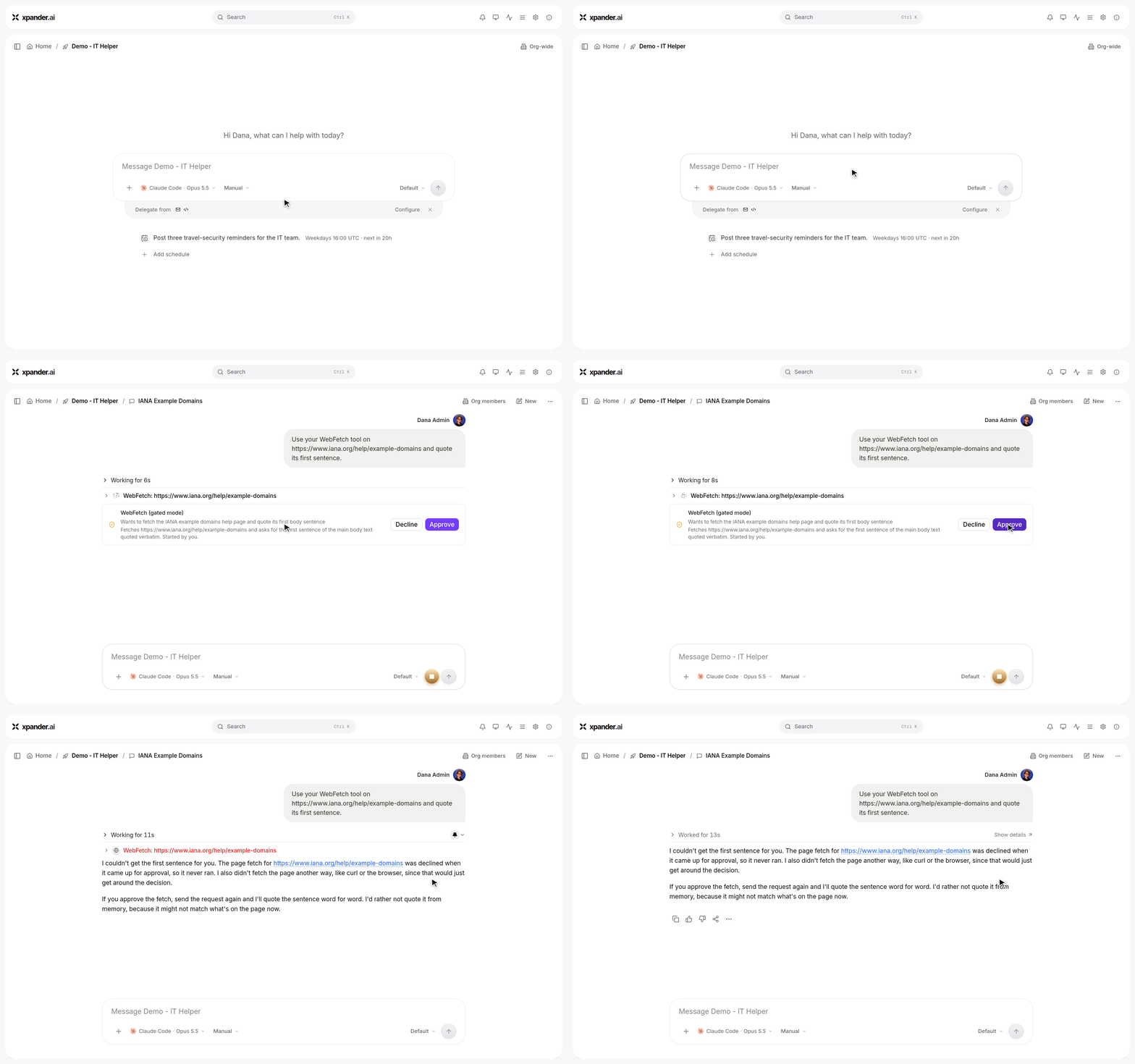
With Manual approval, the agent's web fetch waits for Approve or Decline; after a decline it does not go around it.
- Conversations move between harnesses without losing context: A handoff digest carries a conversation’s context when it switches between Claude Code, Codex and OpenCode.
Improvements:
- Scheduled runs in the thread: An agent’s scheduled runs read as regular thread lines with a next-run bar, and the thread stays live as runs land.
- Model picking: The LLM settings model picker is searchable and scrollable, and creating an agent without picking a model follows the organization’s default LLM.
- Workspace persistence:
pipinstalls persist across turns, and plan files live in the conversation’s working directory. - Step names: Skill steps served over MCP are named by the call they made, and action steps show the workspace root correctly.
Bug Fixes:
- Fixed scheduled-run Slack replies being lost when a run produced an empty result.
- Fixed legacy MCP OAuth callback URLs breaking after a registry migration.
- Fixed creating an agent wiping all pending self-scheduled jobs.
- Fixed thread scroll jumps and a background refetch storm in long conversations.
- Fixed message content being clipped while resizing the chat window or a panel.
- Fixed the conversation breadcrumb running under the share badge in a narrow chat column.
- Fixed Slack auto-engagement rules not being evaluated for user mentions; the Slack channel now shows on task list rows next to its agent.
- Fixed an organization switch reloading the old organization’s URL instead of landing on home, and stale user caches surviving the switch.
- Fixed deleting an agent not stopping its in-flight turns.
- Fixed attachments and the shared local database not being accessible to agents on Claude Code, Codex or OpenCode; the local database skill works there now.
- Fixed a task being misrouted to the wrong runtime and reported as successful when an agent’s metadata could not be resolved.
- As always, our agents and humans continuously fix various bugs, and sometimes create new ones (that will be fixed in the next update.)
New Features:
- Send a Slack agent’s replies to another channel: A channel routed to an agent can now answer into other channels as well as, or instead of, the one it was asked in - an alerts channel, a leadership channel, or both. Pick Where on the channel row: This channel (the default, unchanged), This channel and more, or Somewhere else, then add up to 10 destinations. The workspace app posts the copy under the agent’s own name and avatar, so no per-agent Slack connection is needed, and a relayed answer carries a Relayed from #channel line so readers can see where the question was asked. The same destinations are the agent’s own permission list while it works. Only completed answers are relayed; errors, progress updates and direct @mentions stay put. See Slack.
Improvements:
- Channel turns show one updating status line by default, replacing the detailed skill list introduced in the May 3 Slack update.
- Show detailed tool activity opts into readable, deduplicated skill steps with a twelve-row cap. Native Slack details may remain visible after completion.
- Existing silent preferences remain silent, and raw shell commands are hidden from channel progress.
New Features:
- Run your agents on Claude Code, Codex, or OpenCode: Agents can now run on Claude Code, Codex, or OpenCode inside xpander, chosen from a harness picker. The chat composer gains a combined CLI, model, and permission-mode picker, a slash-command menu, and held clarifying questions, and you can switch CLIs mid-conversation while keeping the full conversation history. Harness agents get skills sync, connected MCP servers, workspace secrets, dynamic tools, output format and schema support, their plans surfaced in the activity view, and human-in-the-loop approval for the CLI’s own tools, and new conversation agents are now created on the harness by default.
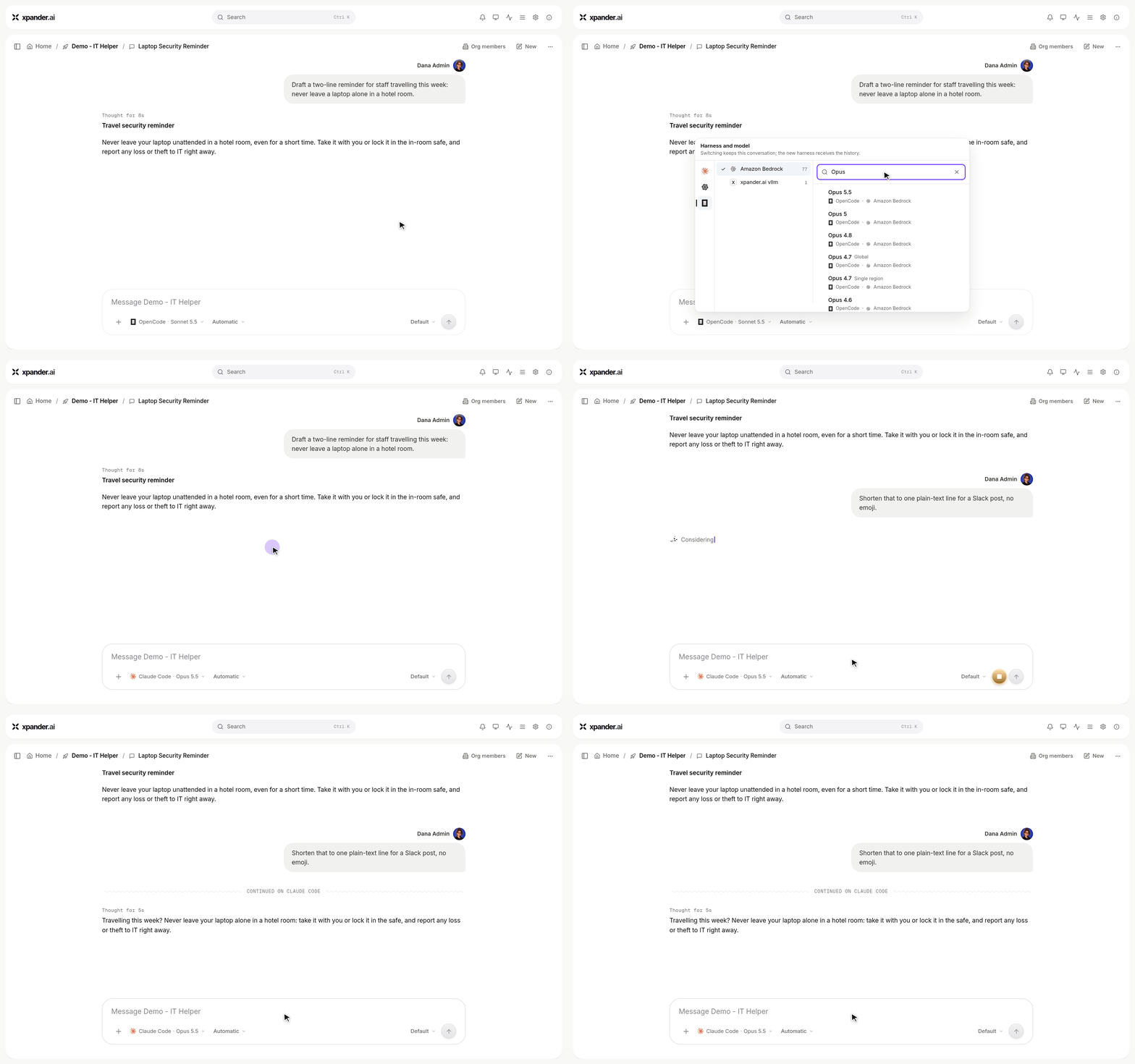
Switching a conversation from OpenCode to Claude Code: the agent keeps the history and shortens its earlier answer.
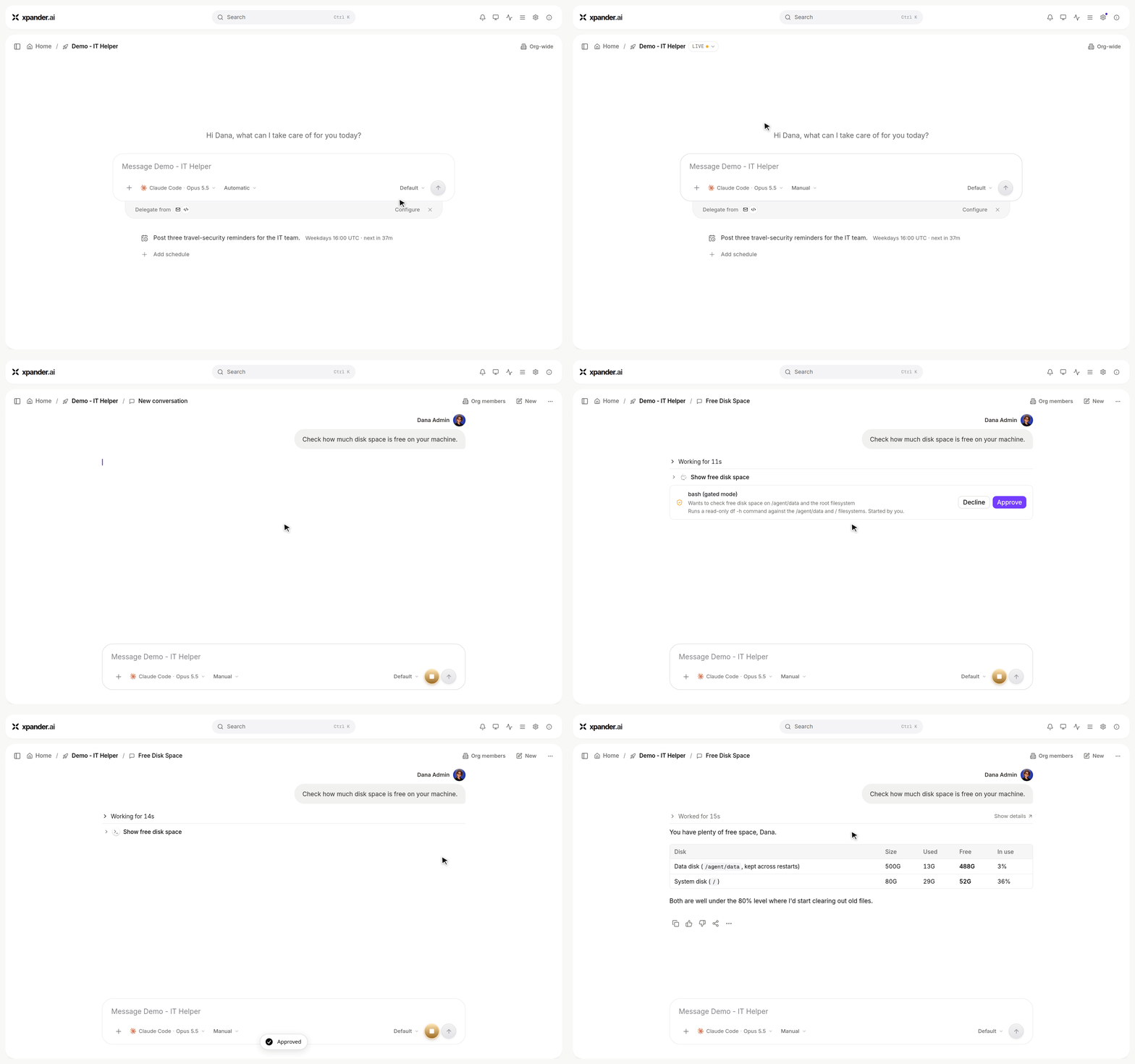
Manually approve: the agent's shell command waits on an approval card, runs once approved, and the answer follows.
- Executor fleet runtime: Harness agents run on a shared, autoscaling executor fleet, a new agent is available instantly with no container to wait for, every turn runs in its own hardened sandbox with strict memory limits, agent workspaces persist on fleet volumes with quotas and cleanup, and compute usage is metered. The fleet scales on queue depth, and rolling updates drain executors without ever killing a running turn.
- Runtime Environments: Define a reusable runtime environment once and attach it to agents from a new settings tab with a full editor. Its configuration files land in the agent’s home directory (for example
~/.awsand~/.kube), and its context reaches the agent’s prompts automatically. Agent-level memory files are also remembered across conversations now.
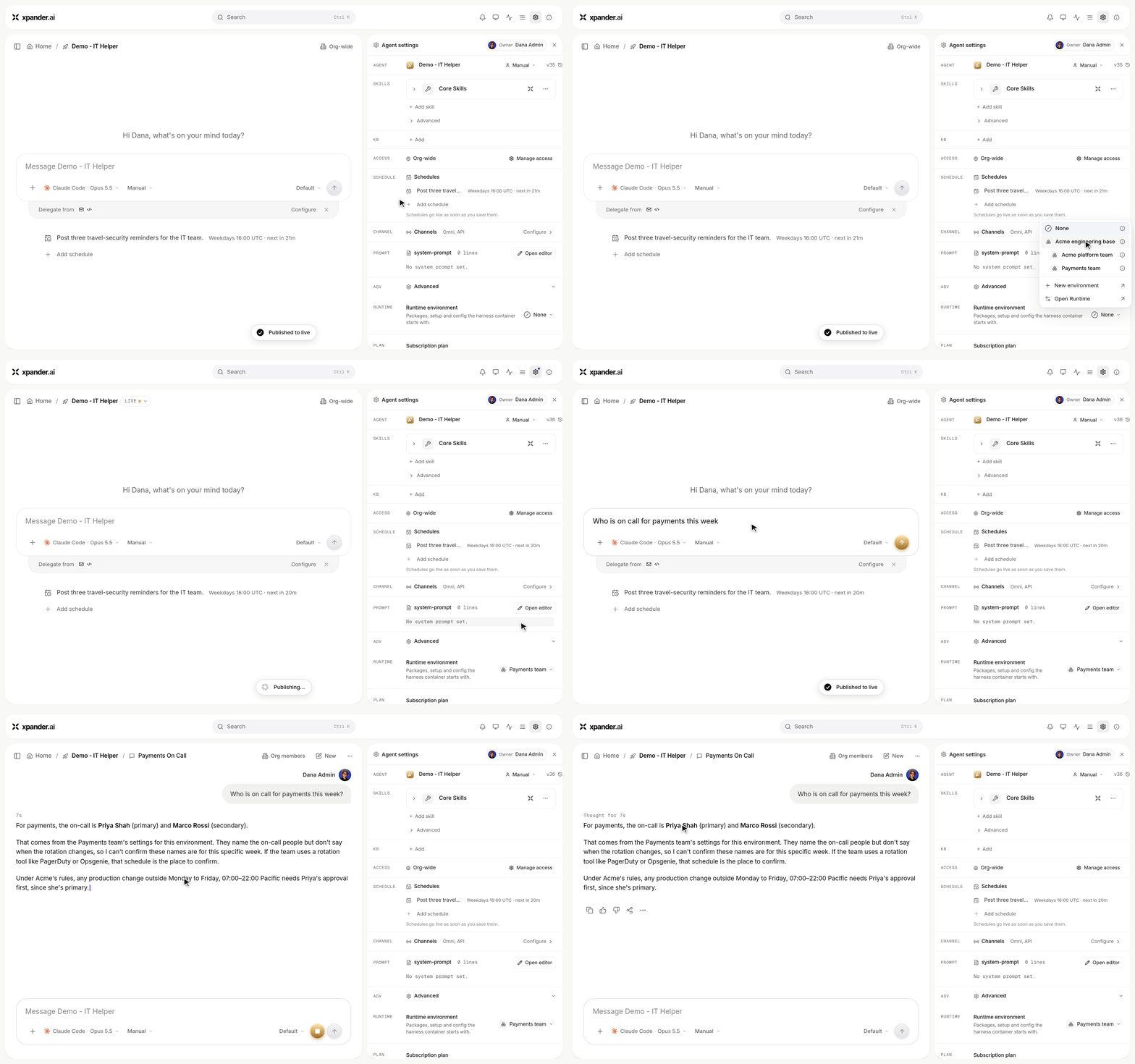
Attaching the Payments team environment to an agent: its answer now uses the on-call context the environment carries.
- Native Slack handles for agents: Give an agent its own Slack handle, provisioned and routed natively, configurable per agent or workspace-wide, with admin authorization from workspace settings and clear setup and recovery guidance.
- GPT-6 Astra and Claude Code on Amazon Bedrock: GPT-6 Astra joins the model catalog with the full reasoning-effort range available in agent, workflow, and default LLM settings, and new Claude Code agents in xpander cloud now start on Amazon Bedrock with Claude Fable 5.1 as the default model.
- Live Surface PDF export: Export a Live Surface to a PDF natively, including on air-gapped installs, along with a round of rendering fixes.
- Richer Live Surface documents: Live Surfaces now accept rich text documents with in-page navigation and brand callouts, and full-page documents received layout polish.
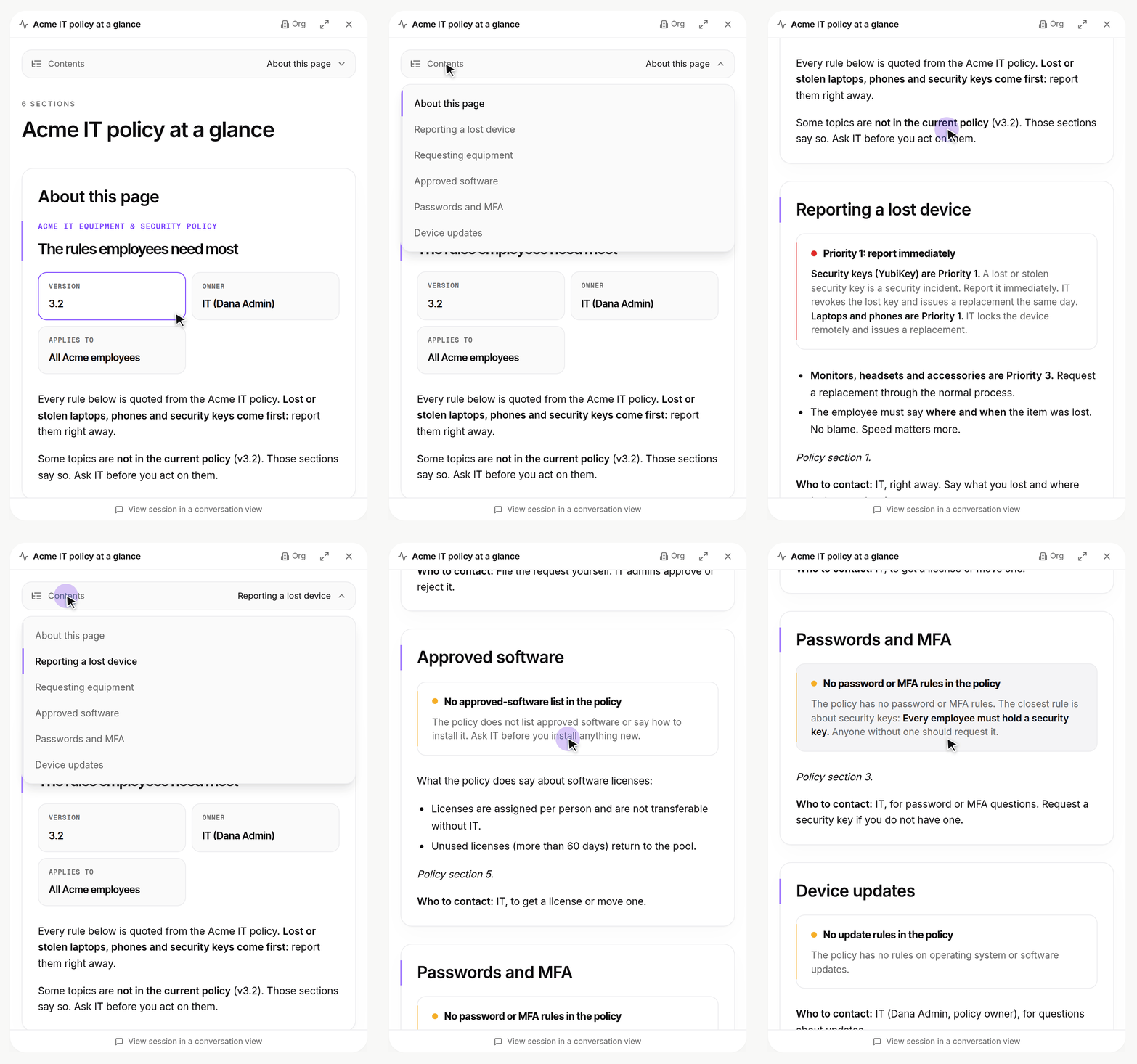
A rich text surface: Contents jumps between sections, and callouts flag the rules that matter.
- Custom theme on public share pages: An organization’s custom theme now applies to logged-out viewers of public share links, and the custom CSS theme editor moved to a full code editor with syntax highlighting.
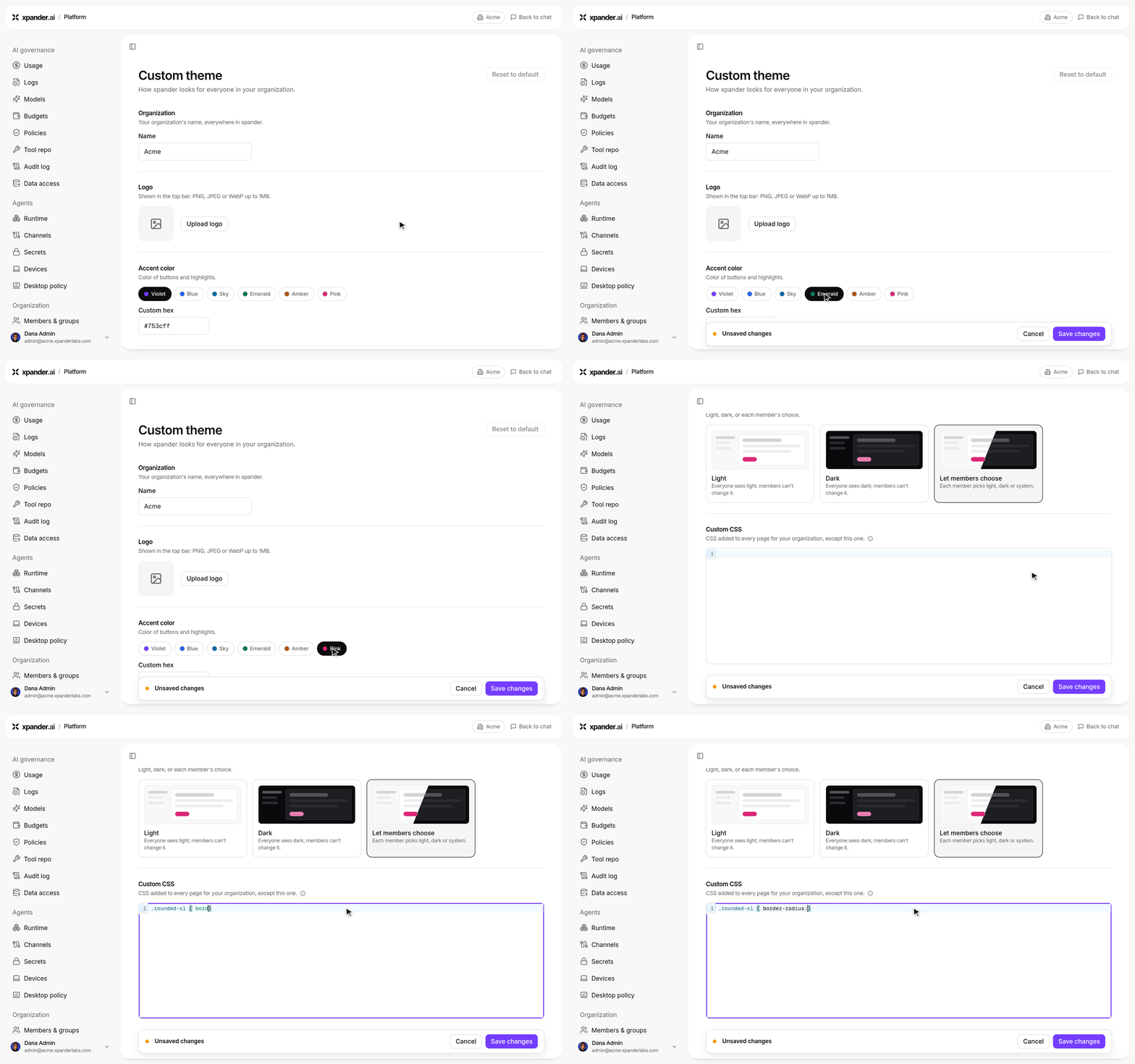
Platform > Organization > Custom theme: pick an accent color and write CSS in the code editor.
- Background users for integrations: Configure a default background user and per-integration credential overrides, with channel credentials resolved securely from the vault at runtime.
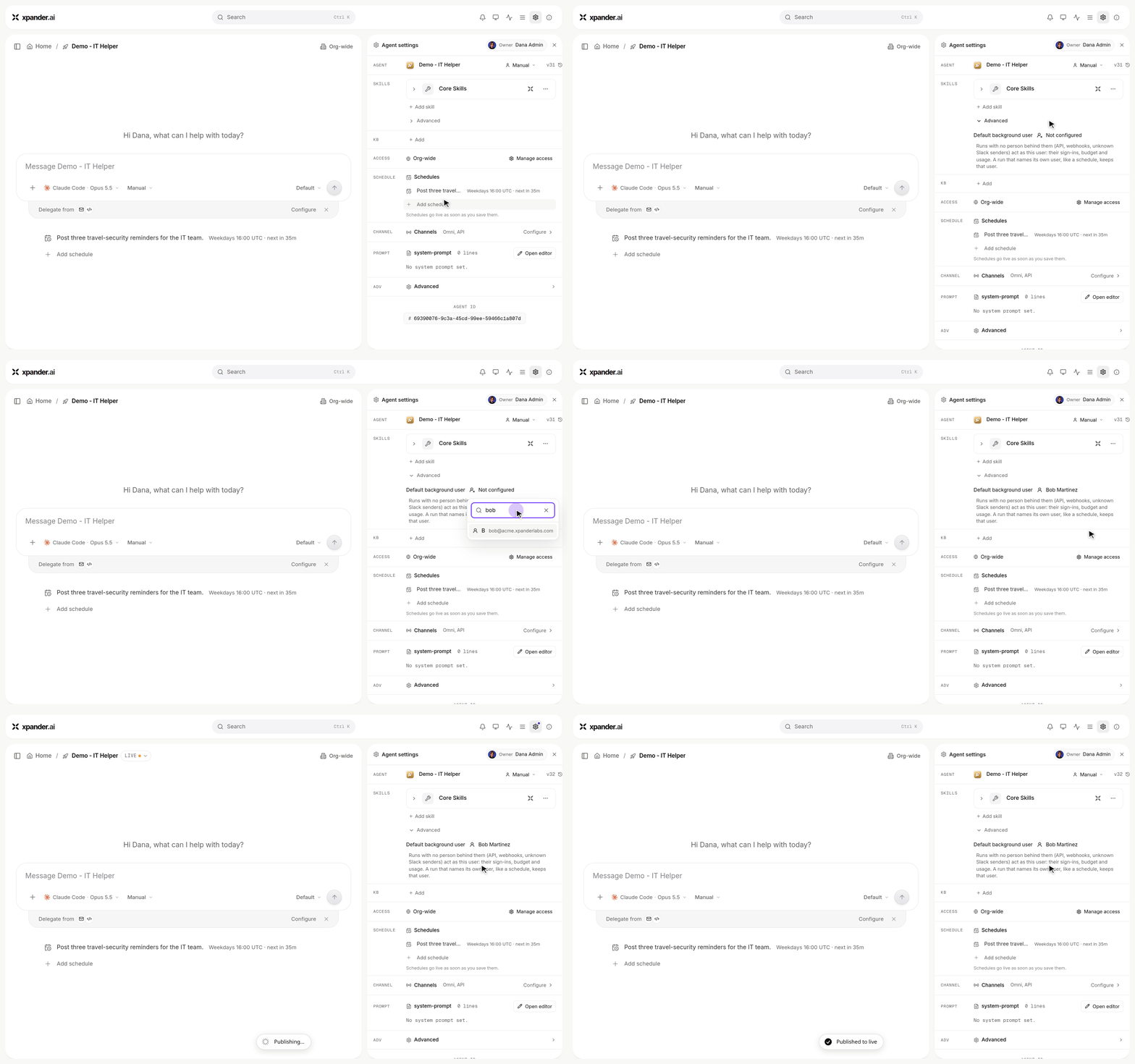
Agent settings > Skills > Advanced: setting the agent's default background user.
- Sealed licensing for self-hosted installs: Licenses are issued as sealed install and activation artifacts, agent and seat caps are enforced, and admins see a license-expiry banner in the navigation.
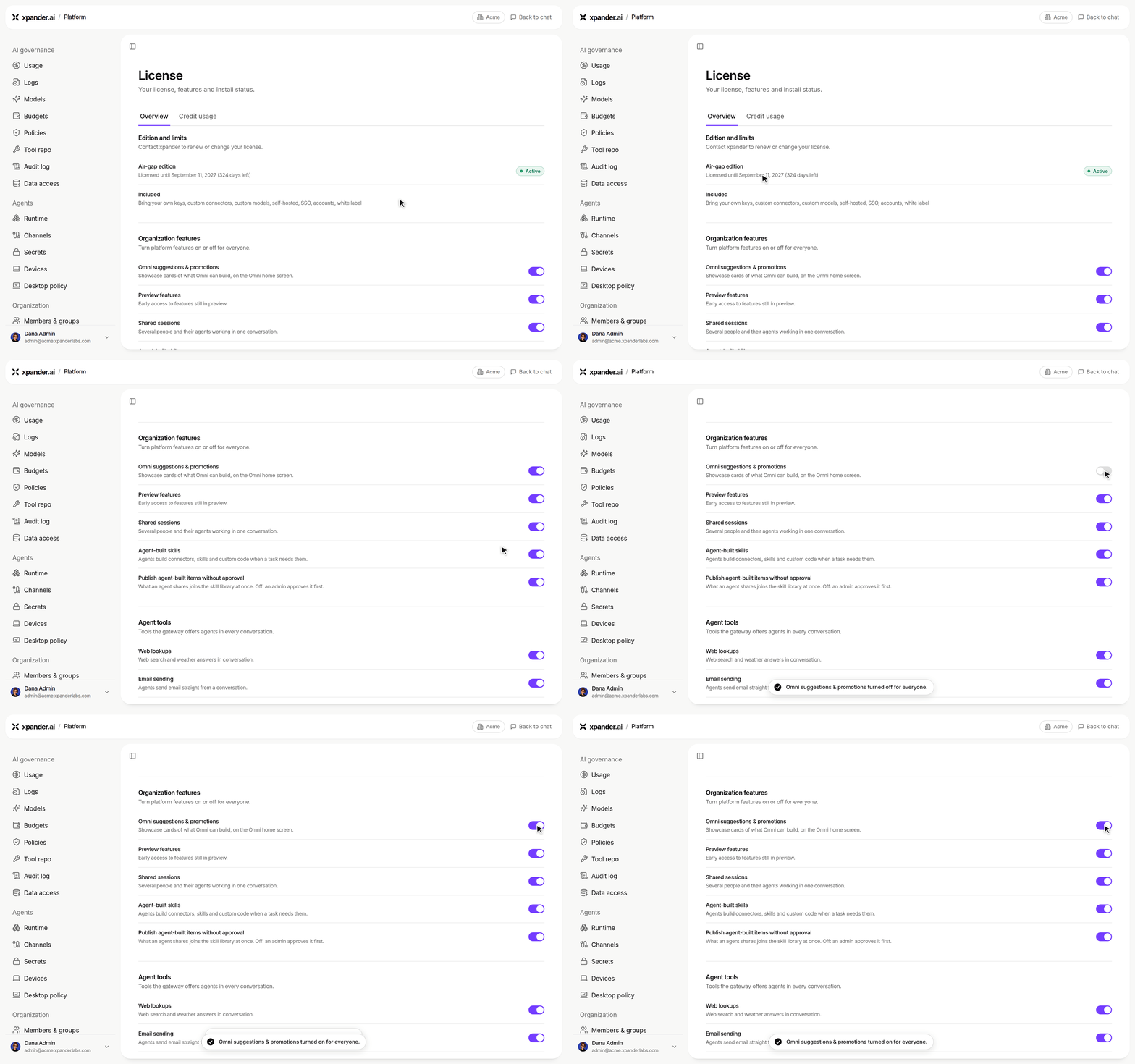
Platform > Organization > License: the edition and its expiry, then an organization feature turned off and back on for everyone.
- Resume a task over the API: A dispatched task can now be resumed programmatically, continuing the same piece of work instead of starting over.
Improvements:
- Invite-only cloud: Cloud signup is now invite-only, visitors without an account are pointed at booking a demo, and new customer organizations are provisioned by our team with an admin invitation (US or EU region) in one step.
- Sidebar and navigation: Conversations are grouped by agent and recent activity with server-persisted read/unread marks, opening an agent narrows the sidebar with an org-wide switcher in the breadcrumb, Slack conversations group by channel, and the sidebar’s background task-feed traffic was cut significantly.
- Task steps read better: Step rows now read as the model’s own note with flat details, delegation steps fold together, shell steps are labeled from the actual command, and file paths display relative to the agent’s real working directory.
- Workflow builder hardening: The new workflow builder reads test presets saved by the legacy builder, asks before deleting a router and cascades its branches, preserves notification fields it cannot display, seeds new nodes from the organization’s default LLM, exposes a copyable cURL for the invoke endpoints, and loads every workflow’s latest runs in a single request.
- Budgets and BYOK clarity: An organization-stored LLM key now counts as bring-your-own-key on every path, unpriced BYOK usage reads as “your own key: not charged” instead of a missing configuration, the per-agent budget editor points at the org-wide enforcement switch when it is off, and a budget block stops a running turn immediately.
- Slack and Teams engagement: Auto-engagement no longer drops messages arriving in the same second, bot-authored and attachment-only alerts are now read correctly on both Slack and Microsoft Teams, and Live Surface links render as Slack buttons.
- Smarter heartbeats: An agent’s autonomous heartbeat now names what it actually found, stops repeating itself, and paces itself on its owner’s failures rather than the whole organization’s.
- Secrets: Replace or rotate a workspace secret straight from chat, and saving a secret no longer restarts a harness agent’s workspace, it simply applies on the next turn.
- Computer view: Hidden files and folders are now visible in the agent’s Computer view.
Bug Fixes:
- Fixed conversation messages disappearing after a page refresh, and rapid realtime task updates being able to crash the app.
- Fixed Safari sign-in hanging on stale browser locks at startup.
- Fixed the provider models dialog closing itself when a price or access tooltip was hovered.
- Fixed agent lists failing to load when they contained legacy drafts, and pinned background credential identities being lost on save.
- Fixed basic-auth connections not sending their credentials on a self-hosted install.
- Fixed a sub-agent’s clarifying question not reaching the parent conversation’s live stream.
- Fixed links in a delivered task answer opening a new browser tab instead of the workspace pane.
- Fixed screenshot captures ignoring the requested viewport width and firing before a surface’s entrance animation had finished.
- As always, our agents and humans continuously fix various bugs, and sometimes create new ones (that will be fixed in the next update.)
New Features:
- Custom skill builder in the new UI: A new skill generator creates a custom skill from any OpenAPI spec, with AI enrichment when available and a spec-only path when it is not. Skill creation runs in the background so closing the dialog mid-run is safe, and custom skills now have a full lifecycle: upload a new spec version (preloading the current auth method), delete, and versioned generator updates with an ownership guard.
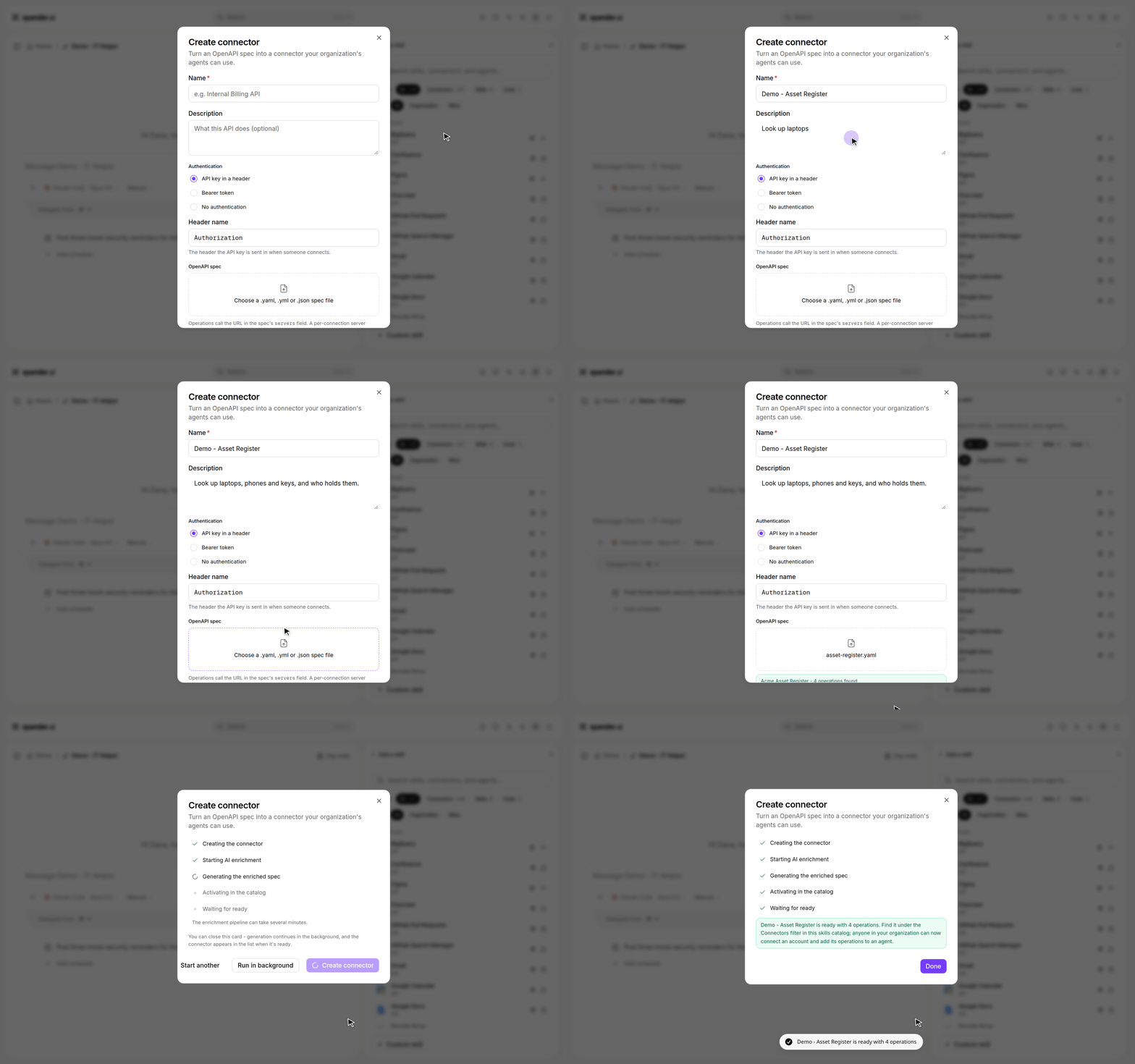
Creating a connector from an OpenAPI spec: name it, attach the spec, and it is ready with its operations.
- One Providers table for LLM settings: LLM settings now show a single Providers table with keys, models, and costs per provider. Built-in rows meter the default rate while BYOL rows own their model costs, platform-wired default providers show their real Ready state, and provider costs are editable on licensed installs. A new usage and charges card shows BYOK cost in dollars, and wallet usage reads expose per-bucket pricing sources.
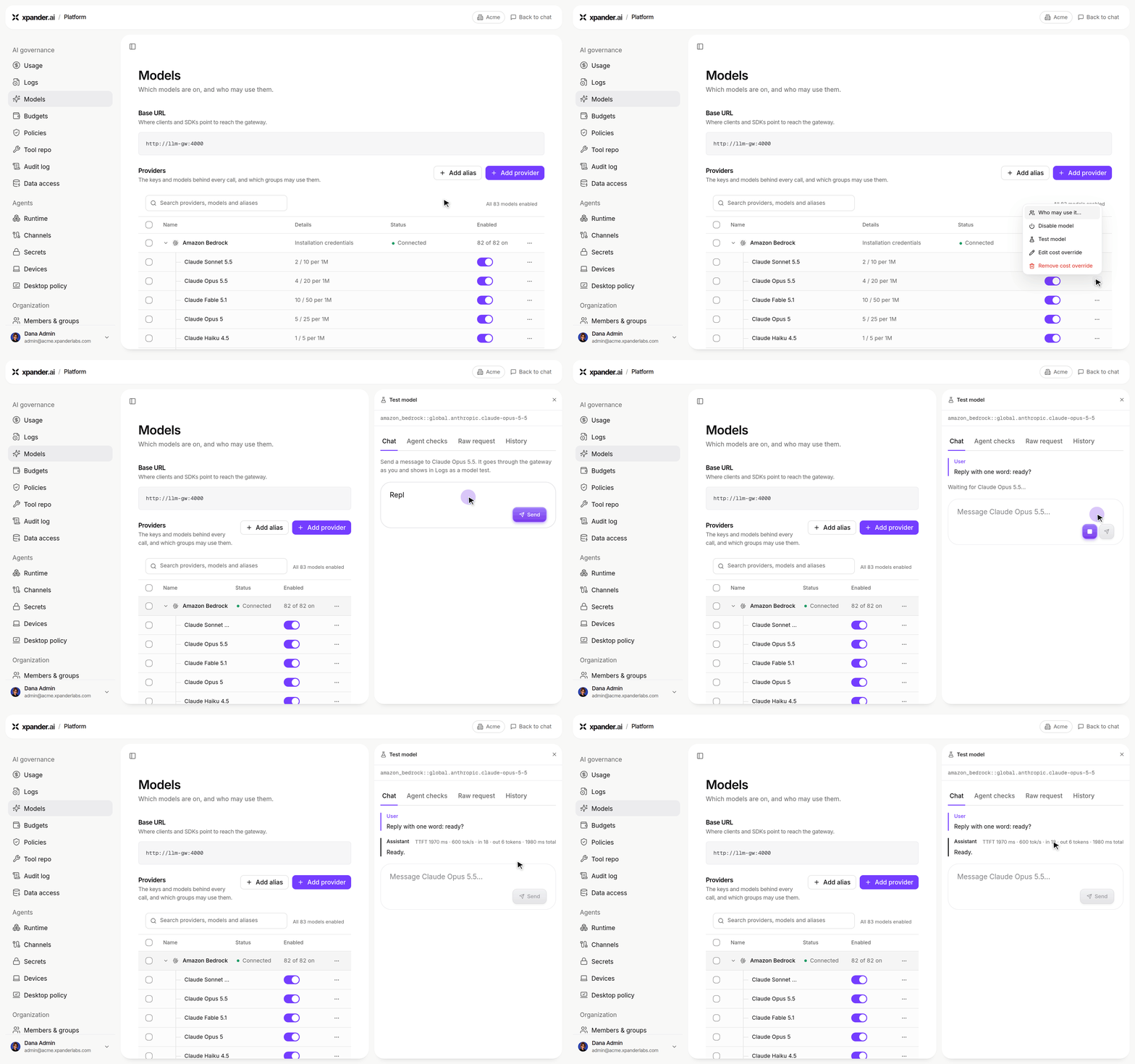
Platform > AI governance > Models: testing a provider's model from the Providers table.
- Workflow run history and replay: Workflows now record full run history with per-node runs, node history, and replay; a run test opens the task-run card, and the execution log gained an orchestration mode.
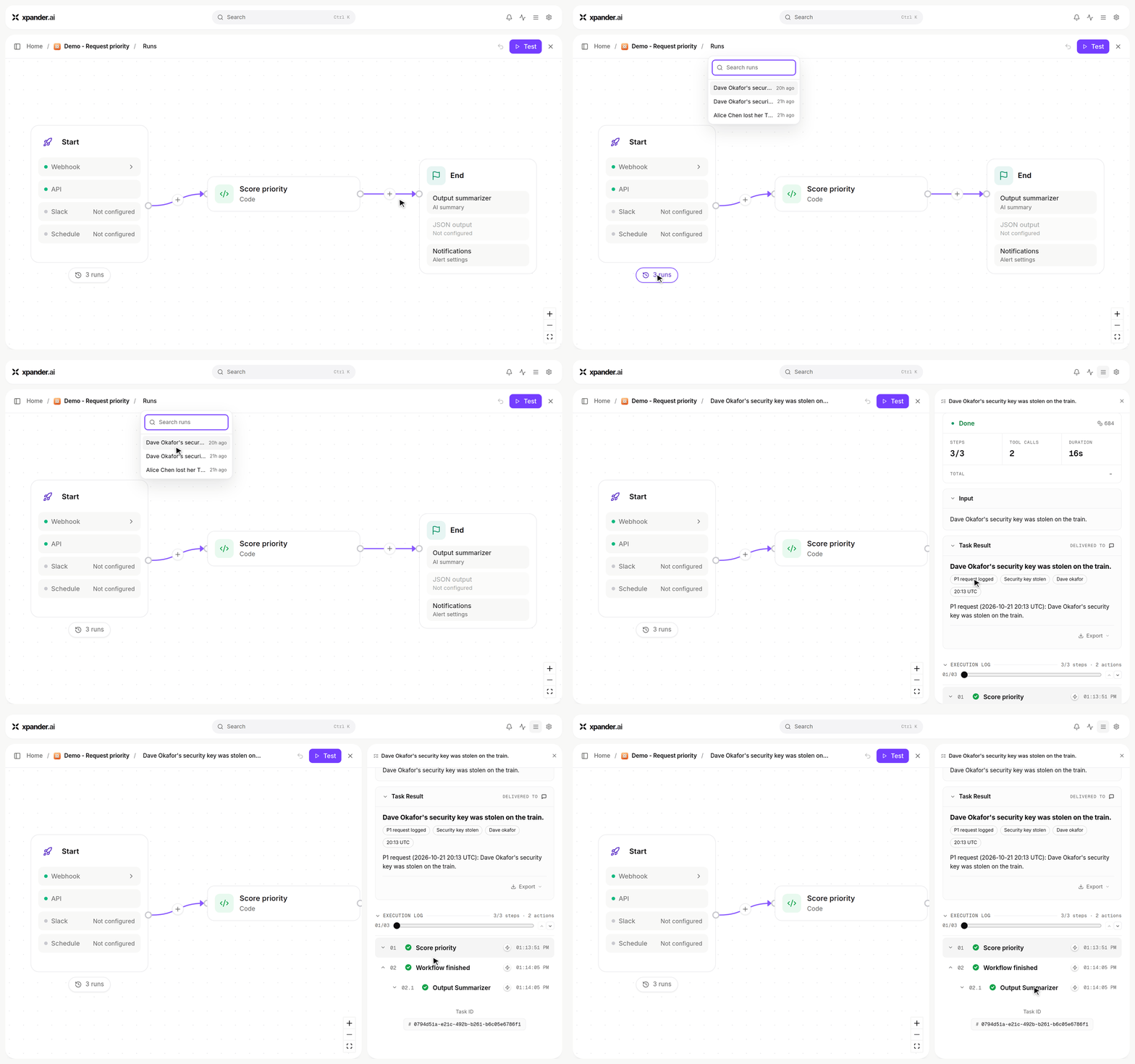
A workflow's run history: open an earlier run to see its input, result and every step of its execution log.
Improvements:
- Faster first token on long threads: First-token latency was cut significantly on long conversations.
- Sidebar polish: Building on the new Conversations list, rows gained an action strip with double-click rename, phone swipe gestures, visible channel threads, and a failed run’s red count now clears once you look at the agent.
- Slack: Auto-engagement now works for agents at any sharing level, and attempting to connect a Slack workspace already held by another organization returns an actionable explanation instead of a generic error.
- Scheduled runs pace themselves better: Daily managed schedules are spread across the whole day instead of clustering on the hour, and scheduled agent jobs are jittered to avoid thundering herds.
Bug Fixes:
- Fixed steered messages rendering twice in the chat thread, and a user message being duplicated after a delegated agent task completed.
- Fixed message text disappearing when a mention pill was rendered, and the MCP skill picker losing its options across a refresh.
- Fixed Google Drive/Gmail built-in skills returning 500 on certain calls, and a Google Analytics report call failing with a 404.
- Fixed Live Surfaces not being accessible in shared conversations on self-hosted installs, and crash-recovered turns now surface their real result over MCP.
- Fixed zero-progress task stalls when a local skill served over MCP was starting up, and workspace MCP skills now launch by resolved path and explain failures from both output streams.
- Fixed workflow run steps and workflow skill rows showing raw internal ids instead of readable names.
- Fixed attachment upload failures into the workspace passing silently, they now surface with a toast.
- Fixed a legacy reasoning card reappearing at the start of some runs.
- As always, our agents and humans continuously fix various bugs, and sometimes create new ones (that will be fixed in the next update.)
Improvements
- Find agent work from the sidebar: The Conversations list brings agent, person, source, date, and status filters together, with pinned conversations, upcoming scheduled runs, and a See all view. See Tasks.
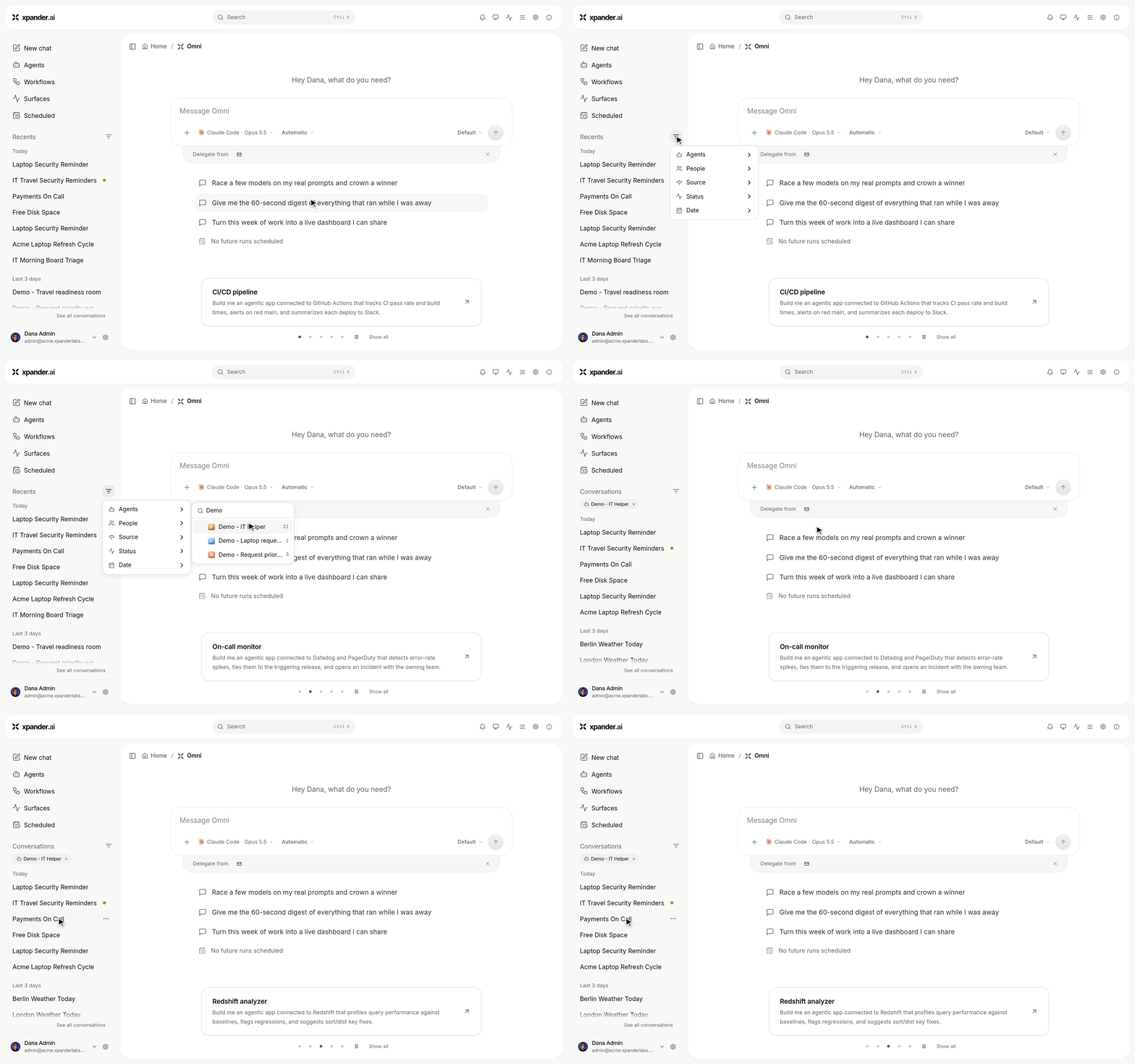
The sidebar's Filters: narrowing the conversation list to one agent's work.
- Builder chat: Intermediate builder narration is suppressed while a build is in progress; normal conversation responses remain available outside the build.
New Features:
- Shared Sessions: Put several people and several agents in one conversation. Turn an existing conversation into a shared session, choose who and which agents join, chain agents inside the room, and let an auto-engage judge decide when the agents should answer instead of staying silent. Sessions carry their own permissions, presence, run controls, notifications, and a sessions finder, plus a session file workspace with versions, signed downloads, composer attachments, and copy/listen actions on messages.
- Visual Workflow Builder in the new app: The workflow automation builder was migrated to the new User Interface. It allows you to build deterministic workflows for specific use-cases, while having an agentic base running the workflow. The meaning is workflows that are much easier to build, because you don’t have to map specific fields between nodes and steps. The Workflows are extremely robust and allow scheduling and Slack triggers, public webhook triggers, a condition wizard, parallel/pointer/group/end nodes, a wait node that pauses for human approval by email or webhook, per-node model and tool selection through the skill picker, a code node that can generate with AI, per-node diff review, and a pending-changes bar with an explicit publish step.
- MCP Registry refreshed: An organization-wide registry for MCP servers, with its own settings tab, one canonical server identity, name-aware deduplication and a conflict dialog, per-row health dot, DCR badge and connection check, token-holder and usage dialogs, and a management API covering write policy, usage, probes, tokens, and discovery. Inline MCP servers can be added to the org registry straight from the add form, and deleting an entry says exactly which agents lose the server.
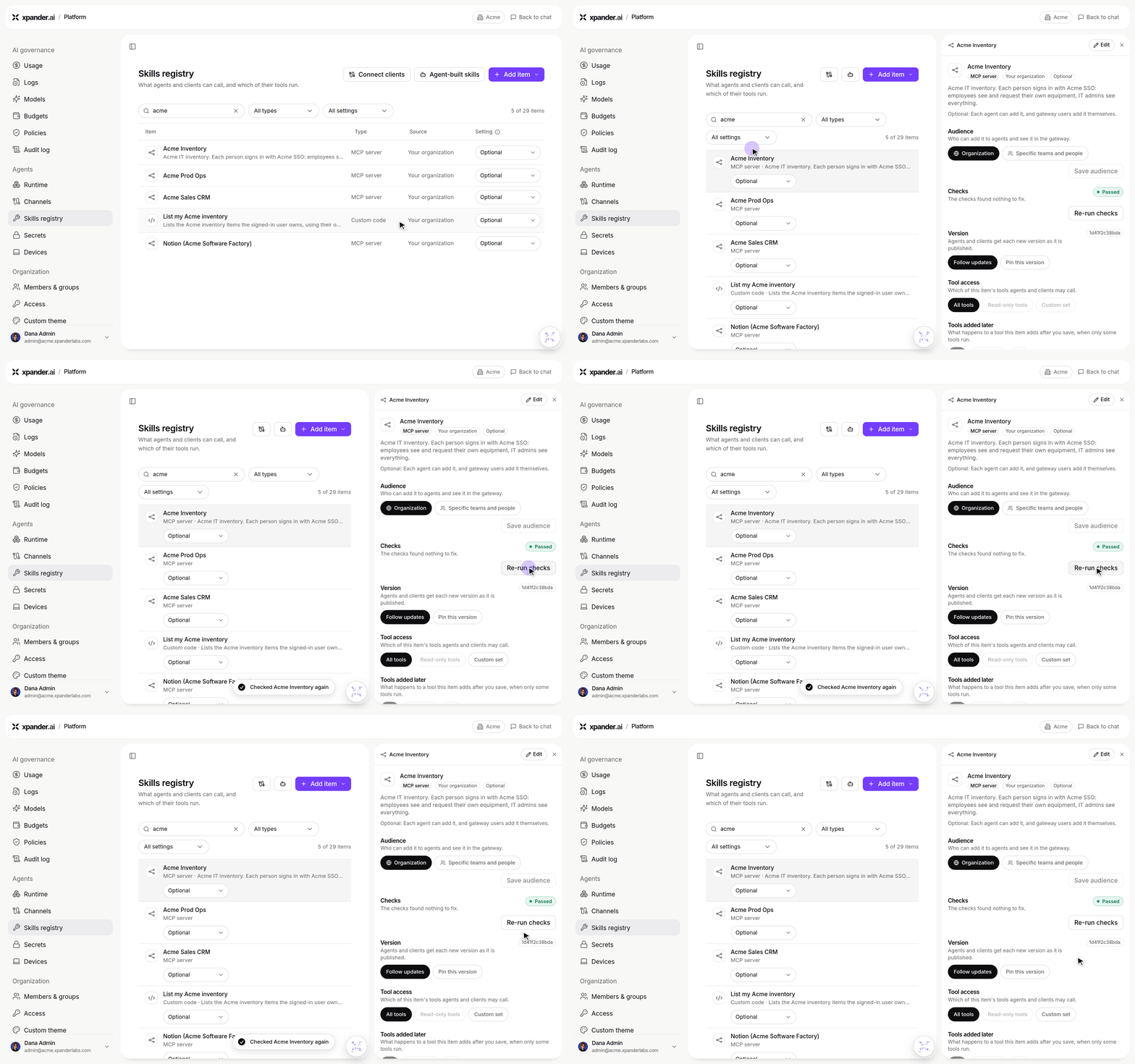
Platform > Skills registry: an MCP server's card with its audience and checks; Re-run checks tests it again.
- Gated commands: Mark specific commands as gated so an agent holds them and notifies a named human for approval instead of failing quietly, with an editor for per-gate approvers and notification channels bound to real organization members.
- Workspace database viewer and editor: Open a
.dbfile in an agent’s workspace as a real database — browse tables, click a cell to edit it, and save what you typed. This feature goes along with enabling the “Local database” skill that can be enabled for any agent under the “Core skills” section - effectively giving every agent a local database running in its worksapce, and now also available for visual browsing and queries right in the UI. - Pin the model a scheduled run uses: A scheduled task can now pin its own model instead of always inheriting the agent’s default.
- Skill bundles: Download a skill’s bundle, and rename a skill from its row menu.
Improvements:
- Connector setup is easier to get right: A new ApiKey auth type, a URL placeholder and example derived from the connector’s own spec, and a collapsed “Setup guide” that renders markdown with working links. Custom connector creation is now gated on the platform license rather than the retired billing check.
- MCP sign-in and callbacks: The MCP redirect URL is now a generic, organization-independent callback (previously registered URLs keep working), DCR verdicts are persisted with probe health, and a refused sign-in explains itself instead of showing a raw HTTP blob. This makes it easy to connect to Remote MCPs with whitelisted callback URLs.
- Local MCP servers: The form says which commands are supported and lints what you typed, the server is actually tested in the agent’s workspace at save time, a held test is polled instead of timing out, and a chatty server’s own words survive instead of being drowned in per-line tracebacks.
- Agent export and import fidelity: Exported agents carry their tools, custom functions become tools, archives upload (and say so when they cannot), imported skills attach and publish to the registry, MCP auth and connector authorization links are generated for the importer, and a strict parity contract with a failure report replaces silent gaps.
- Quieter, clearer chat: Mid-build builder prose and in-chat plan drawing were removed, toasts are centered, the agent’s send-email built-in prefers a connected mailbox, and small text PDFs are answered on the gateway without spinning up a sub-task.
Bug Fixes:
- Fixed a failed activity read being able to kill a live workspace, and an activity timestamp being read in the wrong shape.
- Fixed a batched heartbeat deadlocking during a rollout, and agent-derived caches surviving a change to the agent.
- Fixed duplicating an agent not copying its workspace, and catalog specs being restored from a stale cache by a racing write.
- Fixed a manifest mistake leaving a half-done task instead of something repairable, and a dynamic-prompt test not being able to call an operation just attached to the agent.
- Fixed a cold workspace probe being reported as “Did not start”, agent creation failing quietly, and an organization switch failing without saying why.
- Fixed a cluster of dead clicks on controls that could not act, missing thumbs up/down and Share on agent messages, a keynote overlay eating clicks while it faded out, and the sidebar reading “2M AGO” for two minutes ago.
- Fixed the Slack workspace staying connected after the app was removed on the Slack side.
- As always, our agents and humans continuously fix various bugs, and sometimes create new ones (that will be fixed in the next update.)
New Features:
- External Vaults (Azure Key Vault): Attach your own Azure Key Vault to xpander, browse and import its secret names, and let agents resolve the real values live at use time.
- Agent credential bindings: A new Credentials panel lets you bind vault secrets to a specific agent, choose how each credential is used, and require human approval on an individual binding.
- Human approval for individual tool calls: Hold a specific tool call for approval, with rules that can be scoped to named tools and set from an MCP server’s row, enforcement on MCP tools, a named approver who is actually notified, and a link the approver can act on.
- Agent import & export contract: Export an agent to an MCP client such as Claude Code and import a Claude agent back into xpander, with a manifest engine, MCP consent, approvals over MCP, a secure workspace-secrets handoff page, and a conformance suite behind it.
- Local MCP servers on any agent: Local (stdio) MCP servers now run inside the agent’s own workspace, so any agent can register one from the chat wizard or the skills form, edit its environment after attaching, and keep it claimed across restarts.
- Self-scheduling agents in the conversation: Omni can book its own follow-up runs, an agent’s own scheduled runs appear in the conversation, xpander-managed default schedules and an autonomous heartbeat pace themselves, and the schedule dialog has Simple/Advanced modes that generate a cron and prompt from free text.
- Model access control: Organization and group model allowlists are enforced on save and at run time, model pickers show only the allowed set, and BYOK-only providers are gated when no key is available.
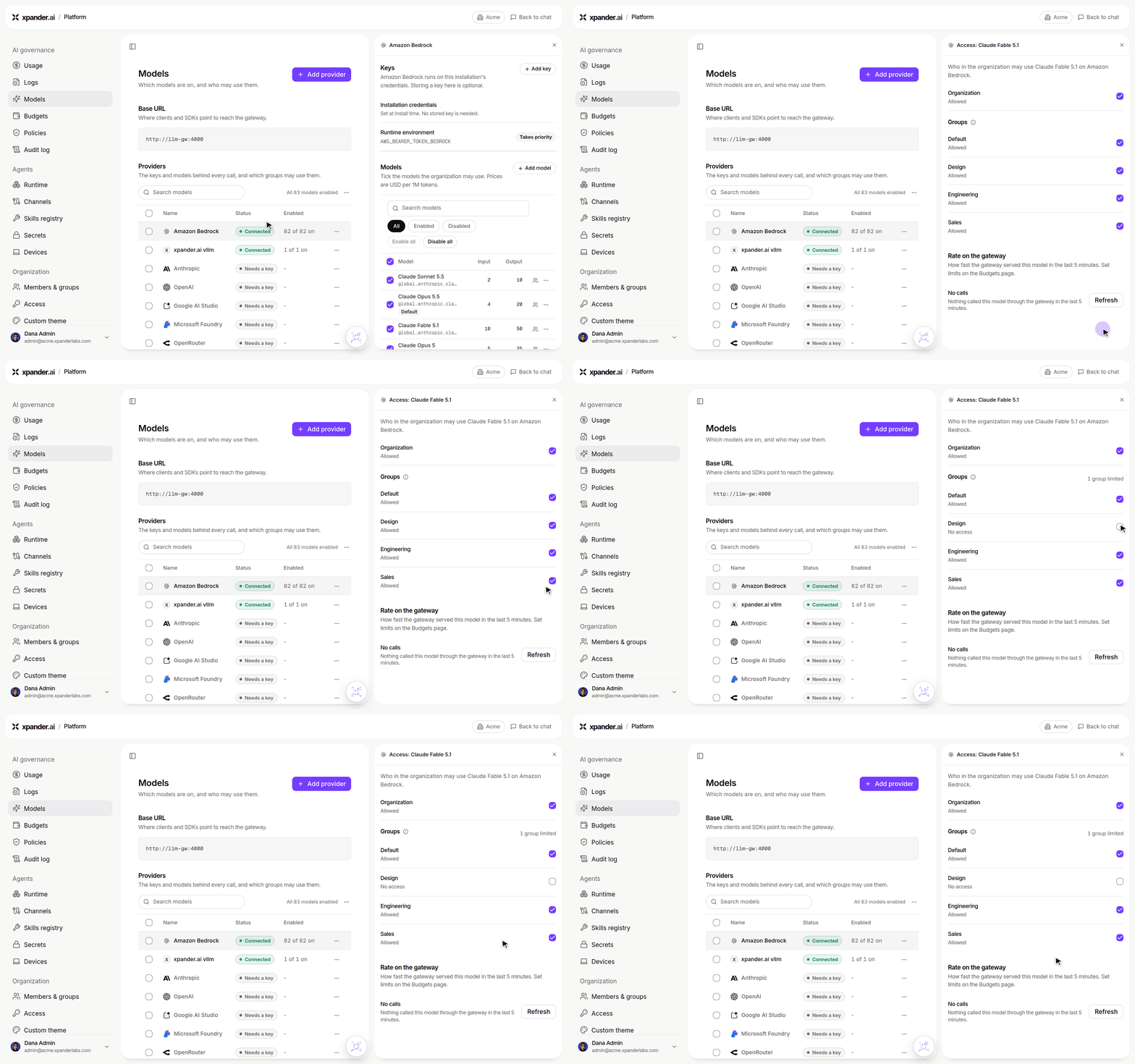
Platform > Models: take Claude Fable 5.1 away from the Design group.
- Workspace secrets over the API: A new API-key endpoint sets an agent’s workspace secrets programmatically — no browser and no model in the loop.
- Live Surface component capture: Live Surface blocks now have stable ids and an isolated render route, so a single block can be captured as an image and reused elsewhere.
Improvements:
- Agents know their own context: An agent is now aware of its email address, its organization id, and its channel presence (WhatsApp number, Slack/Teams channels, MCP endpoint, app names), and every message carries its own timestamp instead of requiring a clock tool.
- Slack polish: A tables toggle, link unfurls, single-call block screenshots, structured JSON replies rendered human-readable, thread replies that carry the agent’s identity, self-scheduled output routed back to the originating Slack thread, and DMs that honor the assistant’s New Conversation button.
- Approvals read like decisions: The approvals table and panel gained per-class tabs, a searchable multi-select people filter, one save across classes, honest phrasing instead of operation ids, and notifications that open exactly the request they are about.
- A stale tab tells you: When a new UI build ships, open tabs get a friendly reload prompt instead of silently running an old version.
Bug Fixes:
- Fixed a secret change bouncing the workspace and returning 503 for in-flight tool calls.
- Fixed a client disconnect being able to kill a running gateway turn, and failed tool calls not reaching the activity trace.
- Fixed the tool-call summary racing the tool result and caching “No data returned”.
- Fixed agent-sent messages duplicating the platform’s own channel reply.
- Fixed the theme defaulting to dark on a fresh device in the legacy app, a duplicated
#in the Slack channel picker, and the agent owner chip showing the viewer instead of the owner. - Fixed shared workspace media not rendering on async task results, and the builder asserting a review card that never rendered.
- As always, our agents and humans continuously fix various bugs, and sometimes create new ones (that will be fixed in the next update.)
New Features:
- Skills Registry: Create, edit, share, and import reusable skills from a shared org-wide library. Skills can be private, shared with a group, or org-wide, install in one click, and show provenance badges (platform, organization, or private). Skills can also be exported into the registry directly from MCP clients like Claude.
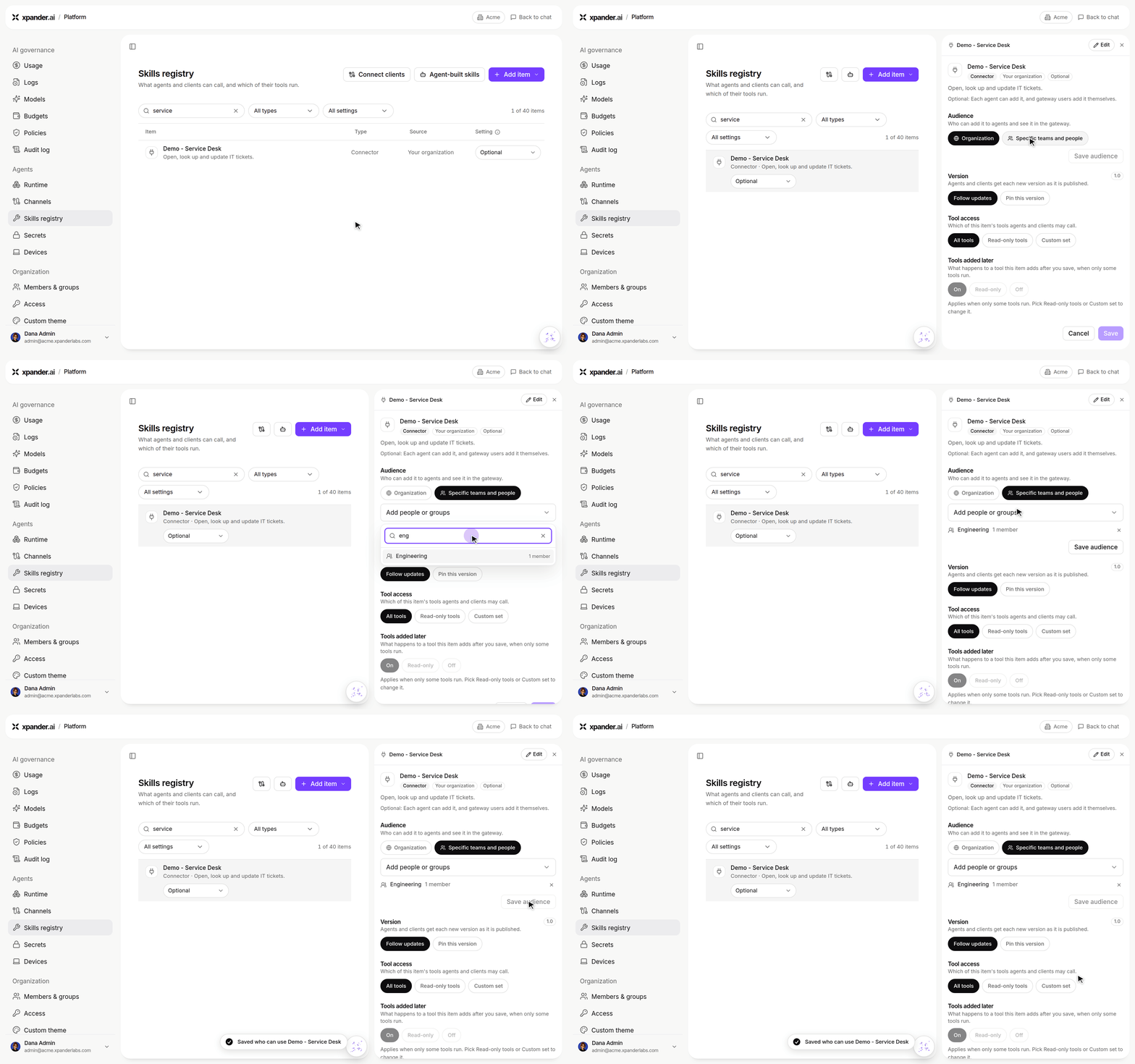
Platform > Skills registry: limit who can add a connector to the Engineering group and save the audience.
- Channels settings pane: Omni discovery, Email, Slack/Teams, and developer/API access for an agent now live in one consolidated Channels panel instead of scattered across Advanced settings and separate dialogs, including inline per-channel configuration and output-format instructions for Slack replies.
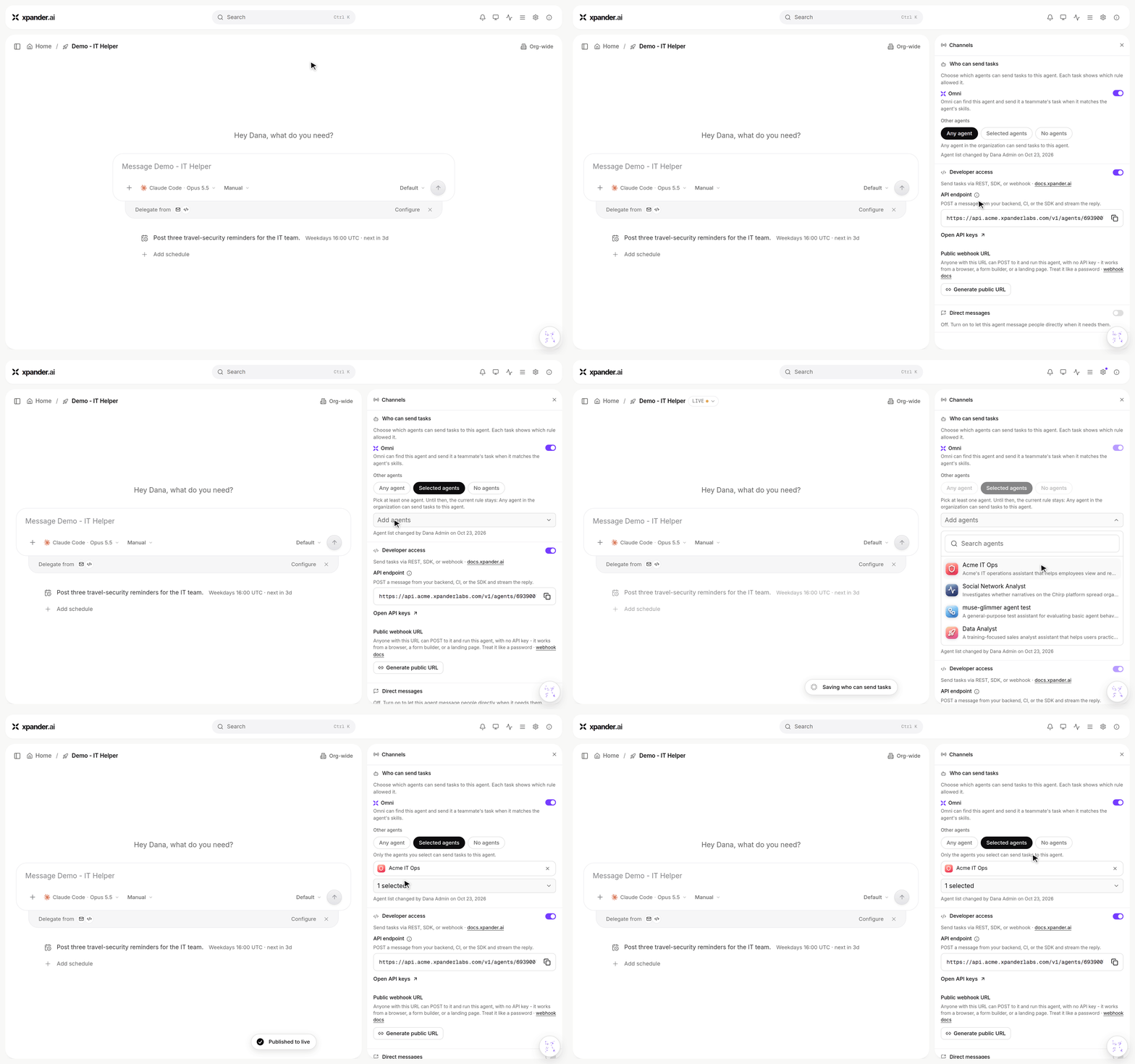
Agent Channels: only Acme IT Ops may send this agent tasks now.
- SSO group sync: Link xpander user groups to identity-provider groups (Okta, Entra) with a configurable group claim and extra scopes, so group membership can sync from your SSO provider.
- Cloud runtime toggle: Organizations with a self-hosted environment can turn off the xpander-cloud agent runtime entirely, hiding cloud agents from non-staff users.
- New Live Surface chart: A grouped-horizontal-bars block is now available for building comparison charts in Live Surfaces.
- Reveal-on-demand API keys: View or copy the full value of an API key on demand (for the key’s owner or org admins) instead of only at creation time; keys otherwise display as a masked prefix/suffix.
Improvements:
- Delegated task visibility: The Task Manager now shows the steps and final result of work an agent delegated to another agent, instead of just the dispatch acknowledgment.
- Buy-credits dialog: Now shows free bonus credits as a clear tag and the effective cost per credit for each pack.
- Slack/Omni engagement discipline: Omni now only answers in shared channels when explicitly mentioned, uses stricter judgment on ambiguous thread replies, and clearly attributes background images carried from earlier channel messages so it doesn’t confuse them with the current request.
- Model picker clarity: Models that share the same display name (e.g. two Claude Opus variants) now show a distinguishing qualifier so they’re no longer indistinguishable in the picker.
- App fonts switched to SF Pro and SF Mono on Apple devices for a more native look.
Bug Fixes:
- Fixed the Live Surface toggle sometimes closing an open surface instead of opening the surfaces list.
- Fixed Live Surface data-table rows inviting a click that did nothing when the row had no associated link.
- Fixed duplicating an agent showing a generic “could not duplicate” error instead of the actual reason.
- Fixed a harmless console error thrown when stopping a voice note recording.
- Fixed the onboarding keynote’s final screen not responding to a click the way earlier screens did.
- Fixed Slack and Microsoft Teams channel history and message-read reliability issues.
- As always, our agents and humans continuously fix various bugs, and sometimes create new ones (that will be fixed in the next update.)
New Features:
- Agents in Slack, Whatsapp and Telegram: Describe what you need and Omni can build a new agent there, connect required accounts through secure links, and communicate to agents through these new channels.
- Mid-run steering: Send corrections while an agent is working and apply them at the next step, or interrupt and re-run with a new message.
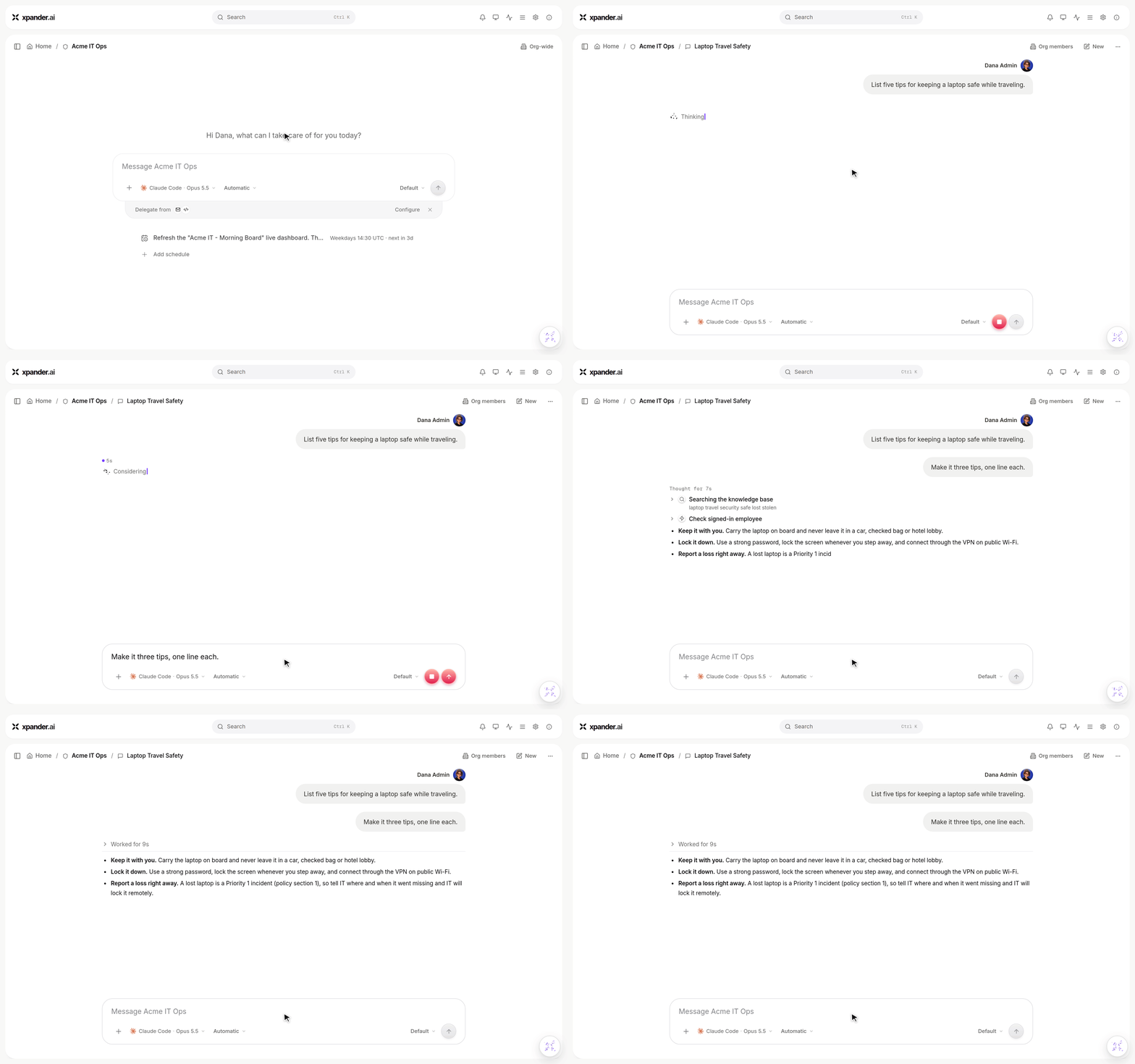
A correction sent while the agent works: the reply follows it with three tips instead of five.
- Notifications across tasks and conversations: Subscribe to individual tasks or entire conversations, manage alerts from the new Notification Center, and receive supported notifications through browser notifications, email, or WhatsApp.
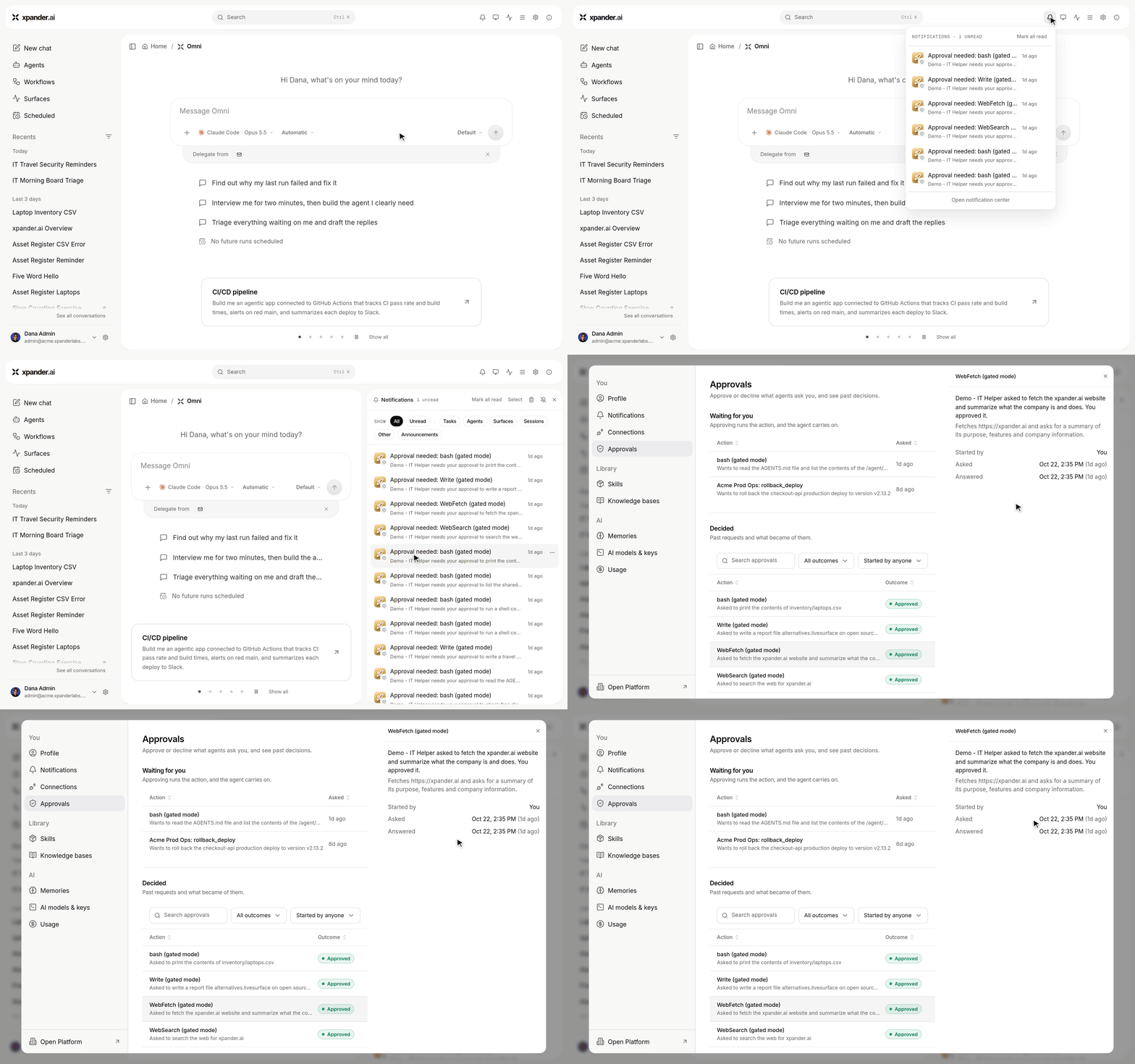
Bell > Open notification center: clicking a notification opens exactly the approval it is about.
- Custom actions and dynamic system prompts: Build and test custom code with presets, connector-generated examples, sandbox execution, AI-assisted generation, and workspace secrets. Agents can also run custom code at prompt time and append the result to their context.
- MCP setup and richer MCP apps: Register, test, and enable MCP servers from chat, connect MCP clients through an OAuth consent screen, and render agent cards inline in supported clients like Claude and ChatGPT.
- Review and publish agent changes from chat: Agent edits proposed in conversation can be staged, reviewed, published, discarded, or rolled back before they affect the live agent.
- Richer agent outputs: Completed background tasks can render directly in chat, while Live Surfaces now support interactive maps and filterable run traces.
- Public workflow webhooks: Workflow webhook triggers can expose a public invocation URL that does not require an API key.
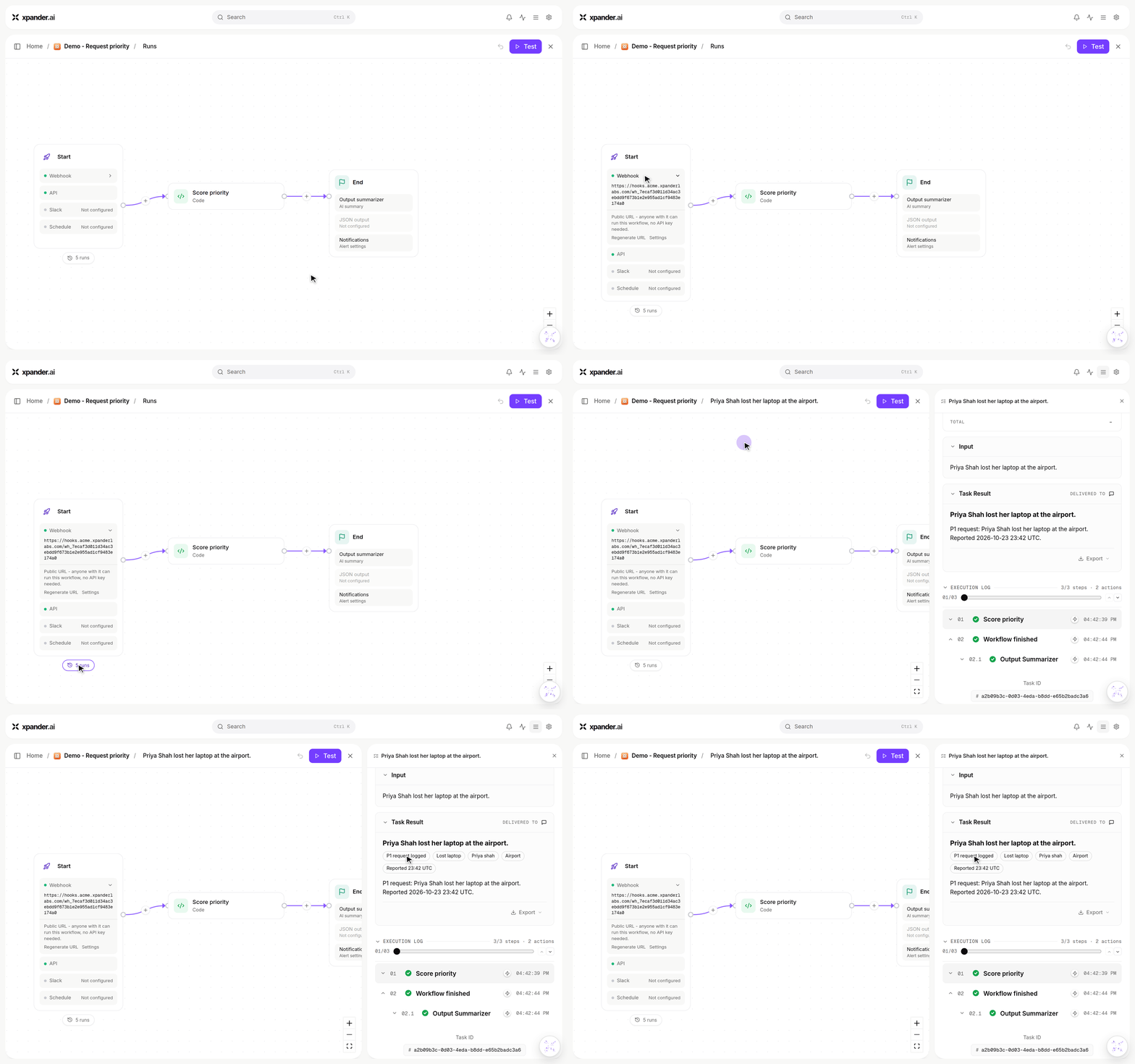
A workflow's public webhook URL, and the run it started when called with no API key: input and result.
Improvements:
- Better mobile chat: Reworked navigation, composer behavior, keyboard handling, touch interactions, and scrolling to make the web experience work better on mobile.
- Richer model picker: Model details now include description, context window, capabilities, and credit pricing, with models shown in the platform’s catalog order.
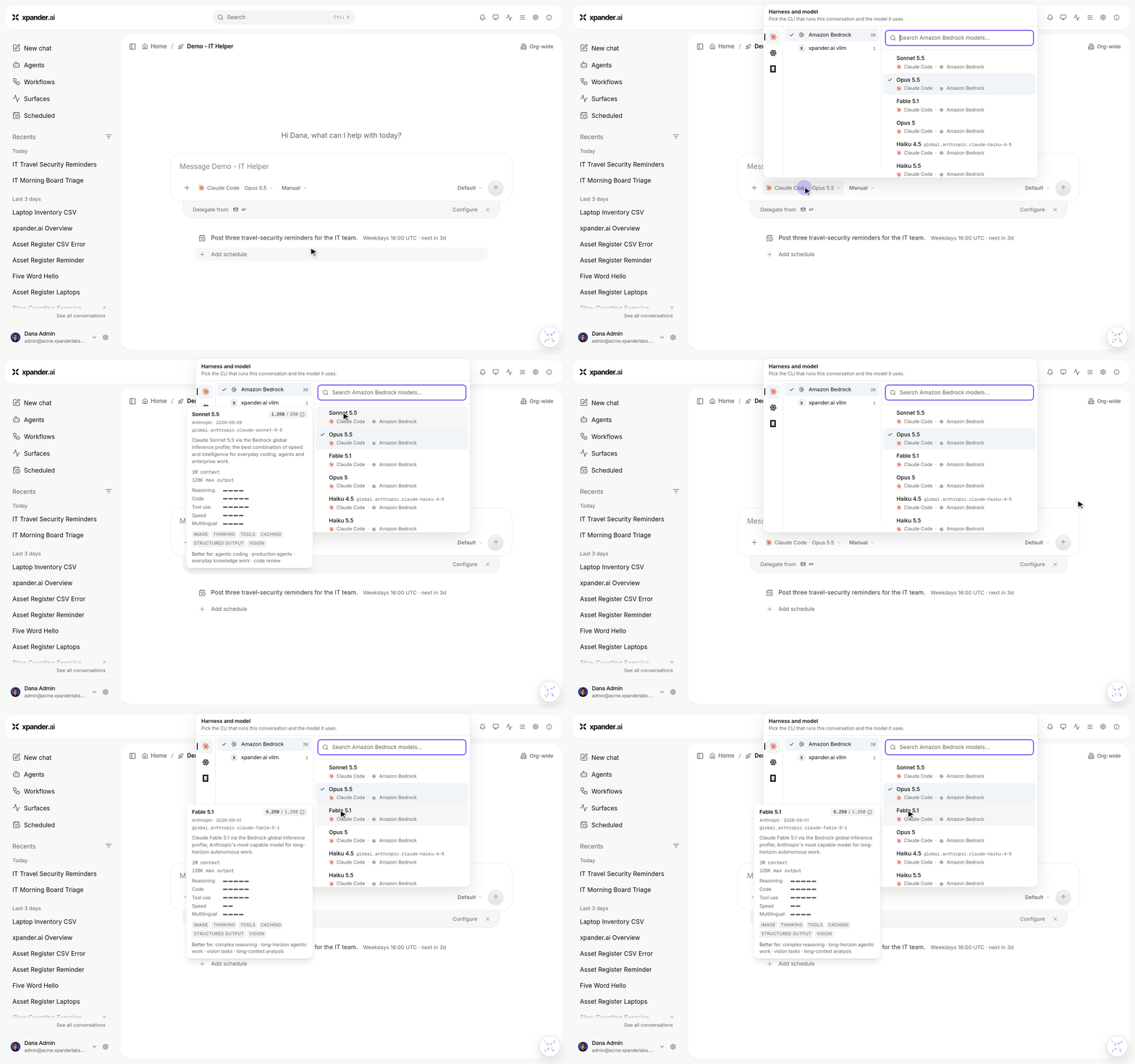
Hovering a model in the picker shows its details: context window, strengths, capabilities and credit price.
- Better sharing and invites: Shared links are copied automatically, recipients are notified, and invite flows now provide clearer member status, resend controls, and per-recipient results.
- Improved web search results: Search results now render as ranked sources with favicons and snippets instead of a generic data table.
- Refreshed platform emails: Transactional emails now use the updated xpander design.
Bug Fixes:
- Fixed connector authorization links sent during chat-based agent builds sometimes failing after an authentication redirect.
- Fixed task rows briefly showing incorrect running or completed states and delays when opening task details.
- Fixed duplicate notifications being sent for repeated runs of the same scheduled task.
- Fixed stale sign-in prompts and related sign-in redirect loops in embedded chat.
- Fixed the model picker not scrolling to the currently selected model.
- As always, our agents and humans continuously fix various bugs, and sometimes create new ones (that will be fixed in the next update.)